How to Cancel an eBay Order Without Getting a Defect
- eBay, eBay Policies & Seller Protection
- 13 min read
Table of contents
An order comes in for the last unit, you go to pick it, and the shelf is empty. Or the buyer messages an hour after paying to say they ordered the wrong size. Or the address is a half line with no postcode. Each of these ends in a cancellation, and only one of them has to end in a transaction defect. Knowing how to cancel an eBay order without a defect is knowing which is which, and it is a distinction eBay draws sharply: the reason you select decides whether the cancellation counts against your seller level.
This guide covers the eBay cancellation reasons and what each one does to your metrics, the buyer requested cancellation eBay process and its 3 day clock, why an eBay out of stock cancellation is the one that defects and how to avoid needing it, the 30 day window, refunds and fee credits, and the sequence to follow every time you cancel eBay order as seller. It is the order level companion to our guide on how to lower eBay defect rate.
Key Takeaways
- Main Insight: eBay’s own help page states that cancelling because you are out of stock is able to produce a transaction defect. Cancelling because the buyer asked, or because there is a problem with the address, does not. Avoiding the defect is mostly a matter of establishing which of those is true and selecting it honestly.
- Strategy Tip: When a buyer wants out, get the request from them, through the cancellation request flow or a clear message, before you cancel. Their request is what makes the cancellation theirs rather than yours, and it is the core of a defect-free cancellation.
- User Benefit: Sellers who follow the sequence keep out of stock cancellations to genuine stock errors, keep their defect rate under the Top Rated threshold, and stop paying for other people’s changes of mind with their own seller level.
The eBay Cancellation Reasons and What Each One Costs
When you cancel eBay order as seller, eBay’s seller cancellation guidance asks you to choose a reason. At the time of writing the reasons offered to sellers fall into three groups: the buyer asked to cancel, there is a problem with the buyer’s address, and the item is out of stock or damaged.
Unpaid orders are handled through eBay’s unpaid item process rather than as a seller cancellation reason. Everything starts with these three groups. The wording of these options changes from time to time, but the underlying logic has been stable: the out of stock reason is the one that produces a transaction defect under the seller standards policy, because it is the seller failing to complete a sale the seller made.
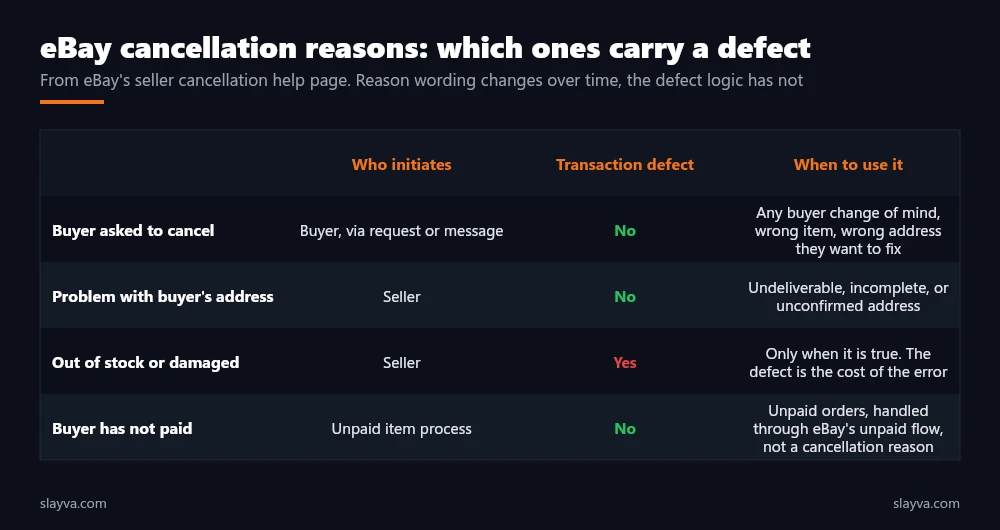
The eBay cancellation reasons are not interchangeable, and this is where sellers get into trouble in both directions. Some select out of stock for everything because it feels like the honest default, and collect defects they never needed to. Others select buyer asked to cancel when the buyer did no such thing, which is misuse of the flow and, if a buyer disputes it, a worse outcome than the defect would have been. A defect-free cancellation is not a trick. It is selecting the true reason, and arranging your process so the true reason is rarely out of stock.
| Reason | Who it belongs to | Defect | Evidence to keep |
|---|---|---|---|
| Buyer asked to cancel | Buyer | No | Cancellation request or message from the buyer |
| Problem with buyer’s address | Seller, caused by buyer data | No | Address as entered, carrier rejection, message asking for correction |
| Out of stock or damaged | Seller | Yes | Stock record, so you fix the cause |
| Buyer has not paid | Unpaid item process | No | Handled by eBay’s unpaid flow |
Buyer Requested Cancellation on eBay: The Cleanest Route
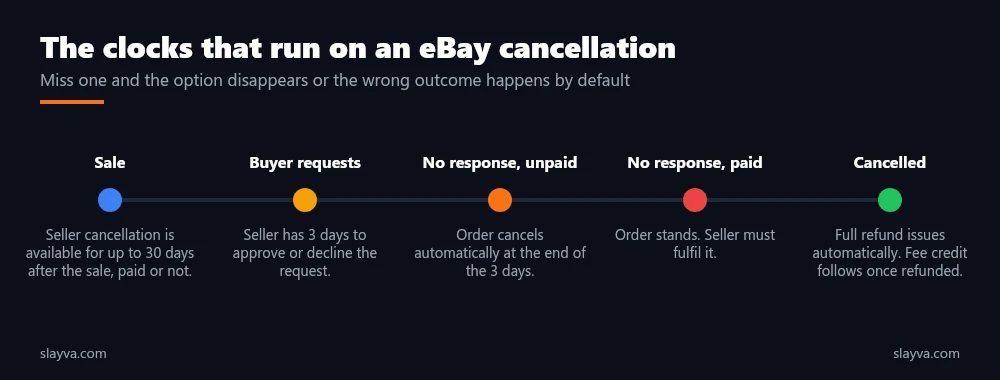
The buyer requested cancellation eBay flow is the clean route. A buyer opens a cancellation request from their purchase, eBay notifies you, and you have 3 days to approve or decline. If you do nothing and the buyer has not paid, the order cancels automatically at the end of the 3 days. If you do nothing and the buyer has paid, the order stands and you have to fulfil it. Approving a buyer’s request carries no defect, because the buyer initiated the change. This flow is a defect-free cancellation in its purest form.
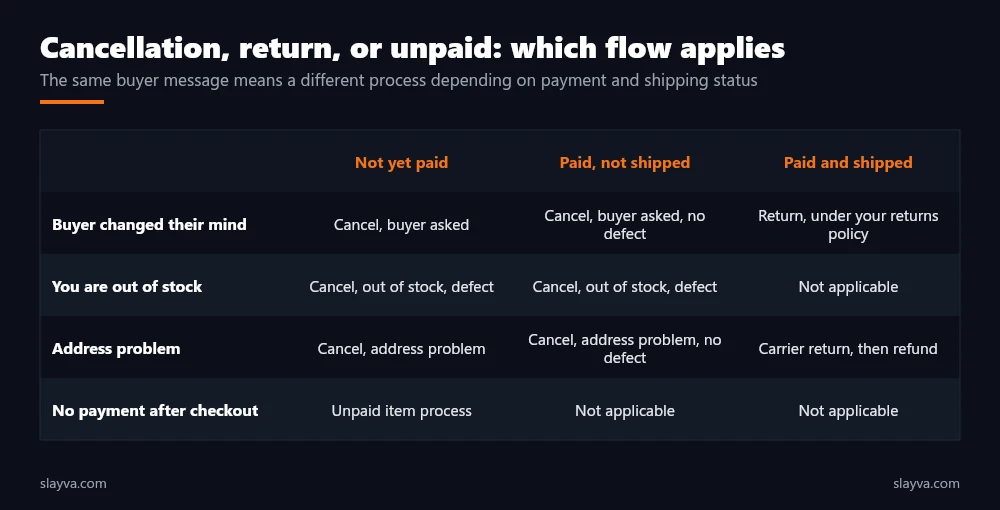
Two practical points. First, buyers often message rather than use the request flow, and a clear message saying they want to cancel is enough for you to cancel with the buyer asked reason, provided you keep the message. Second, if a buyer has paid and asks to cancel after you have shipped, that is no longer a cancellation. It is a return, handled under the eBay returns policy for sellers, and the defect logic is different again. Cancellation stops being an option the moment the item is with the carrier.
Why You Should Answer Inside 3 Days
Letting a request expire is not a neutral choice. For an unpaid order it produces the cancellation anyway, without your input on the record. For a paid order it commits you to fulfilling something the buyer no longer wants, which tends to end in a return or a case, both of which are more expensive than a clean cancellation. Responding on time is a quiet part of avoiding the defect. Our guide to eBay buyer protection for sellers covers how cases develop from orders that should have been cancelled early.
eBay Out of Stock Cancellation: The One Case That Carries a Defect
The eBay out of stock cancellation exists for a real situation: you sold something you do not have. eBay treats it as a defect because the buyer did nothing wrong and the seller failed to deliver a listed item. There is no reason code that makes a genuine stock error free. The only way to cancel an eBay out of stock cancellation without a defect is not to be out of stock, which is why this section is about prevention rather than about the flow.
Stock errors come from a short list of causes. Multichannel selling without a sync, so the same unit sells twice. Listings that were never counted against physical stock. Relisting rules that return ended listings without checking quantity, which our guide on automatically relisting ended eBay listings addresses directly. Damage discovered at picking. Supplier shortfalls on items listed before arrival. Each has a process fix, and our guide to managing a large eBay inventory covers the SKU discipline and safety stock that remove most of them. Sellers running dropshipping models carry this risk structurally, because the stock is never in their hands. For them, avoiding the defect is a supplier reliability question first.
An out of stock cancellation is the receipt for an inventory mistake. The defect is the price. Choosing a different reason does not cancel the mistake, it adds a second one.
When Out of Stock Is the Honest Answer
Sometimes it is. The item is damaged, lost, or was double sold, and the buyer has done nothing to cause it. Cancel with the accurate reason, refund immediately, message the buyer with a short apology and no excuses, and then fix the record so it does not repeat. One defect on a high volume account is survivable. A pattern of them is a below standard rating, covered in our guide to handling an eBay account warning. Note the defect, the date, and the cause in your own log, because a defect that resulted from an eBay system error rather than your stock is one you are able to request removal for.
How to Cancel an eBay Order Without a Defect: The Sequence
The steps below are the practical version. The order matters, and the reason code comes last.
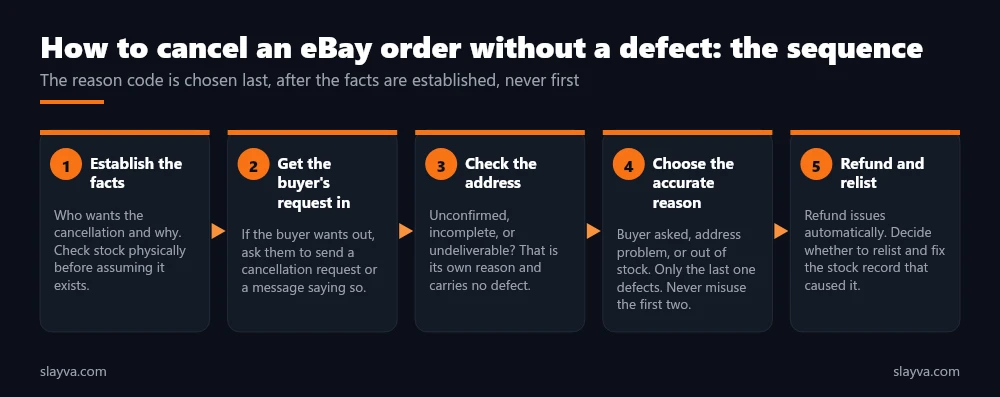
- Establish the facts: Who wants this cancelled and why. If it is you, check the stock physically before concluding it is missing. Picking errors are common.
- Get the buyer’s request in writing: If the buyer wants out, ask them to open a cancellation request or to confirm in a message. Do not cancel on a phone call or a hunch.
- Check the address: If the address is incomplete, unconfirmed, or the carrier rejects it, message the buyer for a correction first. If it stays unfixable, that is the address reason, and it carries no defect.
- Choose the accurate reason: Buyer asked, address problem, or out of stock. The first two carry no defect. The third does. Never select a reason that is not true, because avoiding a defect never means choosing a false reason.
- Refund and relist: The full refund issues automatically on cancellation. For single quantity Buy It Now items, eBay relists automatically unless you choose not to. Decide whether you want that, and fix whatever caused the cancellation.
| Situation | Right move | Defect |
|---|---|---|
| Buyer messages “please cancel, wrong size” | Cancel with buyer asked, keep the message | No |
| Buyer opens a cancellation request, unpaid | Approve inside 3 days | No |
| Address has no house number, buyer does not reply | Cancel with address problem after a documented attempt | No |
| Last unit sold twice on two channels | Cancel with out of stock, refund, fix the sync | Yes |
| Item damaged at picking | Cancel with out of stock, refund, apologise once | Yes |
| Buyer wants to cancel after shipping | Handle as a return, not a cancellation | Return rules apply |
| Buyer has not paid | Use the unpaid item process | No |
Refunds, Fee Credits, and Relisting When You Cancel eBay Order as Seller
When you cancel eBay order as seller, a full refund to the buyer issues automatically. Once the buyer is refunded, you are usually eligible for a credit of the fees charged on the sale, under eBay’s fee credit rules. Check that the credit appears on your next invoice.
Our eBay seller fees breakdown explains which fees are refundable and which are not, and our managed payments guide covers how refunds move through payouts. For single quantity Buy It Now listings, eBay relists automatically after a cancellation unless you select otherwise, so a cancelled out of stock item returns to sale immediately if you forget, which is how one stock error becomes two, and it is the last thing to check.
The automatic relist after a cancellation is helpful when the buyer changed their mind and harmful when you were out of stock. Know which one you are in before you confirm.
Preventing Cancellations So the Question Rarely Comes Up
A clean cancellation is a fallback. The main work is not needing to. Three habits reduce cancellations of every type. Accurate stock, synced across channels, removes most out of stock cases. Clear listings, with precise titles, complete item specifics, and honest photos, remove most buyer changes of mind, and our guides on eBay listing titles and eBay item descriptions cover the detail.
Address checks before printing a label catch the unfixable addresses early, when a message to the buyer still has time to work. These three habits avoid the defect by not needing to cancel at all. Sellers automating parts of this, such as stock sync and buyer messaging, should read our eBay automation guide for where automation helps and where it creates the exact stock errors it was meant to prevent.
| Cancellation type | Root cause | Prevention |
|---|---|---|
| Out of stock | Unsynced channels, uncounted stock, relist without quantity check | Daily sync, safety stock, relist rules that check quantity |
| Damaged at picking | Storage and handling | Inspect on receipt, store by fragility |
| Buyer changed mind | Unclear listing, impulse purchase | Precise title, specifics, photos, size guidance |
| Address problem | Buyer data entry | Address check before label, prompt message for correction |
| Unpaid | Auction or offer with no payment | Immediate payment where the format allows it |
Three Cancellations, Worked Through
The rules are clearer with cases. Each of the three below happens weekly on a mid sized account.
Case one: the wrong size. A buyer pays for a medium at 9pm and messages at 9:15pm that they meant large. The seller has not shipped. The right move is to reply asking the buyer to open a cancellation request, or to confirm in the message that they want the order cancelled, then cancel with the buyer asked reason, and invite them to reorder the large. No defect. The wrong move is to cancel immediately with out of stock because it is faster, which records a defect for a change the buyer made.
Case two: the missing postcode. An order arrives with a street name and a city and nothing else. The seller messages the buyer for the full address, waits a reasonable time, and gets no reply. The label cannot be produced. The right move is to cancel with the address problem reason, keeping the message as evidence. No defect. Shipping to a guessed address, the wrong move, risks an item not received case that would cost more than any cancellation.
Case three: the double sale. The last unit of a SKU sells on eBay and on a second channel within the same hour because the sync runs nightly. One buyer will not get the item. The right move is to cancel the eBay order with out of stock, refund, send one short apology, accept the defect, and move the sync to hourly. The wrong move is to select buyer asked to cancel. The buyer did not ask, and a buyer who complains about a cancellation they never requested turns a single defect into a policy problem.
Frequently Asked Questions About eBay Order Cancellations
Does cancelling an order always give me a defect?
No. Cancelling because the buyer asked, or because of a problem with the buyer’s address, carries no transaction defect. Cancelling because the item is out of stock or damaged does, according to eBay’s seller cancellation guidance. Whether it counts is a matter of which reason is true.
How long do I have to cancel an eBay order as a seller?
Up to 30 days after the sale, whether or not the buyer has paid. Knowing the window matters, because a late cancellation is not available at all. After that the cancellation option is no longer available and the transaction has to be resolved another way.
What happens if I ignore a buyer’s cancellation request?
You have 3 days to respond. If you do not and the buyer has not paid, the order cancels automatically. If you do not and the buyer has paid, the order stands and you must fulfil it.
Is it safe to select buyer asked to cancel when the buyer only messaged me?
Yes, if the message clearly says they want to cancel. Keep the message, because it is your record that the cancellation was the buyer’s. Selecting that reason when the buyer did not ask is misuse of the flow, and a buyer who disputes it creates a worse problem than the defect you avoided.
Do I get my fees back when I cancel?
Once the buyer is refunded you are usually eligible for a credit of the sale fees under eBay’s fee credit rules. Check your next invoice. Our fees guide covers which charges are and are not refundable.
Will the item relist automatically after I cancel?
For single quantity Buy It Now listings, yes, unless you choose not to during the cancellation. This step catches sellers who have otherwise got everything right. Decide deliberately. If you cancelled for stock reasons, an automatic relist puts an item you do not have back on sale.
Is it possible to remove an out of stock defect?
Only where the cancellation resulted from something outside your control that eBay’s policy recognises, such as a site issue. A stock error on your side is not removable. Prevention is the only reliable route, which is why avoiding cancellation defects starts with inventory, not with the reason code.
Cancellations piling up from stock errors?
We fix the sync, the relist rules, and the picking process on managed accounts, and we handle cancellations correctly when one is unavoidable, so out of stock stops being a reason you ever have to select.
Conclusion
How to cancel an eBay order without a defect comes down to the truth of the reason. When the buyer asks, get it in writing and cancel with that reason inside 3 days. When the address is the problem, document the attempt to fix it and cancel with that reason. When you are out of stock, cancel with that reason, refund, take the defect, and fix the cause so it does not happen again. Answer every request inside the window, watch the automatic relist, and confirm the fee credit.
Most cancellations that defect are inventory errors wearing a reason code. Fix the inventory and the question comes up a few times a year rather than a few times a week. More eBay order and account guides are in the blog library.

Usman Malik
All posts by Usman MalikNeed this handled for you?
eBay Policy Violation Recovery
VeRO, policy warnings and removed listings resolved.
See the serviceeBay Account Management
Listings, orders, cases and growth, run for you.
See the service- Have this problem now? eBay policy violation
- Have this problem now? eBay account suspended (MC999)
- Have this problem now? eBay sales dropped