

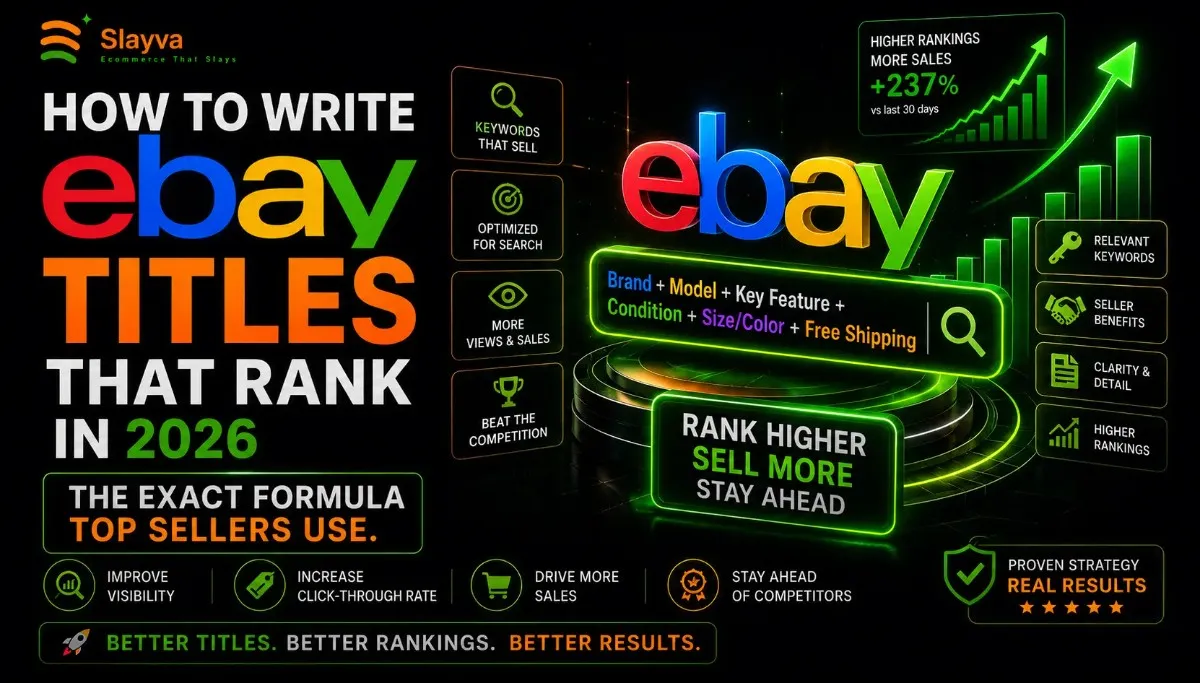
Writing eBay listing titles feels like guessing when you first start. You type some words describing your product. You publish the listing. You wait for views. Then nothing happens. Your item sits buried on page twelve while competitors sell similar products daily.
The difference sits in their eBay listing titles. Top sellers follow a specific formula. They structure titles in a particular order. They include keywords buyers actually search for. They follow eBay’s current algorithm preferences that most sellers ignore.
This guide reveals the exact formula for writing eBay listing titles that rank in 2026. Every technique here comes from analyzing thousands of top-performing listings across multiple categories. You will learn the structure, the keyword strategy, the length rules, and the common mistakes that kill visibility. By the end, you will write eBay listing titles that compete with established sellers.
Let me walk you through the complete system.
Key Takeaways
- Main Insight: eBay listing titles follow a specific keyword order that the search algorithm prioritizes. Product type first, brand second, key features third, condition last. This structure alone improves search visibility significantly.
- Strategy Tip: Research buyer search terms before writing a single eBay listing title. Use eBay’s autocomplete suggestions and sold listing data to identify exactly which words drive purchases in your category.
- User Benefit: Optimized eBay listing titles generate more views from relevant buyers, increase click-through rates, and improve sell-through rates without spending money on promoted listings.
Why eBay Listing Titles Matter More in 2026
eBay search evolved significantly between 2023 and 2026. The algorithm now processes natural language better. It understands buyer intent beyond exact keyword matching. It prioritizes listings that match complete search phrases rather than individual keywords.
But the fundamental truth remains unchanged. Your eBay listing titles serve as the primary ranking signal. The search algorithm reads your title first and most heavily. If the right keywords appear in the right order, your listing surfaces when buyers search. If keywords are missing or poorly structured, your listing stays hidden regardless of product quality or pricing.
Top sellers understand this reality. They treat eBay listing titles as their most important optimization task. They research keywords before listing. They follow proven title structures. They update titles based on performance data. This methodical approach separates sellers making consistent sales from those posting listings that never get seen.
The 2026 algorithm rewards several specific title elements. Complete product identification helps eBay categorize your listing correctly. Natural keyword phrasing matches how buyers actually search. Mobile-optimized title length ensures full visibility on phone screens. Category-specific keywords trigger eBay’s structured data features.
Understanding these algorithm preferences gives you an advantage. Most sellers still write eBay listing titles the same way they did in 2020. The algorithm changed. Their titles did not. Your opportunity sits in closing that gap.
How to Write eBay Titles That Get More Views: The Research Phase
Writing effective eBay listing titles starts before you type a single word. Research determines which keywords drive views and sales. Skip this phase and you write titles based on assumptions rather than data.
Finding Buyer Search Terms
Buyers search using specific language patterns. Understanding these patterns helps you match their search queries exactly.
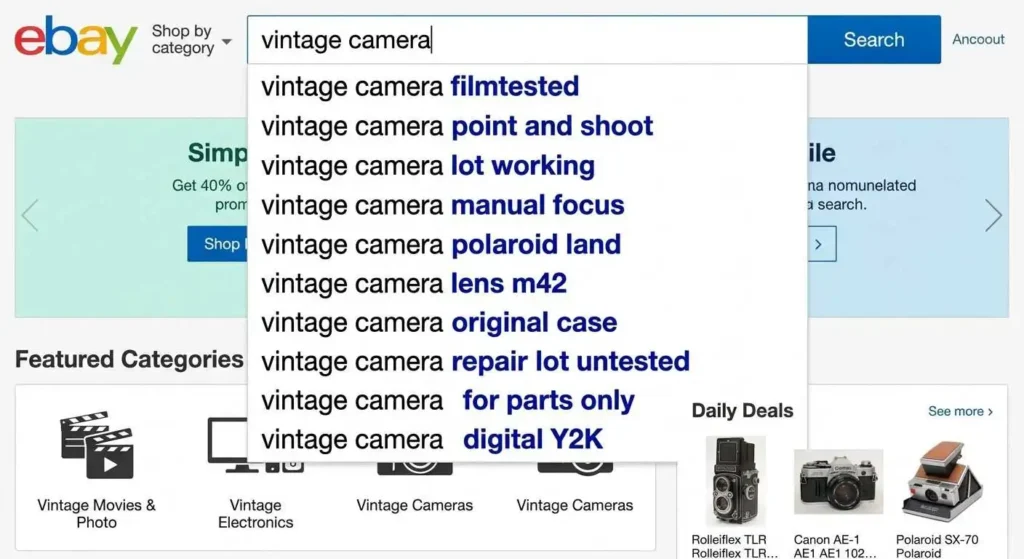
eBay Search Autocomplete: Start typing product descriptions into the eBay search bar. Note the suggestions that appear. These suggestions reflect actual search volume from real buyers. They represent the most common search phrases in your product category.
For example, typing “leather wallet” might suggest “leather wallet men,” “leather wallet personalized,” and “leather wallet vintage.” Each suggestion reveals what buyers actually search for. Include these complete phrases in your eBay listing titles when relevant.
Sold Listing Analysis: Search completed and sold listings in your category. Filter by sold items to see only successful listings. Analyze the eBay listing titles of items that sold quickly and at good prices. Look for common keywords, phrases, and title structures among top performers.
Pay attention to the specific words successful sellers use. A seller of vintage cameras might include terms like “tested working,” “light meter accurate,” or “clean optics” in their eBay listing titles. These descriptive phrases signal quality to buyers and match their search queries.
Competitor Title Analysis: Identify the top five sellers in your product category. Study their eBay listing titles across multiple active and sold listings. Note patterns in their keyword choices, title structure, and descriptive language. Top sellers usually optimize titles based on performance data. Their patterns reveal what works.
Using External Keyword Research Tools
Free tools supplement eBay’s internal data with broader search insights.
Google Trends: Compare search terms to identify which variations get more volume. Enter product descriptions into Google Trends to see relative search interest over time. This helps prioritize keywords when multiple options exist for your eBay listing titles.
Keyword Research Tools: Free tools like AnswerThePublic reveal question-based searches related to your products. These uncover long-tail keyword phrases buyers use when researching purchases. Include relevant question phrases in your eBay listing titles when they match buyer search behavior.
eBay Seller Hub Data: Access your eBay Seller Hub for traffic reports on existing listings. Review which search terms bring buyers to your current listings. Expand on terms already driving traffic. Address missing terms that competitors rank for. Find seller tools and analytics at the eBay Seller Center.
Keyword Priority Framework
Not all keywords deserve equal placement in your eBay listing titles. Prioritize based on search volume and purchase intent.
Primary Keywords: The product type and main descriptor. These tell eBay and buyers exactly what you sell. “Men’s leather wallet,” “vintage film camera,” or “wireless Bluetooth speaker” serve as primary keywords. Place these first in your eBay listing titles.
Secondary Keywords: Additional features, specifications, or use cases. These differentiate your item from similar listings. “RFID blocking,” “full frame 35mm,” or “waterproof portable” work as secondary keywords. Place these after primary keywords.
Tertiary Keywords: Condition, included items, or special attributes. “New with tags,” “includes original box,” or “limited edition” function as tertiary keywords. These help buyers make final purchase decisions.
Keyword Priority Table for eBay Listing Titles
| Priority Level | Keyword Type | Placement | Example |
|---|---|---|---|
| Primary | Product type, brand | First 3-5 words | “Men’s Leather Wallet” |
| Secondary | Features, specs, size | Middle of title | “RFID Blocking Bifold” |
| Tertiary | Condition, extras | End of title | “New with Tags Gift Box” |
The Exact eBay Title Formula for Higher Search Ranking
Top sellers follow a consistent title structure. This formula matches how eBay’s algorithm reads and ranks eBay listing titles. Apply it to every listing for maximum visibility.
The 2026 eBay Title Formula
Product Type + Brand + Key Features + Size/Specs + Condition + Extras
Each section serves a specific purpose in ranking and conversion. The order matters because eBay weights title words left to right. Words at the beginning of eBay listing titles carry more ranking weight than words at the end.
Product Type (First 3-5 Words): Start with exactly what the product is. Use the most common search term buyers use for this item. “Men’s Leather Bifold Wallet” rather than “Genuine Cowhide Men’s Pocket Organizer.” Match buyer language exactly, even when it feels less creative. The algorithm prioritizes eBay listing titles that match search queries word for word.
Brand (When Applicable): Include the brand name if buyers search for it. “Samsung Galaxy S24 Case” gets more searches than “Android Phone Case.” Brand names function as high-volume keywords in many categories. Place the brand immediately after the product type in your eBay listing titles.
Key Features (Middle Section): Include two to four distinguishing features buyers care about. Focus on features that differentiate your item and match search queries. “RFID Blocking,” “Genuine Leather,” “Wireless Charging Compatible,” or “Waterproof” serve as effective feature keywords. Choose features buyers actively search for rather than features you think matter.
Size and Specifications: Include measurements, capacity, or technical specifications buyers need to confirm compatibility. “13-inch Laptop Sleeve,” “500GB SSD,” or “Size Medium Fits 38-40 Chest” help buyers self-select the right item. These details reduce returns and improve buyer satisfaction.
Condition: State the condition clearly using eBay’s standard terminology. “New,” “New with Tags,” “Open Box,” “Used,” or “For Parts.” eBay listing titles with clear condition descriptors help buyers filter results and make purchase decisions faster.
Extras: Include bonus items or special attributes that add value. “Includes Original Box,” “Free Shipping,” “2-Year Warranty,” or “Limited Edition.” These extras appear at the end of eBay listing titles and serve as conversion triggers for buyers comparing similar listings.
Real-World Title Examples
Poor Title: “Nice Leather Wallet for Men Brown Color Bifold Style Lots of Card Slots Great Gift”
This title wastes space on subjective words. “Nice” and “Great Gift” do not match search queries. The structure scatters keywords randomly. eBay’s algorithm struggles to categorize this listing correctly.
Optimized Title: “Men’s Leather Bifold Wallet RFID Blocking Genuine Cowhide Holds 12 Cards New with Box”
This title follows the formula precisely. Product type first. Key features in the middle. Condition and extras at the end. Every word matches potential search queries. The algorithm understands exactly what this listing offers.
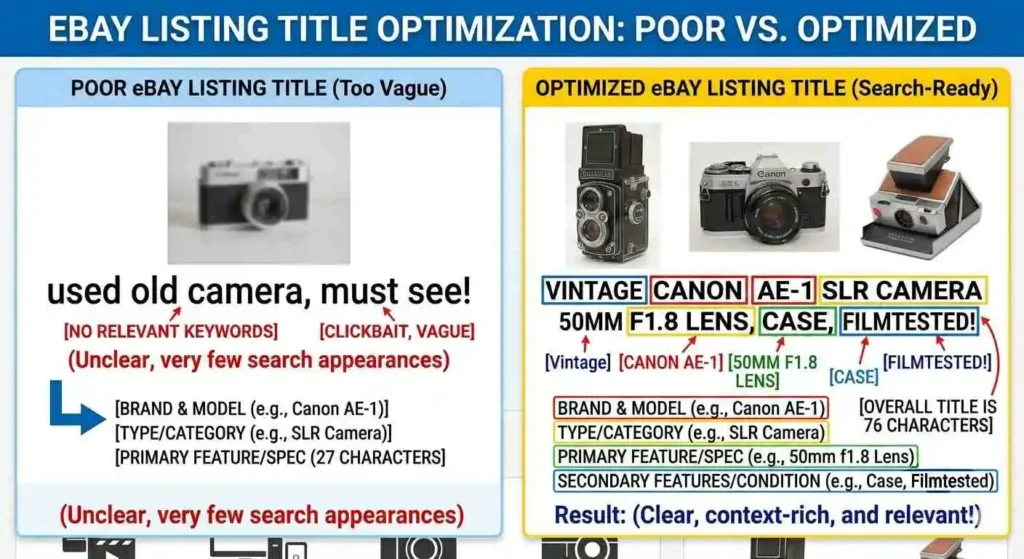
Poor Title: “Vintage Camera Canon AE-1 Works Great Takes Beautiful Photos Includes Lens”
“Works Great” and “Takes Beautiful Photos” waste characters. Buyers search for “Canon AE-1” not subjective descriptions. Missing key specifications like lens type reduces search visibility.
Optimized Title: “Canon AE-1 35mm Film Camera with 50mm f/1.8 Lens Tested Working Clean Optics Includes Case”
Product type and brand lead. Lens specification included. Condition described with specific terms buyers search for. Extras noted at the end. This eBay listing title matches how buyers actually search.
Title Formula Application Table
| Formula Element | Poor Example | Optimized Example |
|---|---|---|
| Product Type | “Nice Camera” | “Canon AE-1 35mm Film Camera” |
| Brand | Missing | “Canon” |
| Key Features | “Takes Great Photos” | “50mm f/1.8 Lens Tested Working” |
| Condition | “Works Great” | “Clean Optics” |
| Extras | Missing | “Includes Case” |
eBay Title Keywords That Actually Increase Sales 2026
Specific keyword types trigger eBay’s search ranking factors. Including these keywords in your eBay listing titles improves visibility and conversion rates.
High-Intent Modifier Keywords
These words signal purchase readiness to eBay’s algorithm. Include them when accurate for your product.
Condition Modifiers: “New,” “New with Tags,” “New in Box,” “Open Box,” “Manufacturer Refurbished,” “Used,” “Pre-Owned,” “Vintage,” “Antique.” These match eBay’s structured data fields and help buyers filter results. Accurate condition descriptors in eBay listing titles reduce return rates.
Quality Modifiers: “Genuine,” “Authentic,” “Original,” “Official Licensed,” “Handmade,” “Custom,” “Limited Edition.” These differentiate your item from generic alternatives. Use only when truthful. “Genuine Leather” means actual leather. Misleading quality modifiers violate eBay policies and damage seller ratings.
Availability Modifiers: “In Stock,” “Fast Shipping,” “Same Day Ship,” “Ready to Ship,” “Made to Order.” These set buyer expectations for delivery timing. “Fast Shipping” in eBay listing titles appeals to buyers needing items quickly.
Category-Specific Power Keywords
Different product categories benefit from specific keywords that drive conversions. Research your category to identify which apply.
Electronics: “Fully Tested,” “Working,” “Reset,” “Unlocked,” “Includes Charger,” “Warranty.” These address common buyer concerns about functionality and accessories. “Fully Tested” in eBay listing titles for used electronics increases buyer confidence significantly.
Clothing and Fashion: “New with Tags,” “Never Worn,” “Size,” “Fits True to Size,” “100% Authentic.” Size and authenticity concerns dominate clothing searches. Include exact measurements to complement eBay listing titles.
Collectibles: “Rare,” “Vintage,” “Limited Edition,” “First Edition,” “Includes COA,” “Mint Condition.” Collectors search for specific rarity indicators. Include authentication details in eBay listing titles when applicable.
Home and Garden: “New in Box,” “Easy Install,” “Includes Hardware,” “Indoor Outdoor,” “Weather Resistant.” Practical considerations drive home product purchases. Installation and durability keywords improve conversion.
Keywords to Avoid in eBay Listing Titles
Some keywords hurt performance or violate eBay policies.
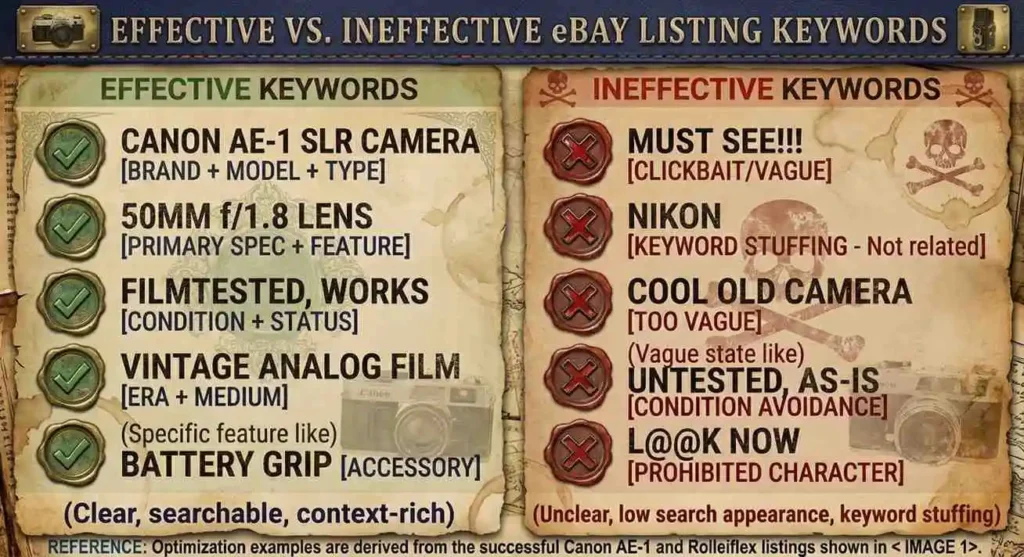
Subjective Adjectives: “Beautiful,” “Amazing,” “Stunning,” “Incredible,” “Best,” “Top Quality.” These waste characters because buyers rarely search for subjective terms. They search for specific product attributes. Replace subjective adjectives with objective specifications in your eBay listing titles.
Promotional Language: “SALE,” “BEST PRICE,” “MUST SEE,” “L@@K,” “WOW,” “CHEAP.” eBay’s search algorithm ignores promotional terms. Some promotional language violates eBay’s search manipulation policies. Focus eBay listing titles on product description rather than sales pitches.
Keyword Stuffing: Repeating the same word multiple times, listing every possible synonym, or including irrelevant popular search terms. “Wallet Purse Handbag Clutch Bag Pouch” violates eBay policies and creates poor buyer experience. Choose the most accurate product descriptor and use it once.
Symbols and Special Characters: Asterisks, excessive punctuation, emojis, and special characters do not improve search ranking. They make eBay listing titles harder to read. Some symbols trigger spam filters. Write clean titles with standard text only.
Effective vs Ineffective Keywords Table
| Category | Effective Keywords | Ineffective Keywords |
|---|---|---|
| Electronics | “Fully Tested,” “Reset,” “Unlocked” | “Amazing,” “Works Perfect,” “L@@K” |
| Clothing | “New with Tags,” “Fits True to Size” | “Beautiful,” “Must Have,” “Stunning” |
| Collectibles | “Limited Edition,” “Includes COA” | “Rare Find,” “Super Rare,” “Wow” |
| Home Goods | “New in Box,” “Easy Install” | “Best Quality,” “Cheap,” “Bargain” |
How Long Should eBay Titles Be for SEO
Title length affects both search visibility and buyer experience. eBay allows 80 characters for most listing titles. The optimal length balances completeness with readability.
The 80-Character Rule
eBay listing titles accept up to 80 characters including spaces. Use all available characters when additional words add value. However, filler words that do not improve search visibility waste valuable space. Every character in your eBay listing titles should serve a keyword or buyer decision purpose.
Mobile devices display approximately 50 to 60 characters in search results before truncating. The most important information must appear within the first 50 characters. Put primary keywords, brand, and product type at the beginning where mobile buyers see them.
Desktop search results display 70 to 80 characters depending on screen size. The full title appears on the listing page itself regardless of length. Buyers searching on desktop see complete eBay listing titles, making the full 80 characters valuable for keyword inclusion.
Title Length by Device Table
| Device | Visible Characters | Priority Placement |
|---|---|---|
| Mobile Phone | 50-60 characters | Product type, brand, key feature |
| Tablet | 60-70 characters | Above plus additional features |
| Desktop | 70-80 characters | Full title visible |
| Listing Page | Full 80 characters | All keywords visible |
Minimum Effective Length
eBay listing titles shorter than 40 characters usually underperform. Brief titles miss keyword opportunities. They provide insufficient information for buyer decision-making. They fail to trigger eBay’s structured data features that require specific keyword types.
A title like “Leather Wallet” (14 characters) ranks poorly because it lacks brand, features, condition, and extras. The algorithm has minimal information for categorization and ranking. Buyers lack details needed to click through.
Maximum Effective Length
Filling all 80 characters with relevant keywords typically produces the best results for eBay listing titles. However, do not add words solely to reach the maximum. Every word must serve a search or decision purpose. A 65-character title with all relevant keywords outperforms an 80-character title padded with fluff.
Length Optimization Strategy
Write your complete title following the formula. Count characters. If under 60 characters, look for additional relevant keywords buyers search for. Add specifications, included items, or condition details that add value. If over 80 characters, remove the least important words first. Cut subjective language before cutting specifications. Preserve product type and brand at all costs.
Common eBay Title Mistakes That Kill Rankings
Avoiding mistakes matters as much as following best practices. These errors reduce visibility even with otherwise good eBay listing titles.
Missing Product Identifiers
Omitting brand names, model numbers, or key specifications prevents your listing from appearing in searches including those terms. A title reading “Smartphone Case” misses buyers searching “iPhone 15 Pro Case.” Include all relevant identifiers in your eBay listing titles.
Incorrect Keyword Order
Placing less important words before primary keywords reduces ranking potential. A title starting with “Free Shipping Brand New” buries the product type. Always lead with what the product is. Lead your eBay listing titles with product type and brand.
Using Irrelevant Popular Keywords
Adding popular search terms unrelated to your product violates eBay search manipulation policies. Including “iPhone Samsung” in a phone case title for one brand misleads buyers. Listings with irrelevant keywords face reduced visibility or removal. Keep eBay listing titles honest and accurate.
Ignoring Mobile Display
Writing long eBay listing titles with crucial information at the end means mobile buyers never see it. Put essential identifying information in the first 50 characters. Mobile optimization matters because over 60 percent of eBay traffic comes from mobile devices.
Copying Manufacturer Titles
Manufacturer product titles often lack keywords buyers search for. “Apple AirPods Pro 2nd Generation” misses search terms like “Wireless Earbuds” and “Noise Cancelling.” Adapt manufacturer titles to include buyer search language. eBay listing titles should match how customers search, not how manufacturers name products.
Not Updating Underperforming Titles
Leaving poor-performing eBay listing titles unchanged for months guarantees continued underperformance. Review listing traffic data in eBay Seller Hub. Identify listings with low impressions. Revise eBay listing titles based on keyword research and competitor analysis. Title optimization is an ongoing process, not a one-time task.
Advanced Title Optimization Strategies
These advanced techniques help your eBay listing titles stand out in competitive categories.
Seasonal Keyword Integration
Add seasonal keywords during relevant periods without removing core product identifiers. “Men’s Leather Wallet Christmas Gift for Him” captures holiday shoppers searching for gift ideas. After the season ends, revert to standard eBay listing titles. Create a calendar reminder to update seasonal keywords.
Trending Keyword Incorporation
Monitor trending terms in your product categories. Use Google Trends and Exploding Topics to identify rising search terms. When a new keyword gains traction in your category, incorporate it into relevant eBay listing titles before competitors catch on.
A/B Testing Titles
For high-value inventory, test multiple eBay listing titles. List identical items with different title variations. Compare view counts, click-through rates, and sell-through rates. Apply winning title patterns to future listings. This data-driven approach eliminates guesswork from title optimization.
Category-Specific Compliance
Different eBay categories enforce different title requirements. Check category-specific guidelines in the eBay Seller Center. Some categories require specific information in eBay listing titles. Others restrict certain keywords or formats. Compliance prevents listing removal and maintains seller standing.
Structured Data Optimization
eBay uses structured data to populate product filters and recommendation engines. Include keywords matching eBay’s structured data fields in your eBay listing titles. Brand, size, color, material, and condition keywords help eBay categorize your listing correctly. Proper categorization improves visibility in filtered searches.
Frequently Asked Questions
How long should my eBay listing titles be?
Optimal eBay listing titles use 65 to 80 characters. The first 50 characters must contain product type, brand, and primary keyword. Mobile displays truncate after approximately 55 characters. Use remaining characters for features, specifications, and condition.
Do eBay listing titles affect search ranking?
Yes. eBay listing titles serve as the strongest ranking signal in eBay’s search algorithm. Keywords appearing earlier in titles carry more weight. Complete product identification helps eBay categorize listings correctly. Well-optimized titles directly improve search visibility.
Can I change my eBay listing titles after publishing?
Yes. Edit eBay listing titles through Seller Hub or the listing page. Changes take effect immediately in search results. However, frequent title changes on active listings with sales history can temporarily affect search ranking while the algorithm reprocesses the listing.
What keywords should I avoid in eBay listing titles?
Avoid subjective adjectives like “beautiful” or “amazing.” Avoid promotional phrases like “SALE” or “L@@K.” Avoid irrelevant popular keywords that do not describe your product. Avoid special characters and excessive punctuation. Keep eBay listing titles factual and search-focused.
How do I find keywords for eBay listing titles?
Use eBay search autocomplete suggestions. Analyze sold listings in your category. Study competitor titles from successful sellers. Use free keyword tools like AnswerThePublic and Google Trends. Check eBay Seller Hub for traffic source data.
Should I include brand names in eBay listing titles?
Yes. Brand names function as high-volume search keywords in most categories. Include the brand name early in eBay listing titles. For unbranded items, use the product type as the leading keyword instead. Never include brand names for items that are not actually that brand.
How many keywords should I put in an eBay listing title?
Focus on 5 to 8 meaningful keywords that buyers actually search for. Do not stuff keywords or repeat terms. Each keyword should describe a different aspect of your product. Prioritize search volume and relevance when selecting keywords for your eBay listing titles.
Do eBay listing titles affect conversion rates?
Yes. Clear, descriptive eBay listing titles attract qualified buyers who understand what you sell. Accurate titles reduce bounce rates. Detailed titles with specifications help buyers make purchase decisions. Better titles lead to higher click-through and conversion rates.
External Resources
Research keyword trends and compare search terms using Google Trends for buyer search behavior insights.
Discover question-based search queries with AnswerThePublic to find long-tail keywords buyers use.
Access seller tools and category guidelines through the eBay Seller Center for official platform resources.
Analyze listing performance and traffic sources in eBay Seller Hub for data-driven title optimization.
Identify emerging product trends using Exploding Topics to find rising search terms before competitors.
Study competitor pricing and listing strategies with Terapeak for eBay-specific market research.
Learn advanced selling strategies from the eBay Seller Community for peer advice and best practices.
Review eBay search policies on the eBay Search Manipulation Policy page to ensure compliance.
Conclusion
Writing eBay listing titles that rank in 2026 requires following a proven formula. Start with product type and brand. Add key features in the middle. Include specifications and conditions. End with extras that add value. Use all 80 characters with relevant keywords. Place the most important information in the first 50 characters for mobile visibility.
Research keywords before writing a single title. Use eBay autocomplete, sold listing analysis, and competitor research to identify terms buyers actually search for. Prioritize factual descriptors over subjective adjectives. Avoid promotional language that wastes characters and violates policies.
Top sellers treat eBay listing titles as their primary optimization lever. They research, test, and update titles based on performance data. They follow category-specific requirements. They adapt to seasonal trends without sacrificing core product identification.
Apply the formula to your next listing. Research keywords specific to your product. Write a title following the product type, brand, features, specifications, condition, and extras structure. Count your characters. Verify mobile visibility. Publish and track performance.
Your eBay listing titles determine whether buyers find your products or scroll past them. Use the formula. Rank higher. Sell more.