How to Create eBay Multi-Variation Listings Correctly
- eBay, eBay Listing Optimization
- 12 min read
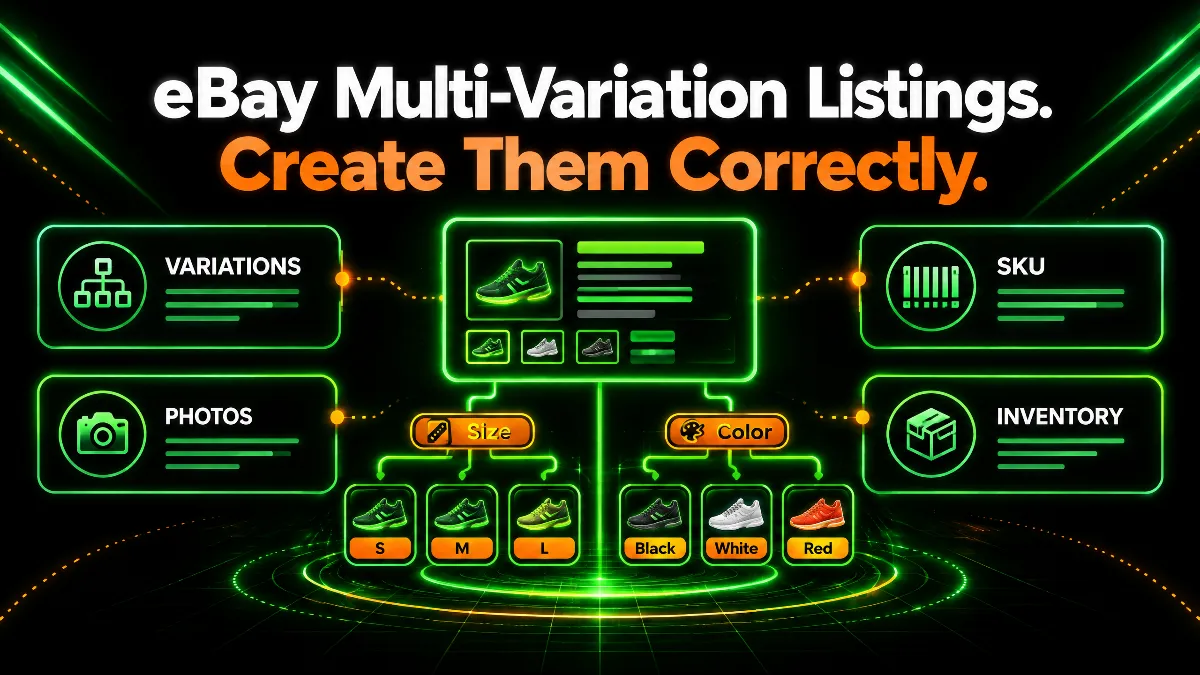
Table of contents
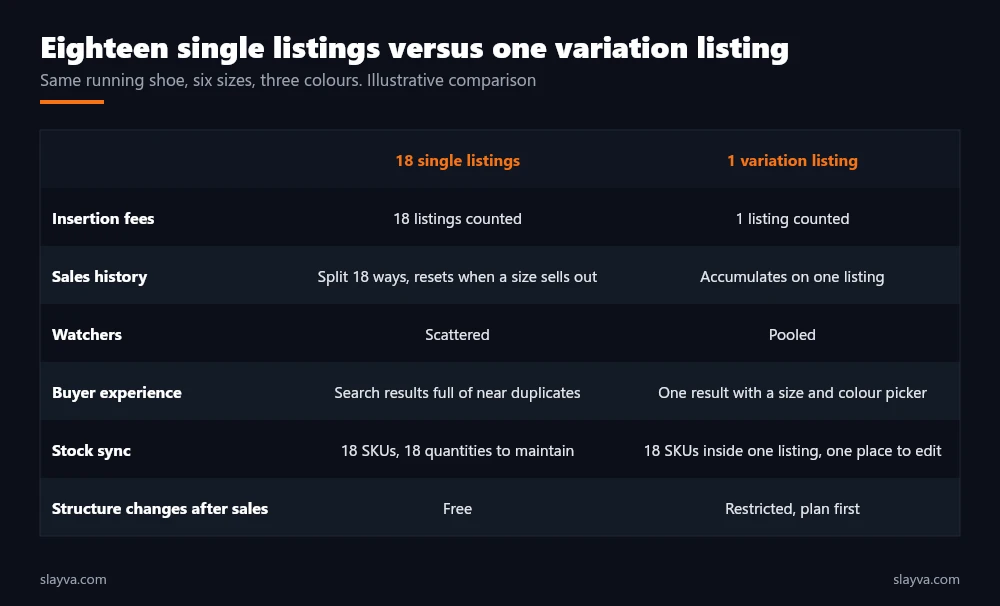
Eighteen listings for one running shoe. Six sizes, three colours, each its own listing, each with its own photos, its own watchers, and its own place in search. When size 9 in black sells out, the listing ends and the search history with it. Working out how to create a multi variation listing on eBay collapses those eighteen listings into one, with one set of watchers, one search history, and a size and colour picker that shows the buyer everything you have. It also introduces a structure that has to be right before the first sale, because eBay restricts what you are able to change afterwards.
This guide covers the eBay variation listing rules and limits, which categories allow variations on eBay, how to choose variation details, how eBay variation SKU structure works and why it matters for inventory, how photos attach to eBay size and color variations, how to create a multi variation listing on eBay step by step, and the mistakes that force sellers to rebuild listings they thought were finished.
Key Takeaways
- Main Insight: A variation listing is one product in several versions, never several products in one listing. eBay allows up to 5 variation details, 50 values per detail, and 250 variations per listing with no extra fee, in fixed price format and in most categories. Those numbers are the boundary of what one listing can hold.
- Strategy Tip: Decide the structure, the SKUs, and the counted quantities before you open the listing form. A variation listing is mostly planning. The form is the last ten minutes.
- User Benefit: One listing accumulates sales history, watchers, and search standing across every size and colour, which is why a well built variation listing usually outranks the same product split into a dozen singles. That ranking advantage is the reason to build variation listings at all.
eBay Variation Listing Rules and Limits
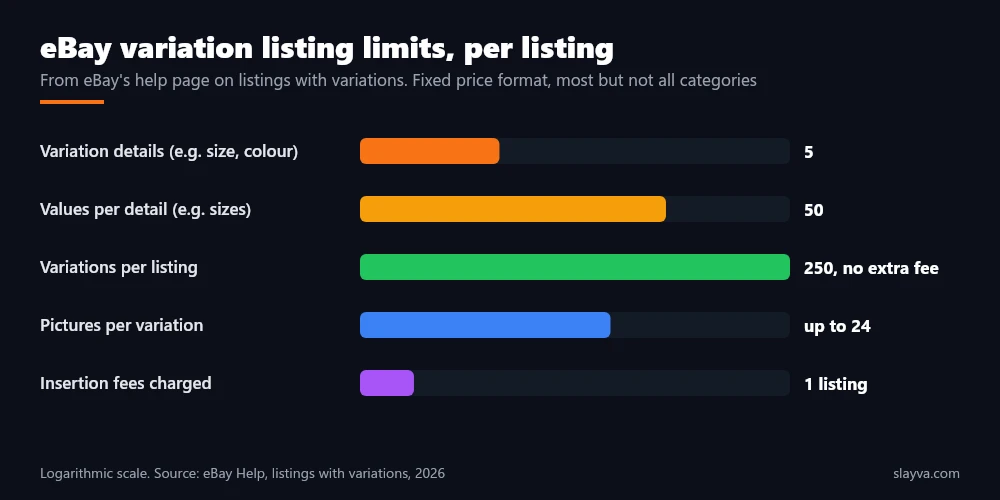
eBay’s help page on listings with variations sets the frame. Each listing supports up to 5 variation details, such as size, colour, or material, with up to 50 values for each detail, and up to 250 variations in a single listing at no additional fee. Each variation carries its own quantity and price, and you are able to add up to 24 pictures for each variation.
Variations are a fixed price feature, and most categories, though not all, are set up for them. eBay’s Seller Hub listing tool and the bulk listing tool both expose the same variation options. Those are the eBay variation listing rules in numbers. The rule that is not a number matters more: every variation must be the same product, differing only in the attributes you define. Everything else follows from that rule.
| Limit | Value | Practical meaning |
|---|---|---|
| Variation details per listing | 5 | Size, colour, material, style, and one more at most |
| Values per detail | 50 | Up to 50 sizes, 50 colours, and so on |
| Variations per listing | 250 | Every combination counts, so 6 sizes by 3 colours is 18 |
| Pictures per variation | Up to 24 | Photos attach to one detail, usually colour |
| Format | Fixed price | Not available on auction style listings |
| Fees | One listing | No additional fee for the variations themselves |
Same Product, Different Versions: The First Rule
The line eBay draws is between versions of one item and different items. A t-shirt in five sizes and four colours is one product. A t-shirt and a hoodie from the same brand are two products, and listing them as variations breaks eBay’s rules and confuses buyers who filter by product type.
The test we use: would a buyer expect the same title, the same description, and the same item specifics apart from the variation details? If the answer is no, it is a separate listing. Our guide on eBay listing titles covers how to write a title that describes the product without naming a specific size or colour, which is the title a variation listing needs. Getting the product boundary right is the first decision.
Categories That Allow Variations on eBay, and How to Check Before You Build
The categories that allow variations on eBay include the ones you would expect: clothing, shoes, accessories, home goods, phone cases, many electronics accessories, hobby supplies, and parts with size or fitment options. Some categories, particularly those where every item is unique such as collectibles, art, and some vehicle parts, do not offer variations because the concept does not apply. eBay does not publish a single definitive list, and category settings change, so the reliable check is inside the listing form: if the variations option appears for your category, it is supported. That check is step one.
Choosing the right category matters for a second reason. Variation details are often tied to the category’s item specifics, and eBay offers standard value lists for details such as size and colour that match the filters buyers use in search. A listing built on those standard values surfaces when a buyer filters for size 9 black. A listing built on custom values such as “Nine” or “Jet” does not. Our guide on improving eBay listing visibility explains why item specifics decide whether a listing appears at all. Standard values are the quiet half of a variation listing that ranks.
| Category type | Variations typically available | Usual variation details |
|---|---|---|
| Clothing, shoes, accessories | Yes | Size, colour, and sometimes length or fit |
| Phone cases, electronics accessories | Yes | Compatible model, colour |
| Home, kitchen, decor | Yes | Colour, size, material, pack quantity |
| Hobby and party supplies | Yes | Colour, size, quantity |
| Collectibles, art, one of a kind | Usually no | Not applicable |
| Vehicle parts with fitment | Varies | Fitment handled separately in many categories |
eBay Variation SKU Structure: The Part Sellers Skip
Every variation in the listing has a custom label field, which is where the eBay variation SKU lives. Sellers who leave it blank build a listing eBay understands and their inventory system does not. The SKU is the key that stock software, order management, and multichannel sync use to match a sale of size 9 black to the correct shelf and the correct count. Without it, a sale decrements the listing on eBay and nothing else, which is how the out of stock cancellations described in our guide on cancelling an eBay order without a defect begin.
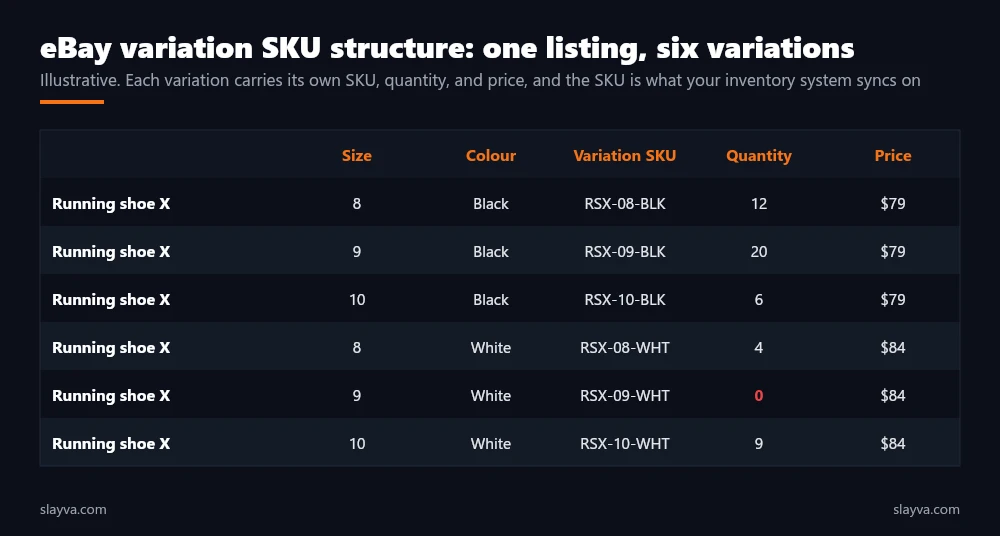
A workable eBay variation SKU pattern is product code, then each variation value, in a fixed order, separated consistently: RSX-09-BLK for running shoe X, size 9, black. The pattern should match what you use everywhere else, because a variation SKU that differs from the warehouse SKU by a hyphen breaks every sync.
Our guide to managing a large eBay inventory covers SKU systems in detail, and it is worth reading before building a variation listing rather than after, because renaming SKUs on a listing with sales history is where sellers lose a weekend. The SKU column is the part of the listing that only you will ever see, and the part that keeps the stock honest.
The variation picker is for the buyer. The variation SKU is for you. A listing with a perfect picker and blank SKUs looks finished and is not.
eBay Size and Color Variations: How Photos Attach
Photos in a variation listing attach to one variation detail, not to each combination. In practice that means you choose colour as the picture detail and upload a set of photos for black, a set for white, and so on, and every size within black shows the black set. eBay allows up to 24 pictures per variation.
You do not photograph size 8 black and size 9 black separately, which is a relief for shoes and a limitation for products where size changes the appearance. For eBay size and color variations, colour is almost always the right picture detail, and the main listing photo should show the range where possible so the search result communicates that options exist. Photo assignment is the step that buyers judge first.
Two photo mistakes recur. Assigning photos to size instead of colour, so that every colour shows the same image and buyers order the wrong shade. And uploading a single generic set with no per colour photos at all, which eBay allows and buyers punish through returns. Our guide on eBay listing optimization covers photo standards for the main image and the gallery.
How to Create a Multi Variation Listing on eBay: Step by Step
The steps below are how to create a multi variation listing on eBay in the order that avoids rebuilding. The planning steps come first because the form enforces decisions that are awkward to reverse.
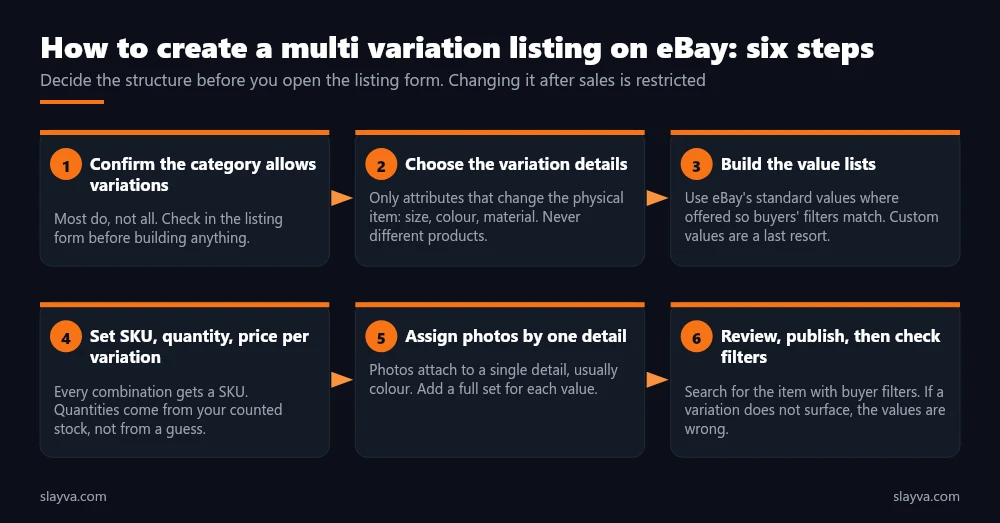
- Confirm the category supports variations: Start a fixed price listing in the category, and look for the variations option. If it is absent, choose a more specific category or list singles.
- Choose the variation details: Pick only the attributes that change the physical item the buyer receives. Size and colour cover most cases. Resist adding a detail because you are able to. Each one multiplies the combinations and the maintenance.
- Build the value lists from eBay’s standards: Where eBay offers standard values for a detail, use them so the listing matches buyer filters. Add custom values only for attributes eBay has no standard for.
- Enter SKU, quantity, and price for every combination: Use your existing SKU pattern. Enter counted quantities, not planned ones. Set price per variation where it genuinely differs, and keep it uniform where it does not.
- Assign photos by one detail: Usually colour. Upload a full set per value, and make the main listing photo represent the product family.
- Review, publish, then test the filters: Search for the product as a buyer with size and colour filters set. Every variation with stock should surface. If one does not, its values do not match eBay’s standards and need correcting.
Pricing Across Variations
eBay lets each variation carry its own price, and the listing shows a price range in search until the buyer selects options. Use per variation pricing where cost differs, such as larger sizes or premium colours, and keep it uniform otherwise, because a range in search results reads as uncertainty.
Our eBay pricing strategy guide covers how to research sold prices per variation, since a size 12 often sells at a different rate and price from a size 9 of the same shoe. Sell-through by variation, using the method in our guide on how to calculate eBay sell through rate, tells you which sizes to reorder and which to price down. Pricing per variation is where the listing meets margin.
What You Can Change After Sales, and Why Planning Comes First
Once a variation has sold, eBay restricts changes to the listing’s variation structure. You are able to add new variations, adjust quantities and prices, and, according to eBay’s help page, delete variations for which you are missing inventory.
Renaming variation details or values, changing which detail carries the photos, and restructuring the combinations become difficult or impossible without ending the listing and starting again, which discards the sales history that made the listing rank. This is the reason the planning steps come first. Get the detail names, the value lists, and the SKUs right before the first sale, and the listing lasts for years. Restructuring after sales is the expensive way to learn.
A variation listing that has sold is a structure with history attached. Change the quantities freely. Change the structure and you are building a new listing with none of the history.
| Change | Before first sale | After sales |
|---|---|---|
| Adjust quantity or price per variation | Yes | Yes |
| Add a new variation combination | Yes | Yes, within the limits |
| Delete a variation | Yes | Where inventory is missing, per eBay’s guidance |
| Rename a variation detail or value | Yes | Restricted, often requires relisting |
| Change which detail carries photos | Yes | Restricted |
| Add a sixth variation detail | Not allowed, limit is 5 | Not allowed |
Variation Listing Mistakes That Force a Rebuild
The patterns below are the ones we see when sellers ask for help with a variation listing that stopped working. Each is avoidable at the planning stage.
- Different products as variations: A hoodie and a t-shirt in one listing. Buyers filtering by product type miss both, and the listing risks removal.
- Custom values where standards exist: “Nine” instead of 9, “Jet” instead of Black. The variation exists and never appears in filtered search.
- Blank SKUs: The listing works on eBay and nowhere else. Multichannel sync fails and stock drifts.
- Planned quantities: Entering stock you expect from a supplier. The first sale of an unarrived size is an out of stock cancellation and a defect.
- Photos on the wrong detail: Images attached to size, so every colour shows the same picture and returns follow.
- Restructuring after sales: Renaming details or values on a listing with history, which ends in a relist and a ranking reset.
Sellers scaling to hundreds of variation listings should look at the bulk tools in our best eBay listing software review, and at the relisting rules in our guide on automatically relisting ended eBay listings, because variation quantities are exactly where automated relisting goes wrong if it does not check stock per variation. Sellers who would rather have the structure designed and maintained for them use our eBay account management services. See all our eBay seller services.
Frequently Asked Questions About eBay Variation Listings
How many variations does eBay allow in one listing?
Up to 250 variations per listing, built from up to 5 variation details with up to 50 values each, at no additional fee. Those limits shape how large ranges are structured. Six sizes by three colours is 18 variations, so most products sit well inside the limit.
Does a variation listing cost more than a single listing?
No. eBay charges the listing’s insertion fee once, and the variations carry no additional fee. Final value fees apply per sale as usual, and our fees breakdown covers those.
Are variations available on auction listings?
No. Variations are a fixed price feature. A variation listing always starts with a fixed price listing in a category that supports variations.
Do I need a different photo for every size?
No. Photos attach to one variation detail, usually colour, and every size within that colour shows the same set. You are able to add up to 24 pictures per variation value.
What if my category does not offer variations?
Some categories do not support them, usually where every item is unique. Check whether a more specific category does. If not, list each version separately and keep titles consistent so buyers find the range.
Is it possible to add a colour after the listing has sold?
Yes. Adding new variations and changing quantities and prices remain available after sales, so a good structure leaves room to grow. Renaming existing details or values and restructuring the combinations are the changes that become restricted.
Should every variation have its own SKU?
Yes. The custom label on each variation is what inventory and order software uses to match sales to stock, and it is the step most often skipped. A blank or inconsistent eBay variation SKU is the most common cause of overselling one size while another sits unsold.
Rebuilding variation listings every few months?
We design the structure, the SKU pattern, and the stock sync once, across the whole catalogue, so the listing keeps its history and the quantities stay honest.
Conclusion
How to create a multi variation listing on eBay comes down to planning the structure before touching the form. Confirm the category supports variations, choose only the details that change the physical item, build the values from eBay’s standards so buyer filters find them, give every combination a SKU that matches your inventory system, enter counted quantities, attach photos by colour, and test the result with filters as a buyer would. Change quantities and prices as often as you like afterwards. Leave the structure alone.
Done this way, one listing carries the sales history, watchers, and search standing of the whole range, and the stock behind it stays synced. More eBay listing and inventory guides are in the blog library.

Usman Malik
All posts by Usman MalikNeed this handled for you?
eBay Listing Optimization
Titles, item specifics and photos rewritten for search.
See the serviceeBay Account Management
Listings, orders, cases and growth, run for you.
See the service- Have this problem now? eBay account suspended (MC999)
- Have this problem now? eBay sales dropped