How to Automatically Relist Ended eBay Listings: 7 Essential Rules
- eBay, eBay Listing Optimization, eBay Seller Tools
- 16 min read
Table of contents
You open Seller Hub on Monday and find forty listings ended over the weekend. Some sold. Some ran out of stock. Some are products your supplier discontinued two months ago. Working out how to automatically relist ended eBay listings is the obvious response, and it is the right one, provided the automation knows which of those forty listings deserve to come back. Relisting everything is faster than relisting nothing, and worse than both.
This guide covers what an ended listing signals, when relisting makes sense, how automated relisting works, and how to keep inventory accurate while software handles the repetitive part.
Key Takeaways
- Relisting Strategy: Define which ended listings qualify before you automate anything. A listing that ended because stock ran out needs a different decision from one that ended on schedule.
- Inventory Control: Relisting and inventory accuracy are the same problem. A rule that returns products you no longer hold creates cancellations, and cancellations cost more than the time the rule saved.
- Automation Workflow: Triggers, filters, conditions, and a review step turn blanket relisting into targeted relisting. Filters are what keep the rule narrow.
- Seller Benefit: Controlled automation removes the repetitive work of finding and reposting eligible listings while leaving the eligibility decision with you.
What Happens When an eBay Listing Ends
Before automating anything, it helps to be precise about what ended means. An ended listing is one that is no longer live in search or available to buy. It still exists in your account and it holds its data, so returning it to the marketplace is a different action from creating a listing from scratch.
Listings end for reasons that are not interchangeable, and automated relisting starts with telling them apart.
- Duration expired: A fixed duration listing reached its end date without selling.
- Sold out: Quantity reached zero because the item sold.
- Ended manually: You ended it, often to edit, reprice, or withdraw the item.
- Out of stock: Inventory reached zero through a sync or a manual change.
- Removed by eBay: A policy, data, or compliance issue took the listing down.
That last category matters most when relisting runs unattended. A listing removed for a policy reason should never enter an automated relisting queue until the underlying issue is resolved, because reposting it repeats the breach.
Why Relisting Depends on the Ending Reason
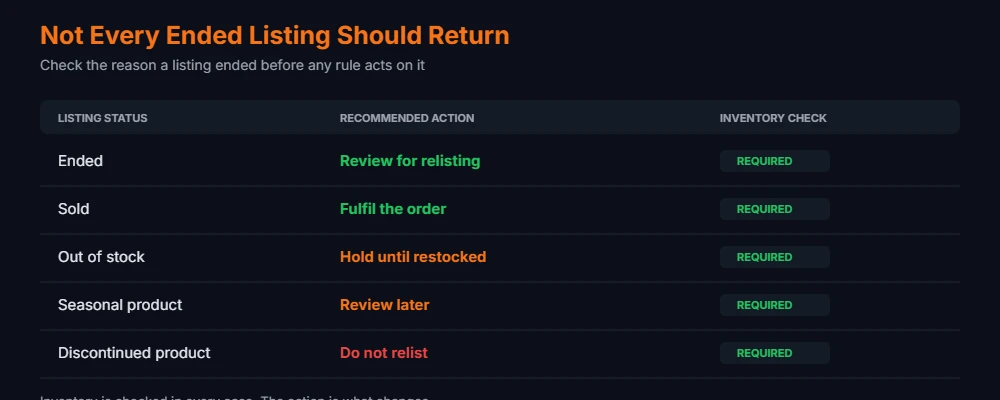
Sellers use these terms loosely and automation does not. The status determines the correct action, and every status requires an inventory check before anything happens.
| Listing status | Possible action | Inventory check |
|---|---|---|
| Ended | Review for relisting | Required |
| Sold | Fulfil the order | Required |
| Out of stock | Hold until restocked | Required |
| Seasonal product | Review later | Required |
| Discontinued product | Do not relist | Required |
Any relisting rule inherits this table. The right action depends on your own inventory position and business rules, not on the status label alone. Two sellers looking at the same ended listing reach different conclusions, and both are correct for their own catalogue.
Why Manual Work Pushes Sellers Toward Automation
Sellers rarely look at relisting automation until manual work stops fitting the week. Manual relisting works. It gives you direct control, and for a small catalogue it costs a few minutes a week. The difficulty arrives with scale rather than with complexity.
- Catalogue size: Reviewing ended listings across hundreds of products turns a five minute task into a recurring afternoon.
- Multiple stores: Each account needs its own review pass, and decisions drift between them.
- Missed listings: Ended listings that nobody notices stay ended, quietly removing products from your available range.
- Inconsistent decisions: The same product gets relisted one week and skipped the next depending on who checked.
- Stale prices: Costs move while a listing sits ended, and reposting the old price sells at a margin you no longer accept.
- Availability changes: Supplier stock shifts between the listing ending and you reviewing it.
- Seasonal and discontinued lines: Products that should stay ended get returned because the reviewer lacked the context.
The pattern is consistent, and it is the practical argument for automation. Manual relisting fails through omission rather than error. Nothing goes visibly wrong, and the catalogue slowly shrinks while attention goes elsewhere. Our guide to managing a large eBay inventory covers the systems that hold up as product counts rise.
Automated relisting works best when sellers automate decisions they have already defined clearly. Automation applied to an undefined decision produces consistent mistakes at speed.
How to Automatically Relist Ended eBay Listings
Automated relisting follows a repeatable sequence. Getting it right means understanding each stage, because skipping one is where inventory problems begin.
- Identify ended listings: Pull the listings that ended and the reason each one ended.
- Check inventory availability: Confirm the product exists and is sellable.
- Define relisting criteria: Decide what qualifies before any rule runs.
- Apply conditions or filters: Narrow the rule to the listings you intend it to touch.
- Set timing or schedules: Decide when the rule evaluates and acts.
- Review the listings: Check price, quantity, and data on what the rule selected.
- Relist eligible inventory: Return the qualifying listings to the marketplace.
- Monitor the results: Watch what came back and what sold.
- Remove or exclude what no longer qualifies: Update exclusions as the catalogue changes.
This is not a set it and forget it process. The rule runs unattended. The rule itself needs maintenance, because a rule written against last quarter’s catalogue keeps making last quarter’s decisions.
Step 1: Identify Which Listings Are Eligible
Eligibility is your definition, not the software’s, and it is the first real decision. Before touching any settings, write down what makes a listing worth returning. Criteria worth considering:
- Inventory available: Confirmed quantity above zero.
- Product still active: Not discontinued or withdrawn.
- Still profitable: Current cost and fees still leave the margin you accept.
- Listing type: Fixed price and auction listings often warrant different treatment.
- Category: Some categories turn over predictably and some do not.
- Listing age: A listing that has sat unsold through several cycles is telling you something.
- Sales history: Products that sold before are safer candidates than those that never did.
- Seasonal status: Off season stock returns at the wrong time without a date condition.
- Tags or store: Your own labels for segmenting the catalogue.
Tool support varies. Not every platform exposes every criterion, and the ones it does expose will not always be named the way you think of them. Check what your software filters on before designing a rule around a field that does not exist.
Step 2: Check Inventory Before You Relist
This step separates working automation from expensive automation, and it is where relisting connects directly to eBay inventory automation. Inventory validation before relisting prevents the failure that costs most: a product returning to sale that you are unable to ship.
- Current quantity: The number in your system, verified rather than assumed.
- Warehouse stock: Physical availability, which sometimes differs from the recorded figure.
- Supplier stock: For dropshipped or made to order lines, availability sits outside your walls.
- Reserved stock: Units allocated to open orders are not available to sell again.
- Damaged stock: Present in the count, absent from what you would send a buyer.
- Discontinued products: Stock that exists now and will not be replaced.
- Multi channel stock: The same units listed elsewhere are already spoken for.
Skipping this check is the fastest way to make automation expensive. Relisting without validating availability creates a problem you then handle manually, which defeats the purpose. Platforms that combine eBay listing automation with inventory actions reduce that gap. 3Dsellers, for example, includes inventory related actions such as updating eBay inventory and warehouse inventory inside the same automations system that handles listing actions, which keeps the stock position and the listing action in one place rather than two.
Step 3: Define Relisting Rules
Rules are the core of automated relisting. A rule is a sentence before it is a setting. Write it in plain language first.
Rule: Relist only ended fixed price listings where inventory is greater than zero and the product is still active.
Seven rules cover most catalogues, and the table below sets them out. That sentence contains three conditions, and each one maps to a filter. Rules written this way are testable. Rules written directly into software rarely are.
| Rule | Purpose |
|---|---|
| Inventory available | Prevent unavailable products from returning |
| Product active | Avoid discontinued products |
| Category filter | Target specific inventory |
| Listing age | Control which listings qualify |
| Sales condition | Avoid unnecessary relisting |
| Store filter | Manage different eBay stores |
| Exclusion tag | Keep discontinued lines out permanently |
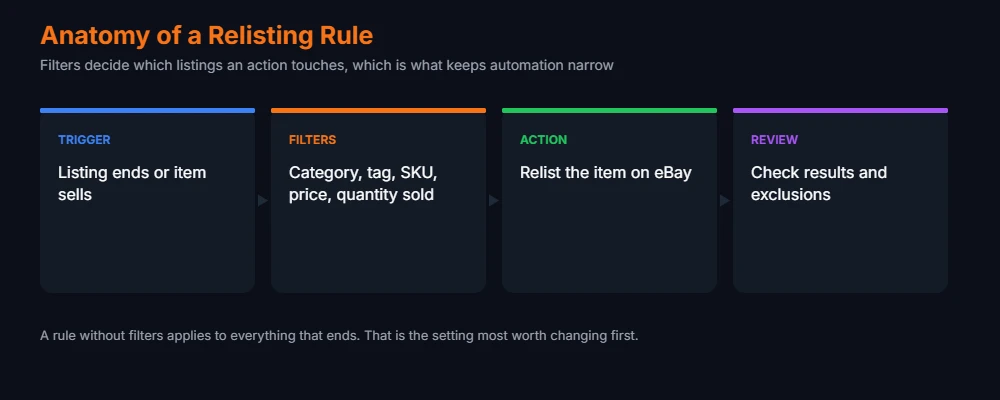
The exact options depend on your software. In 3Dsellers, listing automations combine a trigger with optional filters and an action, and the filter set includes fields such as category, tag, SKU, price, quantity sold, and publish date. Filters narrow which items are eligible before the action runs, which is the mechanism that turns a blanket rule into a targeted one.
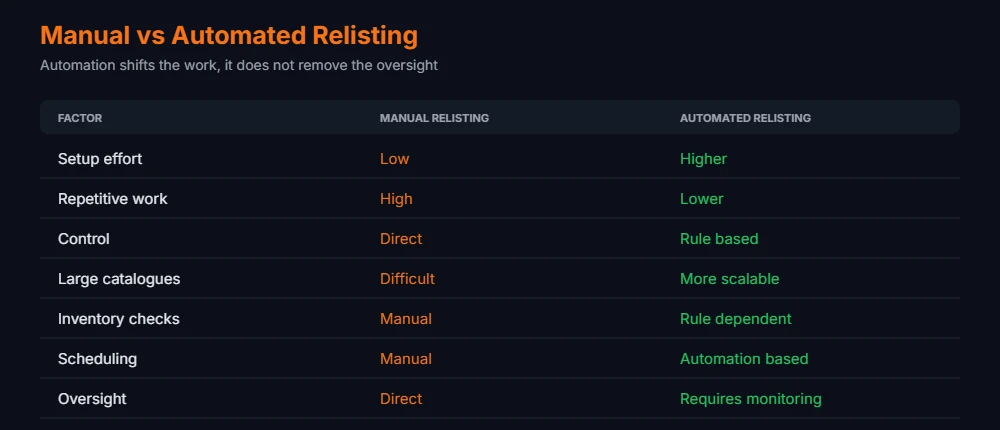
Manual Relisting vs Automated Relisting
Sellers comparing manual work against automation usually want a verdict. Neither approach is universally better. They fail in different places, and knowing which failure you would rather manage is the actual decision.
| Factor | Manual relisting | Automated relisting |
|---|---|---|
| Setup | Low | Higher |
| Repetitive work | High | Lower |
| Control | Direct | Rule based |
| Large catalogues | Difficult | More scalable |
| Inventory checks | Manual | Rule dependent |
| Scheduling | Manual | Automation based |
| Oversight | Direct | Requires monitoring |
Read the inventory row carefully, because it is the row that decides whether automation stays safe. Automated inventory checking is rule dependent, meaning it happens if you configured it and does not if you did not. Automation does not remove the need for inventory review. It relocates that review from every listing to the rule that governs them.
How to Avoid Losing Inventory Control When You Relist
Inventory control is the constraint that makes eBay relisting automation safe, and the reason relisting is an inventory question as much as a listing question. These practices keep the two aligned.
- Maintain accurate quantities: eBay inventory automation acts on your recorded numbers, so the recorded numbers have to be right.
- Use consistent SKUs: Identifiers are how listings, stock, and orders stay connected.
- Avoid duplicate listings: Check whether an active listing for the product already exists before returning another.
- Exclude discontinued products: Maintain an exclusion list and update it when a line ends.
- Review supplier inventory: For lines you do not hold, availability changes without notifying you.
- Monitor multi channel stock: Units committed on another marketplace are not available here.
- Set sensible rules: Narrow rules fail small. Broad rules fail across the catalogue.
- Keep an audit process: Review what the automation did, weekly at first.
- Review exceptions: The listings a rule skipped are as informative as the ones it acted on.
- Test before expanding: Run the rule on one category before applying it to everything.
Use SKUs as the Inventory Connection
SKUs are the connective tissue underneath automated relisting. Consistent SKUs give you one identifier linking products, listings, inventory records, orders, variations, and channels. When those all reference the same code, a quantity change in one place is traceable everywhere else.
SKUs do not prevent overselling on their own, even inside a well built relisting setup. They are a reference system, not a control. What accurate SKU mapping provides is the ability to answer a specific question quickly: is this product available right now, across everywhere it is listed. Without that mapping, the question takes a spreadsheet and a guess.
Where Automatic Relisting Should Not Apply
Not everything qualifies. Some listings end for good reasons. These categories deserve review rather than automatic return.
- Discontinued products: Do not relist products that are no longer available from your supplier.
- Zero inventory: Do not relist products without confirmed stock behind them.
- Seasonal products: Review seasonal inventory before returning it, since the right listing in the wrong month sits unsold.
- Low margin products: Recheck pricing and costs before relisting, because fees and shipping rates move.
- Problem listings: Review anything that ended through a policy, data, or quality issue before it returns.
Common Relisting Automation Mistakes
| Mistake | Practical solution |
|---|---|
| Relisting everything automatically | Add filters so the rule targets a defined subset |
| Ignoring inventory quantity | Make available stock a condition of the rule |
| Relisting discontinued products | Maintain an exclusion list and tag those products |
| Creating duplicate listings | Check for an existing active listing before relisting |
| Forgetting variations | Validate stock at variation level, not parent level |
| Ignoring price changes | Review pricing on anything ended for an extended period |
| Ignoring supplier stock changes | Sync supplier availability before the rule evaluates |
| Overly broad rules | Start narrow, widen only after reviewing results |
| Never reviewing results | Schedule a recurring check of what the rule did |
| No exclusion rules | Define what must never relist before defining what should |
How 3Dsellers Supports Automatic Relisting
Sellers researching relisting automation will meet several platforms offering eBay listing automation. 3Dsellers is one of them, and its structure is a useful illustration of how rule based relisting works in practice.
Within 3Dsellers, automatic relisting is configured through Listing Tool automations as a Relist Item rule. The rule triggers when a listing ends or an item sells, and the platform reposts the item to eBay without manual intervention. Before that addition, returning ended listings meant opening the ended listings view and relisting items one at a time.
The part worth attention is the surrounding structure rather than the relist action itself. Automations combine a trigger, optional filters, and an action. Filters narrow which items are eligible before the action runs, using fields including category, tag, SKU, price, quantity sold, MPN, publish date, and whether an item has variations. That filtering is what separates relisting a defined segment from relisting everything that ends.
Inventory sits in the same system. Actions such as updating eBay inventory, inventory control, and warehouse inventory run through the same automations interface, which keeps stock updates and listing actions from living in separate tools. Automations run only while set to Active, so a rule saved but not activated does nothing.
These rules give sellers more control over which listings qualify when the rule runs. Inventory checks and exclusion rules remain yours to configure. No automation platform removes the need to decide what should return to sale, and treating the software as the decision maker rather than the executor is where relisting automation usually goes wrong. Our overview of 3Dsellers features and pricing covers the wider toolset, and our comparison of eBay listing software puts it alongside the alternatives.
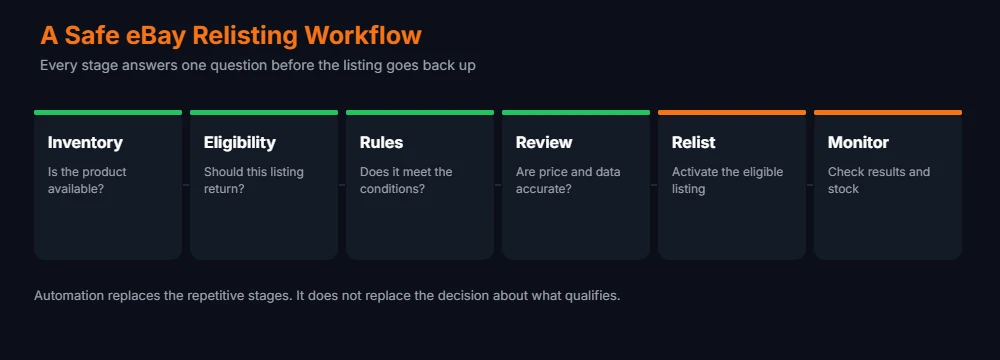
A Safe Workflow for How to Automatically Relist Ended eBay Listings
This sequence works whether you relist by hand or by rule, and it is the shortest honest way to relist without losing track of stock. Automation changes who performs each stage, not which stages exist.
| Stage | Question it answers |
|---|---|
| Inventory | Is the product available? |
| Eligibility | Should this listing return? |
| Rules | Does it meet the automation conditions? |
| Review | Are price, data, and quantity accurate? |
| Relist | Activate the eligible listing |
| Monitor | Check performance and inventory |
Each stage answers one question. Inventory comes first because every later stage depends on it. Eligibility is the business decision, made once and encoded rather than repeated per listing. Rules translate that decision into conditions the software evaluates. Review is the stage sellers drop first and regret, particularly on listings that sat ended for months. Relist is the only stage automation fully owns. Monitor closes the loop and feeds corrections back into the rules.
Is Automatic Relisting Right for Your Catalogue?
Automation suits some catalogues and fights others, so the decision is partly a question of whether your catalogue is ready for it.
Conditions that favour automation:
- Large catalogues: Manual review stops being realistic past a few hundred products.
- Frequent ended listings: A steady weekly volume of endings is repetitive by definition.
- Stable inventory: Stock levels that behave predictably make rules reliable.
- Multiple stores: Consistency across accounts is difficult to maintain by hand.
- Established SKUs: Clean identifiers make conditions dependable.
Conditions that favour manual review:
- Unstable inventory: Quantities that change unpredictably break rule assumptions.
- Seasonal ranges: Timing decisions are hard to encode and easy to get wrong.
- Discontinued lines in flux: A catalogue mid transition needs human judgement.
- Complex variations: Variation level stock adds failure modes worth watching directly.
- Frequent supplier changes: Availability that shifts weekly outpaces most rules.
- Moving margins: Products whose costs change often need pricing review before returning.
Most sellers automate relisting for part of the catalogue only, landing in both camps at once, automating the stable majority of the catalogue and reviewing the volatile remainder by hand. That split is usually the right answer.
Checklist: Automatic Relisting, Safely
- Inventory Accuracy: Confirm available quantity before automation touches anything.
- SKU Structure: Keep product and listing identifiers consistent across channels.
- Eligibility Rules: Define which listings qualify, in writing, before configuring.
- Exclusions: Exclude discontinued and unavailable products explicitly.
- Pricing: Review current pricing and costs before anything returns to sale.
- Product Data: Confirm listing information is still accurate after time ended.
- Variations: Check variation level inventory where the product has variants.
- Monitoring: Review automation results on a schedule rather than on suspicion.
The rule you write is a decision you stop making. Write it as carefully as you would make that decision fifty times by hand, because that is what it replaces.
Practical Example: Automatic Relisting Across 500 Products
Here is the approach applied to a real shape of catalogue. A seller lists around 500 active products across homeware and small electronics. Listings end every week, some through sales and some through duration. Reviewing them by hand takes most of a morning, and the seller has been skipping weeks.
Automating everything is tempting and wrong for this catalogue. The electronics lines change frequently, several homeware products are discontinued, and a seasonal range should stay ended until autumn.
Instead the seller writes eligibility down first: relist ended fixed price listings in the homeware category, where inventory is above zero, the product is not tagged as discontinued, and the listing has sold at least once before. Everything outside that definition stays in a manual review queue.
That is automatic relisting working as intended. The rule takes the repetitive homeware work, which is most of the volume. The electronics and seasonal lines stay with the seller, which is where judgement is needed. That is the realistic shape of a good outcome: a large share of the repetitive work removed, and the decisions that need context still made by a person. Scaling this pattern further is covered in our guide to scaling an eBay store past a thousand listings.
External Resources
Confirm current behaviour at the source before building rules around it. eBay documents selling policies and listing management in the eBay Seller Center, and day to day listing questions are covered in eBay Selling Help. For the automation mechanics referenced above, 3Dsellers publishes a complete guide to listings automations covering triggers, filters, and actions, with current plans listed on the 3Dsellers site.
Frequently Asked Questions
How do you automatically relist ended eBay listings?
The short version of how to automatically relist ended eBay listings: use a listing automation rule that triggers when a listing ends, applies filters so it targets only the listings you intend, and reposts the qualifying items. The work sits in defining the filters rather than in enabling the rule.
Should every ended eBay listing be relisted?
No, and this is the most common error when sellers first automate relisting. Discontinued products, items without stock, off season ranges, and listings removed for policy reasons all warrant staying ended. Blanket relisting returns products you are unable to ship.
How do I prevent out of stock products from being relisted?
This is the core safeguard. Make available quantity a condition of the rule so listings with zero stock fail the check. Pair that with a synced inventory source, since the condition tests your recorded number rather than the shelf.
Does eBay relisting automation work with inventory rules?
It depends on the platform, which is why relisting automation should be researched alongside eBay inventory automation rather than separately. Some tools combine listing automations with inventory actions in one system, which keeps stock and listing decisions together. Confirm which inventory fields your software evaluates before relying on it.
What should I check before automatically relisting an eBay listing?
Before automating relisting at scale, check confirmed stock, current pricing against current costs, product data accuracy, variation level quantities, and whether an active listing for that product already exists.
How does 3Dsellers handle eBay relisting automation?
It handles relisting through a Relist Item rule in Listing Tool automations, triggered when a listing ends or an item sells. Filters such as category, tag, SKU, and price narrow which listings the rule applies to, and the automation runs only while set to Active.
Relisting eating your week?
We manage eBay accounts end to end for growing sellers, listing operations and inventory workflows included. Free audit, no commitment.
Conclusion
Everything here rests on a few points. Ended listings need review because the reason they ended determines what should happen next. Inventory accuracy matters because relisting acts on your recorded numbers, and a wrong number becomes a cancellation. Rules come before automation because software executes decisions rather than making them, and an undefined decision produces inconsistent results faster than a person would.
Exclusions deserve as much attention as inclusions when you set up the rule. Discontinued lines, zero stock products, and problem listings should be named explicitly rather than left for a rule to catch. Monitoring stays necessary because catalogues change, and a rule written six months ago reflects a catalogue that no longer exists.
Handled this way, automatic relisting removes a genuinely repetitive task without handing over the judgement that keeps inventory accurate. More eBay operations guides are in our full library, and our overview of eBay automation for growing sellers covers where relisting fits among the other tasks worth automating.

Usman Malik
All posts by Usman MalikNeed this handled for you?
eBay Listing Optimization
Titles, item specifics and photos rewritten for search.
See the serviceeBay Account Management
Listings, orders, cases and growth, run for you.
See the service- Have this problem now? eBay account suspended (MC999)
- Have this problem now? eBay sales dropped