How to Scale an eBay Store From 100 to 1,000+ Listings
- eBay, eBay Selling Tips
- 14 min read

Table of contents
Introduction
Running an eBay store with 100 listings feels very different from running one with 1,000+ listings. At 100 listings, you can manage everything manually. You can update prices one by one, check inventory individually, and respond to every message personally. At 1,000+ listings, that approach no longer works.
The transition from 100 to 1,000+ listings is not just about adding more products. It is about building a system that can handle more listings without creating more work. Sustainable scaling comes from strong fundamentals: fix what works, systemize it, and then grow, not the other way around. Learning how to scale an eBay store requires a complete shift in mindset from managing individual listings to managing systems.
This guide covers exactly how to scale an eBay store by building the right systems, tools, and workflows. You will learn how to manage 1,000 eBay listings efficiently, use eBay bulk listing to add products faster, implement eBay listing automation, and master managing eBay inventory at scale. By the end, you will have a complete roadmap for growing your eBay store without losing control of your operations.
Key Takeaways
- Scaling is about building systems, not just adding more products
- Manual management becomes impossible at 1,000+ listings
- Consistent listing templates and SKUs are essential for organization
- eBay’s Seller Hub Reports enables bulk listing creation and updates
- Automation reduces errors and saves significant time at scale
- Real-time inventory sync prevents overselling and protects seller metrics
- Daily monitoring of seller metrics catches degradation early
- Performance data should guide where you focus your efforts
- The goal is to increase catalog size without increasing workload proportionally
What Changes When You Go From 100 to 1,000+ eBay Listings?
When you learn how to scale an eBay store, understanding what changes is the first step. The operational challenges multiply as your catalog grows.
More Inventory to Manage
At 100 listings, tracking stock levels is straightforward. At 1,000+ listings, you are dealing with thousands of units across hundreds of SKUs. Product variations (sizes, colors, models) add another layer of complexity. Without a system, tracking what is in stock, what is low, and what is sold out becomes nearly impossible. This is a key challenge when you figure out how to scale an eBay store successfully.
More Listing Updates
At 100 listings, updating prices, titles, or descriptions takes an hour. At 1,000+ listings, manual updates take days. Every listing element, from item specifics to product descriptions to images, needs to be maintained. When something changes, you cannot update 1,000 listings one by one. Understanding how to scale an eBay store means adopting bulk management strategies.
More Opportunities for Errors
The more listings you have, the more opportunities for mistakes. Incorrect inventory counts lead to overselling. Duplicate listings confuse buyers. Outdated information damages trust. Pricing mistakes eat into profits. At 100 listings, errors are easy to spot. At 1,000+ listings, they hide in plain sight.
Comparison: 100 vs. 1,000+ eBay Listings
| Area | 100 Listings | 1,000+ Listings |
|---|---|---|
| Inventory | Easier to track manually | Requires organized systems |
| Listing updates | Mostly manageable | Bulk management becomes important |
| Pricing | Manual updates possible | Automation can save significant time |
| Errors | Easier to identify | Harder to spot manually |
| Workflow | Simple | Needs defined processes |
Build Your eBay Listing System Before Scaling
When you learn how to scale an eBay store, one rule stands above all others: fix the process first, then increase the volume. Scaling a messy process just creates a bigger mess. This is the most important lesson in how to scale an eBay store effectively.
Create Consistent Listing Templates
Consistency is the foundation of scaling. Every listing should follow the same structure so you can create new listings faster and maintain them more easily. This is essential when you learn how to scale an eBay store efficiently.
Title structure: Use a consistent format for all your titles (Brand + Product Name + Key Feature + Condition)
Description format: Create a template that covers all essential information, with placeholders for product-specific details
Image requirements: Define minimum image count, dimensions, and background standards
Item specifics: Identify which item specifics are required for each category and always complete them
Shipping information: Standardize shipping options, handling times, and return policies
Use SKUs to Organize Products
SKUs (Stock Keeping Units) are your secret weapon for organizing inventory. A consistent SKU format makes products easy to find, update, and track.
Create a consistent SKU format: Use a structured pattern like BRAND-CATEGORY-VARIANT (e.g., ADIDAS-SHOES-SIZE10)
Connect SKUs with inventory: Link each SKU to its stock count and product details
Make products easier to find and update: Search by SKU to quickly locate specific products
Create a Listing Checklist
Before publishing each product, ensure every listing meets your quality standards:
- □ Product title completed
- □ Images uploaded
- □ Item specifics completed
- □ Price checked
- □ Quantity verified
- □ Shipping settings checked
- □ Product description reviewed
How to Manage 1,000 eBay Listings Efficiently
Learning how to manage 1,000 eBay listings efficiently requires organization and the right tools. You cannot treat each listing as an individual project. Knowing how to scale an eBay store means mastering bulk management.
Organize Listings Into Logical Groups
Grouping listings makes bulk management easier and helps you identify patterns.
Product categories: Group by product type or category
Brands: Group by manufacturer or brand
SKUs: Use SKU prefixes to identify product families
Inventory status: Group by in-stock, low-stock, out-of-stock
Sales performance: Group by top sellers, slow movers, and non-performers
Use Bulk Actions
Bulk management is essential for reducing repetitive work. eBay’s tools allow you to perform actions on multiple listings simultaneously.
Examples of bulk actions:
- Update prices across multiple listings
- Change quantities in batch
- Edit item specifics for similar products
- Update descriptions in bulk
- End listings that are no longer available
- Revise multiple listings at once
Create a Regular Listing Maintenance Routine
| Task | Suggested Frequency |
|---|---|
| Inventory check | Daily |
| Price review | Weekly |
| Listing performance review | Weekly |
| Old listing review | Monthly |
| Catalog cleanup | Monthly |
Use eBay Bulk Listing to Add Products Faster
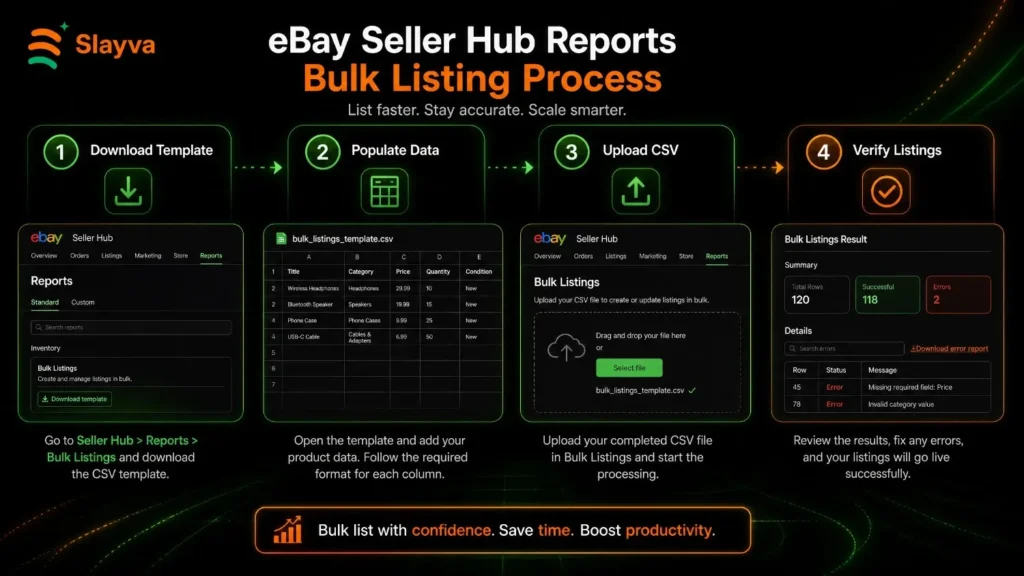
eBay bulk listing is one of the most powerful tools for sellers looking to scale. It allows you to create, revise, and manage multiple listings at once. Mastering eBay bulk listing is essential when you learn how to scale an eBay store.
What Is eBay Bulk Listing?
eBay bulk listing is the process of creating multiple listings simultaneously using structured data rather than entering each one individually. You can use Seller Hub Reports (File Exchange) with CSV templates to create and upload listings in bulk.
When Should You Use Bulk Listing?
- Large product catalogs: When you have hundreds of products to list
- Similar products: Products that share the same template structure
- Product variations: Multiple variations of the same product (sizes, colors)
- Seasonal inventory: Bulk uploads for seasonal product lines
- New product launches: When adding entire product lines at once
Benefits of Bulk Listing
- Save significant time compared to manual entry
- Reduce repetitive work
- Maintain consistency across similar listings
- Scale product uploads efficiently
- Reduce manual errors through template-based creation
Comparison: Manual Listing vs. Bulk Listing
| Task | Manual Listing | Bulk Listing |
|---|---|---|
| Create products | One at a time | Multiple products simultaneously |
| Edit listings | Individually | In batches |
| Update prices | Manual | Batch updates |
| Update inventory | Time-consuming | Much faster |
| Scalability | Limited | Better for large catalogs |
Automate Repetitive eBay Tasks
eBay listing automation is the key to managing 1,000+ listings without hiring a team. At 100 listings, automation is convenient. At 1,000+ listings, it becomes essential for maintaining an efficient workflow. Learning how to scale an eBay store means embracing automation.
What Can You Automate?
- Inventory updates: Sync stock levels automatically
- Price changes: Adjust prices based on competition or demand
- Listing revisions: Update listings in bulk based on template changes
- Ending listings: Automatically end out-of-stock or expired listings
- Relisting products: Automate relisting of ended or unsold items
- Order workflows: Streamline order processing and shipping
- Customer communication: Automate order confirmations and feedback requests
Why Automation Matters at 1,000+ Listings
At 100 listings, you can manually update each listing. At 1,000+ listings, the time required for manual updates multiplies. Automation reduces errors, saves time, and ensures consistency across your entire catalog. This is a critical component of how to scale an eBay store efficiently.
Signs You Need Automation
- You spend hours editing listings every week
- Inventory updates are difficult to keep accurate
- You repeatedly perform the same tasks
- You are hiring people just to perform repetitive work
- Listing management is taking time away from growth
Keep Your eBay Inventory Accurate
Effective eBay inventory management is essential when you scale to 1,000+ listings. Inaccurate inventory leads to overselling, which damages customer trust and your seller metrics. Managing eBay inventory at scale requires systems and processes.
Prevent Overselling
- Keep inventory quantities updated in real time
- Monitor low-stock products proactively
- Remove unavailable products quickly
- Implement buffer stock for high-velocity items
Manage Product Variations
Product variations (sizes, colors, models, bundles) require special attention. Each variation is a separate inventory item that needs tracking.
Common variation attributes:
- Sizes
- Colors
- Models
- Bundles
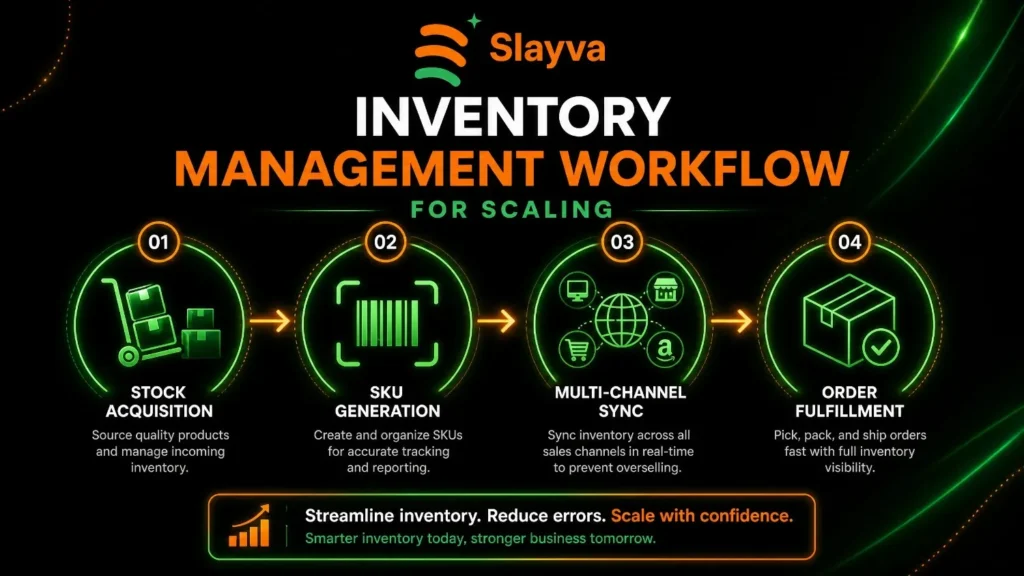
Create an Inventory Management Process
Product added → SKU assigned → Inventory tracked → Listing updated → Stock monitored → Product replenished or removed
This process should be documented and followed for every product.
Common Inventory Problems
| Problem | Possible Result |
|---|---|
| Incorrect stock quantity | Overselling and defects |
| Outdated listings | Poor customer experience |
| Missing SKUs | Difficult inventory tracking |
| Manual updates | More errors |
| Unorganized catalog | Slower workflows |
Optimize Your Listings as Your Store Grows
Adding more products is not enough. To scale successfully, you must also optimize your existing listings. Every listing should be continuously improved. Part of learning how to scale an eBay store is understanding that optimization is ongoing.
Optimize Product Titles
Titles are the first thing buyers see. A strong title attracts clicks and improves search visibility.
- Use relevant search terms that buyers actually search for
- Make titles easy to understand for humans, not just search engines
- Avoid keyword stuffing which looks spammy and hurts conversion
- Include important details like brand, model, and key features
Complete Item Specifics
Item specifics are critical for eBay’s search algorithm. Complete listings appear in more search results.
Key item specifics to complete:
- Brand
- Model
- Size
- Color
- Condition
- Relevant product attributes
Improve Product Images
Images sell products. High-quality images build trust and reduce returns.
- Use clear, well-lit images
- Show multiple angles including close-ups
- Keep image quality consistent across all listings
- Include images showing scale or use context
Improve Descriptions
A good description answers questions before buyers ask them.
- Make important information easy to find with clear sections
- Use short paragraphs for better readability
- Answer common buyer questions proactively
- Include relevant details like dimensions, materials, and care instructions
Track Which Listings Actually Perform
Not every listing deserves the same attention. Performance data tells you where to focus your time and effort. Data-driven decisions are essential when you learn how to scale an eBay store effectively.
Key Metrics to Track
- Impressions: How many times your listing appears in search
- Views: How many buyers click to view your listing
- Click-through rate: The percentage of impressions that become views
- Conversion rate: The percentage of views that become sales
- Sales: Total units sold
- Watchers: How many buyers are watching your listing
- Sell-through rate: The percentage of inventory that sells
What the Numbers Can Tell You
| Metric | Possible Problem |
|---|---|
| High impressions, low clicks | Title or image needs work |
| High clicks, low sales | Price or listing details may need improvement |
| Low impressions | Visibility or SEO issue |
| High sales | Consider expanding similar products |
| Many watchers, few sales | Price or offer strategy may need review |
Use Data to Prioritize
Don’t treat every listing equally. Let performance data tell you where to focus.
- Top performers: Double down on what works
- Underperformers: Diagnose and fix the issue
- Dead weight: Consider removing or completely reworking
When Should You Use eBay Listing Management Software?
Spreadsheets and manual processes work at 100 listings. At 1,000+ listings, they become bottlenecks. Knowing when to invest in eBay listing management software is key to scaling successfully. This is a major step in how to scale an eBay store efficiently.
You May Need Software If:
- You manage hundreds of listings
- Your inventory changes frequently
- You sell across multiple channels
- You manage multiple eBay accounts
- You need bulk editing capabilities
- Your team spends too much time on repetitive tasks
What to Look For in eBay Management Software
- Bulk listing: Create and upload multiple listings at once
- Bulk editing: Update hundreds of listings in seconds
- Inventory management: Sync stock levels automatically
- Listing automation: Automate repetitive workflows
- Order management: Streamline fulfillment
- Multi-account support: Manage multiple stores from one dashboard
- Reporting and analytics: Track performance and identify opportunities
How 3Dsellers Helps You Scale an eBay Store
When you are ready to scale, the right tools make all the difference. 3Dsellers is a comprehensive eBay listing management platform designed specifically for sellers who need to grow efficiently. This is a key solution for learning how to scale an eBay store.
Listing management: 3Dsellers provides a centralized dashboard for managing all your eBay listings. You can create, edit, and monitor listings from one place without logging into eBay separately. This streamlines your workflow and reduces the time spent on listing management.
Bulk listing and editing: With 3Dsellers, you can create and upload hundreds of listings at once using customizable templates. Bulk editing allows you to update prices, quantities, and item specifics across multiple listings simultaneously. This is essential for maintaining consistency and saving time at scale.
Inventory workflows: Real-time inventory sync ensures your stock levels are always accurate. When a sale happens, your inventory updates automatically, preventing overselling and protecting your seller metrics.
Listing automation: Automate repetitive tasks like price updates, relisting, and inventory adjustments. This reduces manual work and ensures consistency across your entire catalog.
Multi-account management: If you manage multiple eBay stores, 3Dsellers supports multi-account management so you can handle everything from one dashboard.
Order management: Streamline your fulfillment process with integrated order management tools. Process orders faster and keep customers informed.
Centralized eBay operations: 3Dsellers brings all your eBay tools together in one place, reducing the complexity of managing a growing store.
The goal isn’t simply to reach 1,000 listings. It’s to build an eBay operation that can handle 1,000 listings efficiently. That’s where the right listing, inventory, and automation system makes the difference in how to scale an eBay store successfully.
Your Roadmap From 100 to 1,000+ eBay Listings
| Store Size | Main Focus | Priority |
|---|---|---|
| 100 listings | Build foundation | Standardize processes |
| 250 listings | Improve organization | Use templates and SKUs |
| 500 listings | Reduce manual work | Implement bulk management |
| 750 listings | Improve efficiency | Adopt automation |
| 1,000+ listings | Systemize operations | Optimize and scale |
Common Mistakes When Scaling an eBay Store
Mistake 1: Adding Products Without a System
Skipping the system-building phase is the most common mistake. When you add products without a standardized process, you create inconsistencies that become harder to fix as you grow. A clear listing and inventory system should be in place before you add hundreds of products. Understanding how to scale an eBay store means building systems first.
Mistake 2: Managing Everything Manually
The hidden cost of repetitive tasks is enormous. At 100 listings, manual management works. At 1,000+ listings, the time spent on manual updates is time taken away from growth. If you are spending more time managing listings than building your business, you need automation.
Mistake 3: Ignoring Inventory Accuracy
Overselling is a fast way to destroy your seller reputation. When inventory counts are wrong, you sell products you don’t have. This leads to cancellations, negative feedback, and lost customer trust. Accurate inventory management should be a priority from day one.
Mistake 4: Focusing Only on Listing Quantity
More listings don’t automatically mean more sales. A hundred optimized listings will outperform a thousand poorly optimized ones. Quality matters as much as quantity. Before adding more products, ensure your existing listings are performing well.
Mistake 5: Never Reviewing Existing Listings
Listings become outdated. Prices change, inventory levels shift, and buyer expectations evolve. Regularly reviewing your catalog ensures your listings stay accurate, optimized, and competitive. Old listings can contain outdated information that hurts conversions.
Mistake 6: Waiting Too Long to Automate
Automation should be introduced before manual work becomes overwhelming. Waiting until you are drowning in repetitive tasks means you are already losing time and money. The right time to automate is when you see repetitive patterns emerging, not when you are already overwhelmed.
Frequently Asked Questions
How do I scale an eBay store from 100 to 1,000 listings?
To scale an eBay store from 100 to 1,000 listings, start by standardizing your processes. Create consistent listing templates, use SKUs for organization, and establish a listing checklist. Implement eBay bulk listing tools to add products faster. Automate repetitive tasks like inventory updates and pricing. Use performance data to identify what works. The key is to build systems that reduce manual work as you grow. Learning how to scale an eBay store requires patience and systematic implementation.
How can I manage 1,000 eBay listings?
To manage 1,000 eBay listings efficiently, organize your catalog using SKUs, product categories, and performance groups. Use bulk editing to update prices, quantities, and item specifics across multiple listings at once. Establish a regular maintenance routine for inventory checks, price reviews, and catalog cleanup. Consider using eBay listing management software like 3Dsellers to streamline your workflow.
Is it better to create eBay listings individually or in bulk?
Bulk listing is much more efficient for larger catalogs. Individual listing is suitable for small stores where each product is unique. For a store with 1,000+ listings, bulk listing saves significant time, maintains consistency, and reduces manual errors. Use eBay’s Seller Hub Reports or third-party tools to create and upload multiple listings at once.
How can I automate eBay listing management?
You can automate eBay listing management using tools that handle inventory updates, price changes, listing revisions, and relisting. Third-party platforms like 3Dsellers offer comprehensive automation capabilities. Automation is essential at 1,000+ listings because the time required for manual updates multiplies significantly.
How do I manage eBay inventory for a large store?
For a large store, manage eBay inventory by using SKUs to organize products, implementing real-time inventory sync to prevent overselling, and monitoring low-stock products proactively. Create a documented inventory management process from product addition to replenishment. Use automation to keep stock levels accurate across all channels.
When should I start using eBay listing software?
You should start using eBay listing software when manual management becomes inefficient. Signs include spending hours editing listings, difficulty keeping inventory accurate, repeatedly performing the same tasks, and listing management taking time away from growth. The right time is before you become overwhelmed, not after.
Does having more eBay listings guarantee more sales?
No, having more listings does not guarantee more sales. Success depends on product demand, listing quality, competitive pricing, visibility, and conversion rates. A hundred well-optimized listings will outperform a thousand poorly optimized ones. Focus on quality first, then scale quantity.
How long does it take to scale an eBay store to 1,000 listings?
The timeline depends on your catalog size, sourcing capacity, listing workflow, team size, and level of automation. With efficient systems, you can add hundreds of listings per month. Without systems, the same number can take months. The key is building processes that enable faster growth without creating more work.
Final Thoughts
Learning how to scale an eBay store is about building systems, not just adding listings. The goal is to grow your catalog without increasing your workload proportionally.
Start by standardizing your process. Create consistent listing templates and use SKUs to organize inventory. Implement eBay bulk listing to add products faster. Automate repetitive tasks before they become overwhelming. Keep your inventory accurate to protect your seller metrics. And let performance data guide where you focus your effort.
The transition from 100 to 1,000+ listings is not just about numbers. It’s about transforming how you operate. When you build the right systems, you stop being a seller who is just listing products and become a business owner running a scalable operation.
Explore how 3Dsellers can help you manage and scale your eBay store.
Ready to Scale Your eBay Store Without the Extra Work?
Managing hundreds or thousands of listings can quickly become overwhelming. Slayva helps eBay sellers streamline listing management, improve inventory workflows, automate repetitive tasks, and build efficient systems for sustainable store growth.
Need help managing listings, inventory, and daily eBay operations? Explore eBay Management .

Mubshar
All posts by MubsharNeed this handled for you?
eBay Sales Growth
Pricing, visibility and conversion work.
See the serviceeBay Account Management
Listings, orders, cases and growth, run for you.
See the service- Have this problem now? eBay account suspended (MC999)
- Have this problem now? eBay sales dropped