How to Remove Negative Feedback on eBay, and What to Do When You Can’t
- eBay, eBay Policies & Seller Protection
- 14 min read
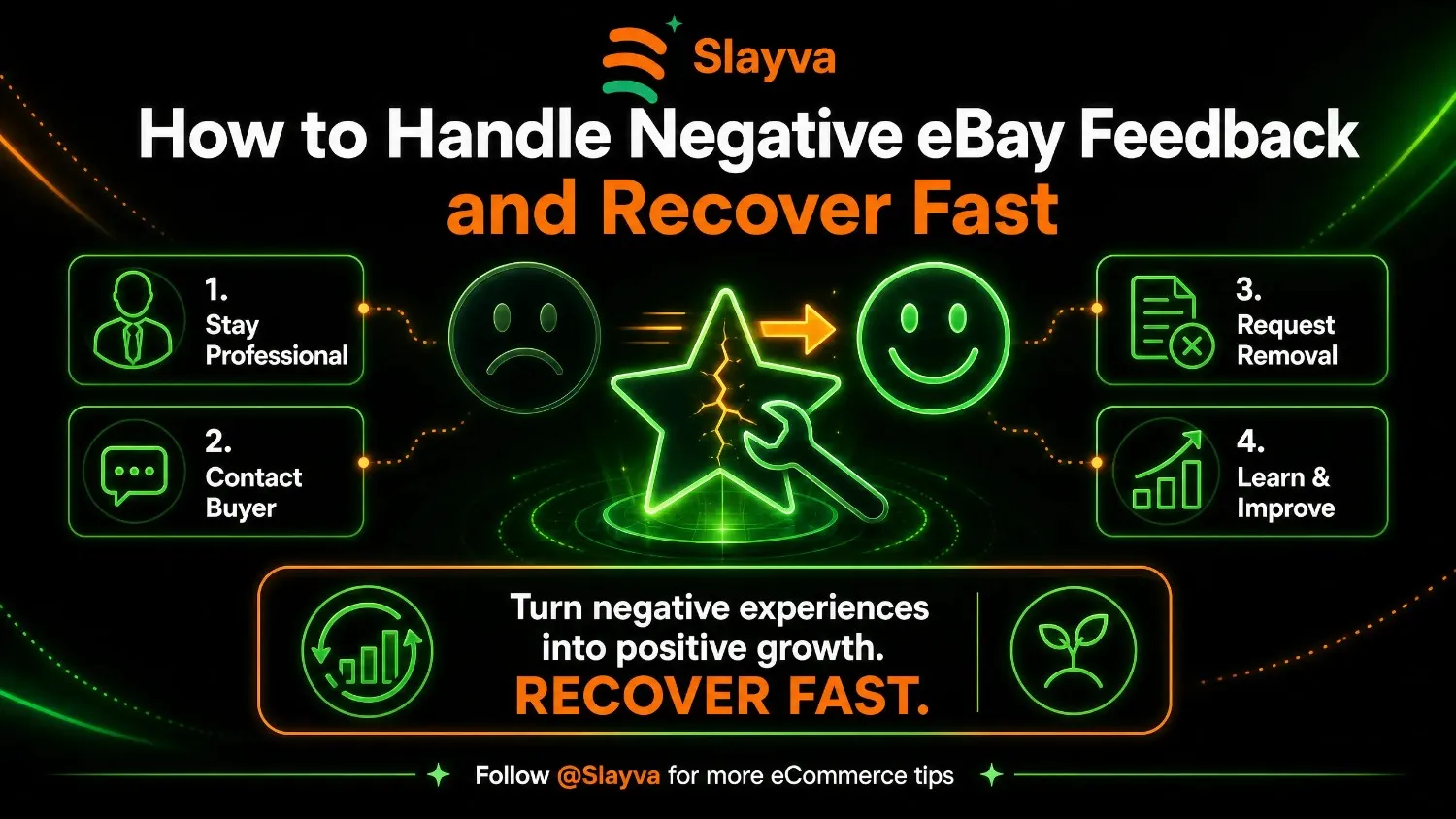
Table of contents
Introduction
That notification hits like a punch to the gut. A negative feedback. Your 100% rating is gone. And suddenly, you are wondering how to remove negative feedback on eBay before it destroys your sales. It is one of the most stressful moments for any eBay seller. Learning how to remove negative eBay feedback is essential for protecting your seller reputation and maintaining buyer trust.
Here is the truth: even the best sellers get negative feedback occasionally. Buyers have opinions, misunderstandings happen, and sometimes people are simply unreasonable. But how you handle it determines whether your business suffers or bounces back stronger. Learning how to remove negative eBay feedback is essential for protecting your seller reputation and maintaining buyer trust. The eBay feedback system is designed to build trust between buyers and sellers, but negative feedback can feel like a personal attack on your business.
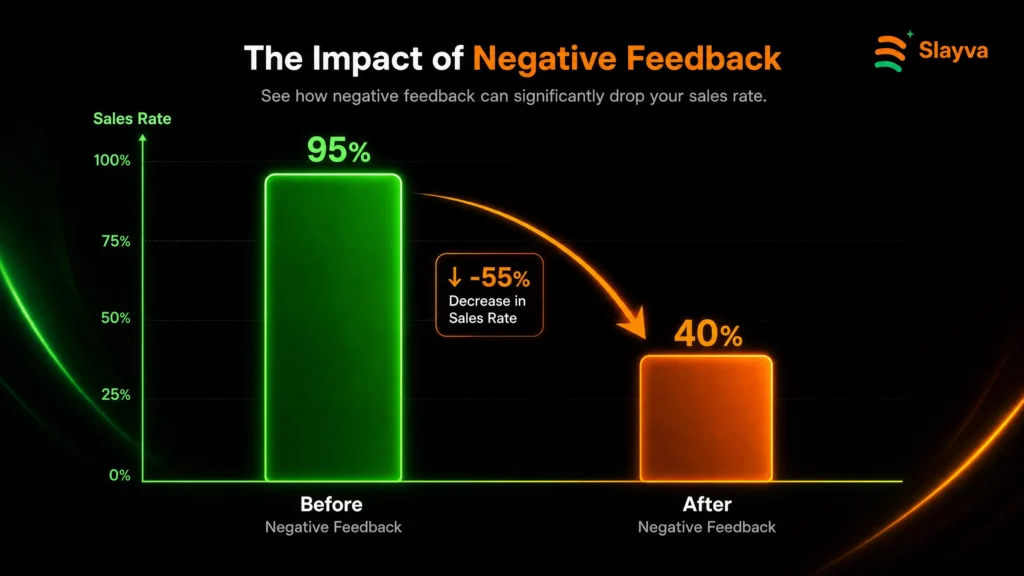
According to academic research, when a seller receives their first negative feedback, their weekly sales rate drops from a positive 5% to a negative 8%. Subsequent negative feedback arrives 25% faster than the first one. That is why knowing how to remove negative eBay feedback quickly is critical for protecting your business. This guide covers everything you need to know about how to remove negative eBay feedback: when eBay will remove it, how to request removal through the proper channels, the feedback revision request process, and strategies to recover your reputation fast.
Key Takeaways
- You can request feedback removal through Seller Help if the feedback violates eBay’s Feedback policy
- Feedback revision requests are limited to 5 per calendar year (plus 5 more per 1,000 feedback received) and only for feedback under 30 days old
- eBay automatically removes feedback for buyer non-payment, wrong-item comments, extortion, and delivery issues when you met handling times
- A thoughtful public reply to negative feedback can actually build buyer trust
- Negative feedback does not impact your seller performance – only unresolved cases do
- Since April 2026, eBay no longer automatically removes feedback for free-return transactions
- You have 90 days from the transaction date to request feedback removal
How Negative Feedback Affects eBay Sales
Before diving into removal strategies, it is important to understand the real impact of negative feedback on your business. The research is clear: negative feedback hits sales hard. According to an academic study of eBay seller histories, the effect of negative feedback is most pronounced for the first occurrence. This is why knowing how to remove negative eBay feedback is so important for protecting your business.
The study found that:
- A seller’s weekly sales rate drops from a positive 5% to a negative 8% after the first negative feedback
- Subsequent negative feedback arrives 25% more rapidly than the first one
- Sellers with lower reputations are more likely to exit the platform
- Sellers who intend to exit often receive more negative feedback than their lifetime average
This is why understanding how to remove negative eBay feedback is so important for protecting your business. However, eBay notes that receiving negative or neutral feedback doesn’t impact seller performance. Only unresolved cases and defects affect your seller metrics. That distinction is important – a negative rating doesn’t automatically hurt your standing, but the perception of buyers does matter.
When Will eBay Remove Negative Feedback?
eBay has clear policies for when they will remove negative or neutral feedback. Understanding these rules is your first step in knowing how to remove negative eBay feedback effectively. According to eBay’s Feedback policy, they remove feedback that is harmful, inappropriate, or irrelevant.
Harmful, Inappropriate, or Irrelevant Content
eBay removes feedback containing:
- Profane, obscene, adult, illegal, or explicit content
- Comments intended for a different item or seller
- Personal attacks that could harm your reputation and cannot be viewed as constructive criticism
- Content promoting hatred, violence, or discrimination
- Personally identifiable information
- Links or URLs encouraging sales outside of eBay
- Meaningless content or images not related to the item purchased
Example: A buyer leaves negative feedback saying “Shirt was very poor quality” on a listing for a photo frame. Since the comment was clearly left for the wrong item, eBay will remove it. This is a common scenario where sellers successfully learn how to remove negative eBay feedback.
Extortion and Manipulation
eBay has zero tolerance for feedback extortion. They remove feedback when:
- It is used as a means to extort another member
- It is used to manipulate feedback ratings
Example: A buyer sends a message saying, “If you don’t include an upgraded memory card and case at no additional charge, I’ll leave you negative feedback.” This is feedback extortion and the feedback is removable. Knowing how to remove negative eBay feedback in these cases is straightforward.
Buyer-Related Transaction Issues
eBay removes negative feedback when:
- The buyer asked to cancel after committing to buy
- The order was canceled because the buyer didn’t pay
- The order was canceled due to an issue with the buyer’s address
- The buyer is raising an issue that was correctly disclosed in the listing
- The buyer has been actioned under eBay’s Abusive buyer policy
- The buyer requested a change to an order after payment (and the feedback relates to this)
Example: A dress was described as having a stain on the inside. The buyer leaves negative feedback saying “There was a small stain on the inside.” Since the stain was clearly disclosed, eBay will remove the feedback.
Item Delivery Issues
eBay removes feedback when the buyer references:
- A delivery issue where tracking shows handling or delivery time expectations were met
- A delivery issue where a natural disaster or unexpected event caused a carrier delay
- A customs or tax issue outside your control that eBay can identify
Example: An international buyer leaves negative feedback saying “Import duties way too high.” Since the seller was not responsible for taxes, the feedback is removable.
Returns Issues
eBay removes feedback when:
- You declined a change-of-mind return because your listing didn’t offer returns
- The buyer changed their mind and was liable for the cost of an eBay return label
Important 2026 Policy Change: Since April 2026, eBay no longer automatically removes feedback when:
- You offer free returns, properly handle the return, and complete the refund
- The buyer returns an item with usage marks or damage and you deduct from the refund
Example: A listing clearly states no returns. The buyer changes their mind and leaves negative feedback saying “Wouldn’t take the item back.” Since the policy was clear, eBay will remove the feedback.
eBay Site or Program Issues
eBay removes feedback when:
- The problem was caused by a technical issue on the eBay site
- An eBay Money Back Guarantee case or payment dispute was closed with you having met your obligations
- The item was sent on time through eBay International Shipping or the Global Shipping Program and there was a delivery issue
- The item passed eBay’s Authenticity Guarantee program
Not sure this feedback breaks the policy?
Send it to us. We check it against eBay’s Feedback policy and tell you whether to request removal, ask for a revision or reply publicly.
How to Request Feedback Removal
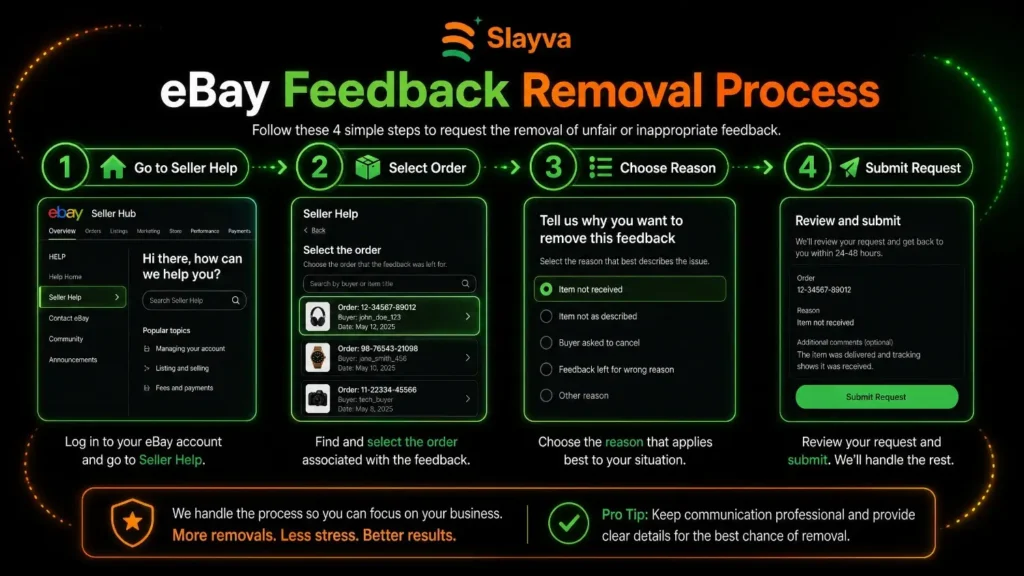
Now that you know when eBay will remove feedback, here is the step-by-step process for how to remove negative eBay feedback from your account. This is the most direct method for how to remove negative eBay feedback when the feedback clearly violates policy.
Identify If the Feedback Violates Policy
Review the feedback against eBay’s Feedback policy. Does it contain profanity? Is it extortion? Is it clearly for the wrong item? Did the buyer not pay? If so, you have a strong case for removal. This is the first step in learning how to remove negative eBay feedback effectively.
Use Seller Help
eBay’s Seller Help is available to all sellers who have listed or sold an item within the past 120 days. You can request feedback removal directly through the “Suggestions For You” section of the Help home page. You have 90 days from the transaction date to request removal. This is the official channel for how to remove negative eBay feedback.
Provide Supporting Evidence
If your case is not clear-cut, eBay may need to conduct a manual review. Provide:
- Screenshots of messages
- Tracking information
- Proof of delivery
- Any other evidence supporting your case
Wait for eBay’s Decision
If your feedback qualifies for removal, eBay will send you an email and the feedback will be removed from your account within 24 hours. If it cannot be removed, eBay will explain why it is allowed under their policy.
What Happens When You Appeal?
eBay uses automation to proactively remove feedback that violates policy. For cases that are not clear-cut, they conduct a manual review. A real-world example: one seller proved a buyer’s color claim was false with a receipt and barcode verification. After media intervention, eBay removed the negative rating as a gesture of goodwill. This shows that persistence can pay off when you know how to remove negative eBay feedback.
The Feedback Revision Request Process
If the feedback does not violate eBay’s policy, you still have another tool: the feedback revision request. This is a key part of understanding how to remove negative eBay feedback when eBay won’t remove it directly. Knowing how to remove negative eBay feedback through revision requests is an essential skill.
What Is a Feedback Revision Request?
A feedback revision request is when you ask the buyer to reconsider and change their feedback. This is your best option when the feedback is technically allowed under eBay’s policy but feels unfair or inaccurate. This is often the most effective way how to remove negative eBay feedback without involving eBay directly.
Eligibility Rules
- You can only request a revision for feedback that is less than 30 days old
- You can make 5 feedback revision requests per calendar year
- For every 1,000 feedback ratings you receive during the year, you can make 5 additional requests
How to Send a Revision Request
Go to your Feedback Profile, find the negative feedback, and select “Request a feedback revision.” eBay will send the buyer an email with the details.
What Happens Next?
The buyer has 10 days to either:
- Revise the feedback: If accepted, eBay guides them through changing their rating and comment. Original comments will no longer be visible.
- Decline the request: The buyer can choose whether to share their reasoning with you.
If the buyer does not respond after 7 days, eBay sends a reminder. If there is still no response after 10 days, the revision request expires.
Best Practices for Revision Requests
- Resolve the issue first – Before asking for a revision, make sure you have addressed the buyer’s concern
- Be professional and polite – Your tone matters. Avoid being defensive or confrontational
- Explain your perspective – Help the buyer understand your side
- Offer a solution – If appropriate, offer a refund, replacement, or discount
- Follow up – If the buyer doesn’t respond within 7 days, consider reaching out again
A buyer can only revise feedback if the seller sends a revision request. Buyers cannot edit or delete feedback on their own. This is a crucial point in understanding how to remove negative eBay feedback.
How to Reply to Negative Feedback
Sometimes, despite your best efforts, you may not be able to remove the feedback. When that happens, your public reply becomes your most powerful tool. eBay encourages sellers to reply to negative feedback to demonstrate how much you care about your buyer’s experience.
Why Public Replies Matter
- They show future buyers you are responsive and professional
- They let you provide your version of events
- They demonstrate your commitment to customer satisfaction
- They can actually build trust if handled well
How to Write an Effective Reply
Acknowledge the buyer’s concern:
“I’m sorry to hear you weren’t happy with your purchase.”
Provide context without being defensive:
“We strive for accurate descriptions and are disappointed this experience fell short.”
Explain what you did or offered:
“We reached out to resolve this and offered a full refund.”
Show your commitment to improvement:
“We’re reviewing our listing process to prevent this in the future.”
Example of a good reply:
“I’m sorry to hear you weren’t happy with the dress. I love making my customers happy. Please open a return on eBay and we can arrange for a refund.”
What to Avoid
- Don’t be defensive or argumentative – This looks unprofessional
- Don’t blame the buyer publicly – Future buyers will see this
- Don’t ignore the feedback – Silence looks like indifference
- Don’t use all caps or aggressive language
How to Recover After Negative Feedback
Once you have learned how to remove negative eBay feedback or responded professionally, the next step is recovery. Here is how to rebuild your reputation after negative feedback.
Focus on Great Customer Service
The best way to overcome negative feedback is to generate positive feedback. Provide exceptional service on every transaction. Respond quickly, ship fast, and communicate clearly. Every positive feedback dilutes the impact of the negative one. This is the long-term strategy for how to remove negative eBay feedback through positive reputation building.
Use eBay’s Automated Positive Feedback
Since April 2026, eBay automatically generates positive feedback for qualifying transactions, helping sellers earn recognition for successful sales. This helps boost your feedback score without extra effort.
Monitor Your Feedback Regularly
Check your feedback profile regularly. If you see a potential issue early, you can address it before it becomes a problem. Early intervention is often easier than late damage control. This proactive approach to how to remove negative eBay feedback prevents problems from escalating.
Consider Your Long-Term Strategy
A single negative feedback is not the end of your business. Buyers don’t expect to see 100% positive feedback. A few negative comments among hundreds of positive ones can actually make your feedback profile look more authentic.
When to Escalate
In rare cases, you may need to escalate beyond normal channels. One seller escalated to eBay executives after exhausting normal routes and successfully resolved their issue. However, this should only be used as a last resort when other methods how to remove negative eBay feedback have failed.
eBay Negative Feedback Removal Tips Summary
Here is a quick checklist of eBay negative feedback removal tips to guide your response:
- □ Check if the feedback violates eBay’s Feedback policy
- □ Request removal through Seller Help within 90 days of the transaction
- □ Provide evidence for manual review if needed
- □ If not removable, consider a feedback revision request (under 30 days old)
- □ Ensure you have revision requests available (5 per year + extras)
- □ Resolve the buyer’s issue before asking for revision
- □ Write a professional public reply if the feedback remains
- □ Focus on generating positive feedback to dilute the negative
- □ Monitor your feedback regularly for early intervention
Frequently Asked Questions
How do I remove negative eBay feedback?
To remove negative eBay feedback, first determine if it violates eBay’s Feedback policy. If it contains profanity, extortion, personal attacks, or is for the wrong item, request removal through Seller Help. If it doesn’t violate policy, consider a feedback revision request to ask the buyer to change it. Knowing how to remove negative eBay feedback through these channels is essential.
Can you dispute eBay feedback in 2026?
Yes, you can dispute eBay feedback in 2026 through Seller Help. You have 90 days from the transaction date to request removal. eBay uses both automation and manual review to evaluate feedback disputes. Understanding can you dispute eBay feedback 2026 options helps you take the right action.
What is the eBay feedback revision request guide?
The eBay feedback revision request guide explains how to ask a buyer to reconsider their feedback. You can request revisions for feedback under 30 days old. You are limited to 5 requests per calendar year, plus 5 more per 1,000 feedback received. The buyer has 10 days to respond.
Does negative feedback affect my seller performance?
Receiving negative or neutral feedback does not impact your seller performance. Only unresolved cases and defects affect your metrics. However, negative feedback can affect buyer trust and future sales. Understanding how negative feedback affects eBay sales helps you prioritize removal.
How does negative feedback affect eBay sales?
Research shows that a seller’s weekly sales rate drops from a positive 5% to a negative 8% after receiving their first negative feedback. Subsequent negative feedback arrives 25% more rapidly, though each additional one has less impact than the first. This is why knowing how to remove negative eBay feedback quickly is critical.
When will eBay remove negative feedback?
eBay removes negative feedback when it violates their Feedback policy, including profanity, extortion, personal attacks, wrong-item comments, issues correctly disclosed in the listing, buyer non-payment, and delivery issues where you met handling times.
How many feedback revision requests can I send?
You can send 5 feedback revision requests per calendar year. For every 1,000 feedback ratings you receive during the year, you can make 5 additional requests.
What if a buyer refuses to revise their feedback?
If a buyer refuses to revise feedback, you can write a professional public reply. This allows you to provide context, show responsiveness, and demonstrate your commitment to customer satisfaction.
Can I remove negative feedback from a buyer who didn’t pay?
Yes, eBay removes negative feedback when the order was canceled because the buyer didn’t pay. This is one of the scenarios where eBay will automatically remove the feedback.
What should I do if a buyer threatens negative feedback?
If a buyer threatens negative feedback as a way to extort something not offered in your listing, this violates eBay’s Feedback policy. Report the buyer through Seller Help and request feedback removal if they leave negative feedback.
How long do I have to request feedback removal?
You have 90 days from the transaction date to request feedback removal through Seller Help. For feedback revision requests, you only have 30 days from when the feedback was left.
What are the 2026 changes to eBay’s feedback policy?
Since April 2026, eBay no longer automatically removes feedback when sellers offer free returns and properly handle returns, or when buyers return items with usage marks and sellers deduct from refunds. eBay now automatically generates positive feedback for qualifying transactions.
Can I ask a buyer to revise feedback if I resolved their issue?
Yes, if you resolve the buyer’s issue, you can send a feedback revision request. The buyer has 10 days to respond. If they accept, eBay guides them through changing their rating and comment.
What happens if a buyer doesn’t respond to a revision request?
If a buyer doesn’t respond to a revision request within 10 days, the request expires and the feedback remains unchanged. eBay sends a reminder after 7 days.
Final Thoughts
Learning how to remove negative eBay feedback is an essential skill for every serious seller. The key is knowing your options: feedback removal through Seller Help, feedback revision requests, and professional public replies.
Start by identifying if the feedback violates eBay’s policy. If it does, request removal through Seller Help. If not, consider a feedback revision request to ask the buyer to reconsider. And if the feedback remains, write a professional public reply that demonstrates your commitment to customer satisfaction.
Remember, even disappointing feedback is just one person’s opinion and won’t affect your seller performance. Focus on providing great service, generating positive feedback, and growing your business. One negative comment does not define your reputation as a seller. Apply these eBay negative feedback removal tips today. Your reputation is worth protecting.
Don’t Let Negative Feedback Hurt Your eBay Business
A few negative reviews can impact your seller performance, buyer trust, and future sales. Slayva helps eBay sellers improve account health, resolve performance issues, optimize operations, and build a stronger store that keeps customers coming back.
Has poor performance led to an account restriction or suspension? Get eBay Suspension Recovery Help .
Next step
Work out exactly what a sale leaves you with with our free eBay Fee Calculator.

Mubshar
All posts by MubsharNeed this handled for you?
eBay Policy Violation Recovery
VeRO, policy warnings and removed listings resolved.
See the serviceeBay Account Management
Listings, orders, cases and growth, run for you.
See the service- Have this problem now? eBay policy violation
- Have this problem now? eBay account suspended (MC999)
- Have this problem now? eBay sales dropped