eBay Account Warning? Exact Steps to Take Before Suspension
- eBay, eBay Policies & Seller Protection
- 13 min read
Table of contents
An eBay account warning lands in your inbox and your stomach drops. You know what usually happens to sellers who mishandle an eBay account warning, the account slides from a fixable notice into a real restriction within weeks. The good news is that an eBay account warning is not a suspension, and how you respond to an eBay account warning in the first few hours largely decides which of those two outcomes your store ends up facing.
This guide breaks down why eBay sends an account warning, what the different warning types actually mean, and the exact sequence that stops an eBay account warning from turning into something far more costly.
Key Takeaways
- An eBay account warning is a checkpoint, not a punishment, most are fully recoverable when addressed within days rather than weeks.
- The category of eBay account warning you receive changes what you should do next; treating every eBay account warning the same way is a common, costly mistake.
- Documentation collected the moment an eBay account warning arrives becomes the foundation of any later appeal, if one is ever needed.
What an eBay Account Warning Actually Is
eBay’s trust and safety systems continuously score every seller account against a set of performance and policy thresholds. Defect rate, late shipment rate, cases closed without seller resolution, message response time, and listing accuracy all feed into that score.
To check your own figures against these thresholds, the eBay seller level calculator predicts your seller level from your defects, cases, late shipments and tracking.
When one of these slips, or a specific complaint is filed against a listing, the system generates an eBay account warning rather than jumping straight to a restriction. Think of an eBay account warning as an early signal, a chance to correct course before eBay takes the decision out of your hands entirely.
Sellers who receive their first eBay account warning often assume the worst. In reality, a single eBay account warning tied to one metric or one case rarely does lasting damage on its own. What actually matters is what you do in response to that eBay account warning.
Why eBay Sends an Account Warning: The Real Triggers
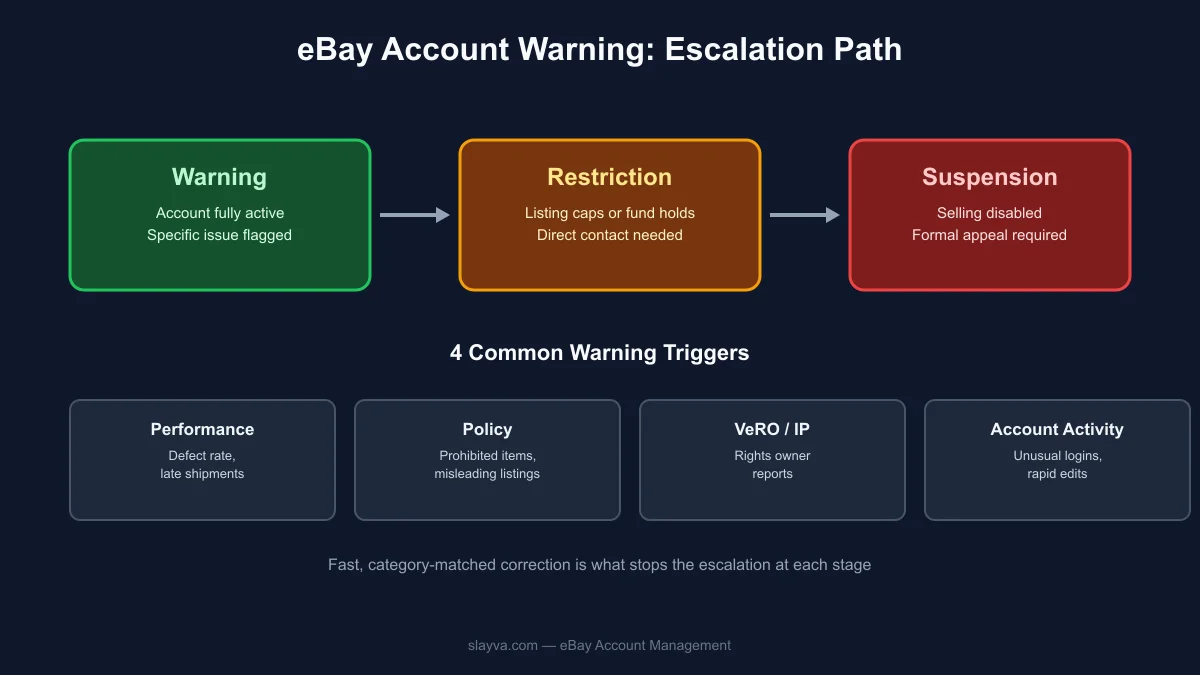
Not every eBay account warning means the same thing, which is exactly why a generic response often fails. eBay typically groups the triggers behind an eBay account warning into a few clear categories, and knowing which one you’re dealing with changes your entire response.
Performance-based warnings show up when defect rate, late shipment rate, or “item not as described” return rate creeps above eBay’s own seller performance standards, which define the “Above Standard” threshold. This type of eBay account warning is usually the most mechanical to fix, the underlying numbers just need to move back into range over the following weeks.
Policy violation warnings are tied to a specific listing or action: a prohibited item, a misleading description, duplicate listings, or keyword spam in a title. An eBay account warning in this category requires you to find and correct the exact listing eBay flagged, not just acknowledge the notice.
VeRO and intellectual property warnings come from a rights owner, a brand, designer, or manufacturer, reporting a listing through eBay’s Verified Rights Owner (VeRO) Program. This kind of eBay account warning needs immediate listing removal and a careful review of anything similar still active on your store.
Account activity warnings are triggered by unusual behavior, rapid listing edits, logins from a new location or device, or signals linking your account to another restricted one. This type of eBay account warning is the least common but often the most serious, since it can point to a security issue rather than a simple performance dip.
Reading the notice carefully to identify which category of eBay account warning you’re actually dealing with is the single most important first step. Sellers who skim the notice and respond to the wrong issue waste the narrow window eBay gives you to self-correct before the eBay account warning escalates further.
Step-by-Step: What to Do the Moment You Get an eBay Account Warning
Step 1: Read the Exact Policy or Metric Cited
Open Seller Hub → Performance and locate the specific metric or policy named in the notice. eBay is usually precise here, it will reference a defect rate percentage, a specific case ID, or a named policy. Don’t assume what triggered it; confirm directly in Seller Hub before doing anything else.
Step 2: Pull Every Related Order or Listing
If the notice cites “item not as described” cases, pull those exact transactions. If it’s tied to a policy flag, locate the exact listing in question. Having specifics ready before you respond, rather than a general explanation, is what separates appeals that succeed from ones that get an automated rejection.
Step 3: Fix the Root Cause Immediately
A notice tied to shipping speed needs a shipping fix, not a written explanation. One tied to a misleading description needs the listing corrected, not defended after the fact. Match the fix to the actual category from the section above, this is where most sellers lose valuable time addressing the wrong thing entirely.
Step 4: Respond Through eBay’s Specified Channel
If you’re directed to Seller Hub or the Resolution Center, respond there, not by replying to the notification email directly. Responses sent through the wrong channel are frequently never read, which counts against you exactly like no response at all.
Step 5: Document the Whole Process
Screenshot the original notice, the change you made, and any confirmation eBay provides afterward. If the situation escalates anyway, this record becomes the backbone of a reinstatement appeal. Sellers who skip documentation and later need to appeal a suspension are usually rebuilding a timeline from memory, a much weaker position to argue from.
Real-World Scenarios: How a Warning Plays Out
Scenario one, a shipping-speed slip. A seller running a side business alongside a full-time job falls behind on handling time during a busy week. Late shipment rate crosses the threshold, triggering a notice. Because the fix (batch-processing orders daily, setting a realistic handling time) is mechanical, the metric recovers within two review cycles and the account returns to good standing without further action.
Scenario two, a flagged listing. A reseller lists a phone case using a trademarked brand name in the title without authorization. The rights holder files a VeRO report, and the resulting notice requires the listing removed immediately. Because the seller pulled every similar listing at the same time rather than waiting for individual flags, no second report follows.
Scenario three, the one that escalates. A seller receives a policy notice, assumes it’s minor, and continues business as usual without reading the specific policy cited. Three weeks later, a second related complaint arrives, and the account moves to restricted status. The lesson in every version of this scenario is the same: the sellers who treat the first notice as urgent are the ones who never see a second one.
Warning vs. Restriction vs. Suspension: Understanding the Escalation Path
| Stage | What It Means | Typical Seller Action |
|---|---|---|
| eBay Account Warning | A metric or policy issue flagged, account still fully active | Fix root cause within days |
| Restriction | Selling ability partially limited (listing caps, hold on funds) | Immediate correction plus direct contact with eBay |
| Suspension | Account fully unable to sell, listings removed | Formal reinstatement appeal required |
Most accounts don’t skip straight from an eBay account warning to suspension, there’s usually a restriction stage in between, where the consequences of an unresolved eBay account warning become far more visible and where a fast, specific correction still carries real weight.
Common Mistakes Sellers Make Handling an eBay Account Warning
The single biggest mistake is treating every notice identically, regardless of category, fixing shipping speed when the real issue was a listing policy flag solves nothing. The second most common mistake is responding emotionally in Resolution Center messages rather than factually; tone doesn’t fix the underlying problem, evidence does.
The third mistake is waiting, sellers who sit on it for a week or more, hoping it resolves on its own, are the ones most likely to see it escalate. Finally, many only read the subject line instead of opening Seller Hub to see the exact metric or case referenced, which means they never actually address the real trigger behind the eBay account warning in the first place.
How It Affects Seller Level and Visibility
An unresolved eBay account warning tied to a performance metric can pull your seller level down at the next monthly evaluation, which in turn affects Best Match visibility, selling limits, and eligibility for certain promotions. This is why it shouldn’t be treated as a minor inbox notification, even when the account remains technically active, an ignored notice has real downstream costs on how often your listings are shown to buyers.
How to Appeal a Warning You Believe Was Issued in Error
Occasionally a notice is triggered by a false report, a buyer’s mistaken claim, or a system error rather than an actual policy breach. If you believe an eBay account warning was issued incorrectly, the appeal path is different from a standard correction: submit a direct appeal through Seller Hub referencing the specific case or policy ID, include any evidence that contradicts the claim (tracking numbers, original listing screenshots, message history with the buyer), and avoid simply asserting that the notice is wrong without supporting detail. eBay’s review teams respond far more favorably to a specific, evidenced appeal than a general objection.
If the appeal is denied and you still believe it was issued in error, escalating through eBay’s official seller support channel, rather than resubmitting the same appeal repeatedly, gives the case a fresh review rather than an automated repeat rejection.
What Happens If an eBay Account Warning Is Ignored
Ignoring an eBay account warning doesn’t make the underlying issue disappear, eBay’s systems recheck the same metrics on a rolling schedule. If the problem is still present at the next check, or a second related complaint arrives, the account typically escalates without a second, more generous notice. This is the exact scenario that turns a fixable notice into a real suspension.
If you’re already past that point, don’t try to reconstruct an appeal alone. Our eBay suspension recovery service handles MC011 and MC999 appeals directly, building the specific, evidence-backed case eBay’s reinstatement team actually needs to see, rather than a generic explanation that gets auto-rejected.
Preventing Repeat Warnings
A single, resolved eBay account warning rarely leaves lasting damage. A pattern of them is what actually erodes an account’s standing over time. Sellers who avoid repeat notices tend to:
- Check Seller Hub performance metrics weekly instead of only after an eBay account warning arrives
- Respond to buyer messages within 24 hours as a standing rule, not an exception
- Keep listing descriptions precise enough to withstand a buyer dispute, our guide on writing eBay item descriptions that hold up under scrutiny covers exactly how
- Resolve negative feedback quickly, since unresolved feedback issues often precede the next eBay account warning, see our guide to handling negative eBay feedback
- Understand how buyer protection cases are decided, since disputed cases are one of the most common triggers behind an eBay account warning, covered in our guide to eBay buyer protection
If tracking all of this alongside actually running your store feels like too much, our eBay account management service includes ongoing policy compliance monitoring specifically so issues get caught and corrected before an eBay account warning ever reaches your inbox.
Frequently Asked Questions
Is an eBay account warning the same thing as a suspension? No. It flags a specific, fixable metric or policy issue while your account remains fully active. A suspension removes your ability to sell entirely and requires a formal appeal to reverse.
How fast do I need to respond to an eBay account warning? There’s rarely a published hard deadline, but eBay’s checks run on a rolling basis, treat the first 48 hours as the window that matters most.
Can one resolved warning hurt my account long-term? Generally no. A single issue, corrected quickly, has minimal lasting effect on seller standing. Repeated or unresolved notices are what compound into real damage.
Should I contact eBay support directly about an account warning? Yes, especially if the eBay account warning seems unclear or possibly issued in error, use Seller Hub’s official channels rather than general customer chat, which often can’t access policy-specific account detail.
What if my account is already suspended after a warning? At that point, a structured, evidence-based appeal is the path forward. This is exactly the process our suspension recovery service is built around.
Does the type of eBay account warning change how I should respond? Yes, significantly, performance, policy, VeRO, and account-activity warnings each require a different fix, which is why identifying the exact category of eBay account warning matters more than reacting quickly to the wrong thing.
Can an eBay account warning lower my selling limits? It can, particularly when the eBay account warning is tied to a performance metric, eBay sometimes ties limit reviews to standing seller-level status.
Will an eBay account warning show up to buyers? No, an eBay account warning is only visible to you as the seller in Seller Hub, buyers never see the notice itself, though a resulting drop in visibility can indirectly affect how often your listings appear.
How Long a Warning Stays on Your Record
Sellers often ask how long the effects of a notice linger. In practice, eBay’s performance evaluations look at trailing windows, typically the most recent evaluation period rather than a permanent mark. Once the underlying metric or issue is corrected and stays corrected through the next evaluation cycle, its influence on your seller standing fades.
Policy-specific flags, particularly VeRO reports, can sit in an internal record longer since they relate to trust and authenticity rather than a rolling performance number, which is part of why repeated intellectual property issues are treated more severely than a single late-shipment blip. The practical takeaway is that consistency after the fact matters as much as the initial fix, one clean evaluation period rarely undoes months of prior strain, but a sustained pattern of clean performance genuinely does reset how the account is viewed going forward.
A Few Terms Worth Knowing
Defect rate is the percentage of your transactions that involve a case, late shipment, or cancellation. eBay tracks this on a rolling basis.
Seller level is eBay’s overall standing tier, Top Rated, Above Standard, or Below Standard. An eBay account warning often precedes a drop in this level.
Resolution Center is where formal disputes and case responses live. It’s different from your regular inbox, and it’s usually where eBay expects you to respond to a warning tied to a specific case.
MC011 and MC999 are the internal codes eBay uses for certain suspension categories, most often tied to policy or authenticity concerns. You’ll see these referenced directly in more serious notices.
Knowing this vocabulary in advance means you’re not decoding unfamiliar terms in the middle of an already stressful moment, you can move straight to fixing the actual problem.
A Quick Reference Checklist
Before you close the tab, run through this checklist against your own situation:
- Have you identified the exact category behind the notice, performance, policy, VeRO, or account activity?
- Have you pulled the specific listing or order it references, rather than working from memory?
- Have you fixed the actual root cause, not just acknowledged the notice?
- Have you responded through the exact channel eBay specified?
- Have you screenshotted the notice, your fix, and any confirmation for your own records?
If you can check every box, an eBay account warning is very unlikely to escalate further. If you’re missing more than one, that’s exactly where to focus next.
Conclusion
An eBay account warning is a fixable checkpoint, not an ending, but only when it’s treated with real urgency. Identify the exact category you’ve received, fix the actual root cause, respond through the correct channel, and document everything along the way.
Sellers who follow that sequence rarely see a warning turn into a suspension. If you’re already past that stage, get a free audit and we’ll tell you exactly what’s fixable and what a real path back to reinstatement looks like, before a manageable notice turns into months of lost selling time.
More Questions About eBay Account Warnings
What to Do When eBay Sends a Warning Email
When eBay sends a warning email, open Seller Hub directly instead of clicking links inside the email itself, then locate the specific metric or case referenced. Treating the email as a pointer to the real detail in Seller Hub, rather than the full explanation, is the fastest way to respond correctly to an eBay account warning.
eBay Policy Violation Warning Steps
The steps for a policy violation warning differ from a performance one: identify the exact listing flagged, remove or correct it immediately, and avoid relisting anything similar until you understand why it was flagged. This sequence resolves most policy-based warnings within a single review cycle.
How to Avoid eBay Account Suspension After a Warning
Knowing how to avoid eBay account suspension after warning comes down to speed and accuracy: fix the specific issue named in the notice within days, respond through the correct channel, and keep performance clean through the next review. Sellers who do all three rarely see the warning escalate further.
Fixing eBay Seller Performance Below Standard
A “Below Standard” rating usually traces back to defect rate, late shipments, or unresolved cases piling up over a rolling window. Bringing each metric back into range individually, rather than waiting for an overall fix, is what actually resolves seller performance below standard and prevents a related eBay account warning from recurring.

Mubshar
All posts by MubsharNeed this handled for you?
eBay Policy Violation Recovery
VeRO, policy warnings and removed listings resolved.
See the serviceeBay Account Management
Listings, orders, cases and growth, run for you.
See the service- Have this problem now? eBay policy violation
- Have this problem now? eBay account suspended (MC999)
- Have this problem now? eBay sales dropped