
eBay account restricted (MC011): how to lift the restriction
An eBay account restricted with an MC011 notice is a verification hold, not a judgement: selling is limited while eBay confirms something, such as identity, address, supplier invoices or the payout bank account. Answer the specific request, through the route eBay gives, once.
We fix it for you: eBay restriction recoveryStep by step: How to remove an eBay MC011 restriction
eBay account restricted: what an MC011 notice means
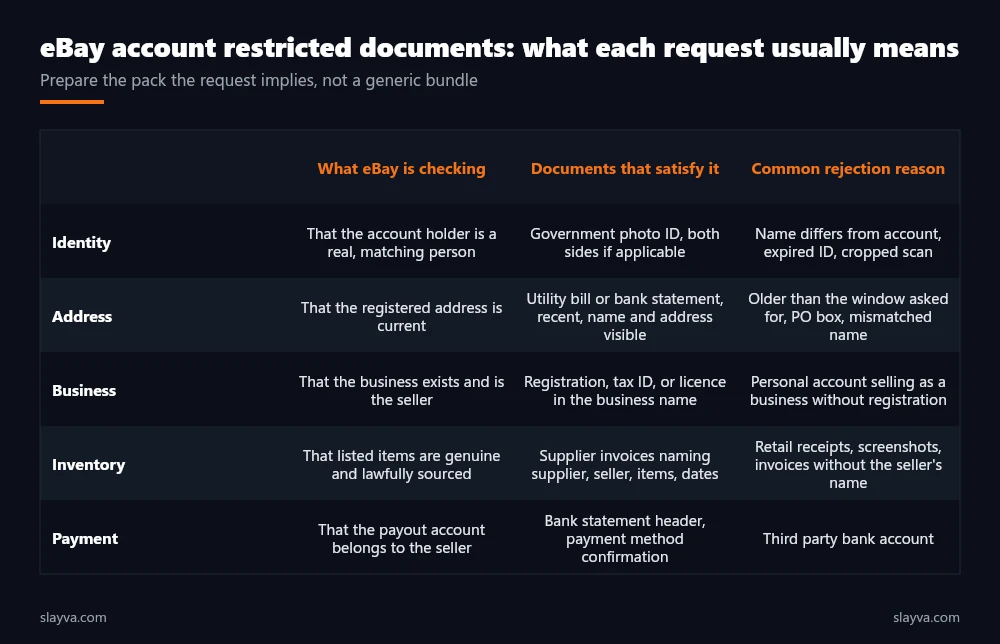
MC011 is the reference on eBay's message that selling on the account has been restricted while eBay confirms something. The wording varies: identity and address verification, supplier invoices for named listings, business registration details, or confirmation of the bank account used for payouts. What every version shares is a specific request and a specific route for answering it.
It is a verification hold, not a judgement, and it is handled by a different process from a suspension. If your notice says MC999, you are on the suspended account path instead.
An eBay account restricted under MC011 is asked to confirm details eBay's Seller Center lists for every seller: identity, contact details and payment information that match each other.
Why eBay restricts accounts
- Sales spike or high-value orders
A sudden jump in volume or order value that eBay wants to confirm before more money moves through the account. Usually answered with supplier invoices.
- New high-risk category
Electronics, branded goods, tickets and similar categories draw requests for invoices and proof of authenticity.
- Details that do not match
The registered name, address or business does not match the payout account or the documents on file.
- Business on a personal account
Regular trading on a personal account, which may need registration details or an account type change.
- Buyer complaints in a cluster
Several cases or complaints close together, prompting a check on tracking and supply.
- Link to another account
Shared details with an account that has problems. The slowest type to resolve.
Before you send anything, review these
- The message inside eBay Messages, not only the email: it carries the upload link, the reference and sometimes the item numbers
- Every document named, the deadline if there is one, and the route for submitting
- Your account details against your documents: name, address, business name and payout account must match
- Supplier invoices: supplier's legal name and address, you as buyer, items, quantities and dates
- Scans in colour, full page, all four corners visible, not cropped or annotated
- Open orders: shipped with tracking or refunded while the restriction stands
Want us to read your notice?
Send it for a free review. We tell you which route applies and what to do first, within 24 hours.
How Slayva handles an MC011 case
We read the exact request, compare every account detail with every document, and flag mismatches before anything is sent. Where the account details need updating first, we tell you. Then we assemble the pack eBay asked for, in the form it asked for, and it goes through the upload route once. If eBay follows up, we answer exactly the follow-up.
- Free notice review within 24 hours
- Detail-matching check across ID, address, business and bank
- Supplier invoice review before submission
- One clean submission through the named route
- Plan to avoid the next restriction trigger
- Read the exact request in eBay Messages.
- Match every account detail to every document.
- Prepare clean, full-page, legible scans.
- Submit once, through the upload link.
- Wait without extra messages; answer only follow-ups.
eBay Suspension & Restriction Recovery: restriction document packs, suspension appeals and follow-up, handled end to end.
Common questions
Is MC011 the same as a suspension?
No. MC011 is a restriction while eBay verifies something: identity, address, business details, the payout account, or where specific items came from. A suspension (MC999) is a decision to stop the account. A restriction lifts when the documents satisfy the request; an ignored restriction can escalate to a suspension.
What documents does eBay usually ask for?
It depends on the trigger. Sales spikes and high-value or high-risk categories usually bring requests for supplier invoices. Mismatches between the account and the payout details bring requests for ID, proof of address and bank confirmation. A business trading on a personal account may be asked for registration details. The message names what it wants; send exactly that.
Will retail receipts work as supplier invoices?
Usually not. eBay wants invoices from a supplier that show the supplier's legal name and address, you or your business as the buyer, the items and quantities, and the dates. Retail receipts and screenshots of online orders are a frequent reason a pack is rejected.
How long does an MC011 restriction last?
Until the request is satisfied. A clean pack that matches the account details is often resolved in days. Packs with mismatched names or addresses, or with documents eBay did not ask for, can take several rounds.
Can I call eBay to speed it up?
A call does not replace the documents. Send what was requested through the route the message provides; repeated calls and messages do not move the review faster.
Read next
How to Remove an eBay MC011 Restriction
The full five-step sequence and the documents table by trigger.
Read the guideeBay account suspended (MC999)
If the notice is a suspension rather than a restriction.
See the solutioneBay Business Account vs Personal Account
When the restriction is really an account type question.
Read the guideSend us the notice
Paste the MC011 message and tell us what you have sent so far. We reply within 24 hours with what the request needs and any mismatches to fix first.
Need more than this fix? See all our eBay seller services, from recovery to account management.
Documents rejected, or about to send them?
Have the pack checked first. Mismatched details are the most common reason a restriction takes three rounds instead of one.