How to Remove an eBay MC011 Restriction and Get Selling Privileges Back
- eBay, eBay Account & Seller Management
- 13 min read
Table of contents
The message has MC011 in the subject line, your listings have dropped out of search, and the text says eBay needs some information before you are able to sell again. Working out how to remove eBay MC011 restriction is less dramatic than dealing with a suspension, and that is the point most sellers miss. A restriction is a request. eBay wants specific documents, and the account returns when the documents satisfy the request. The sellers who stay restricted for months are usually the ones who sent the wrong pack, sent it the wrong way, or argued instead of answering.
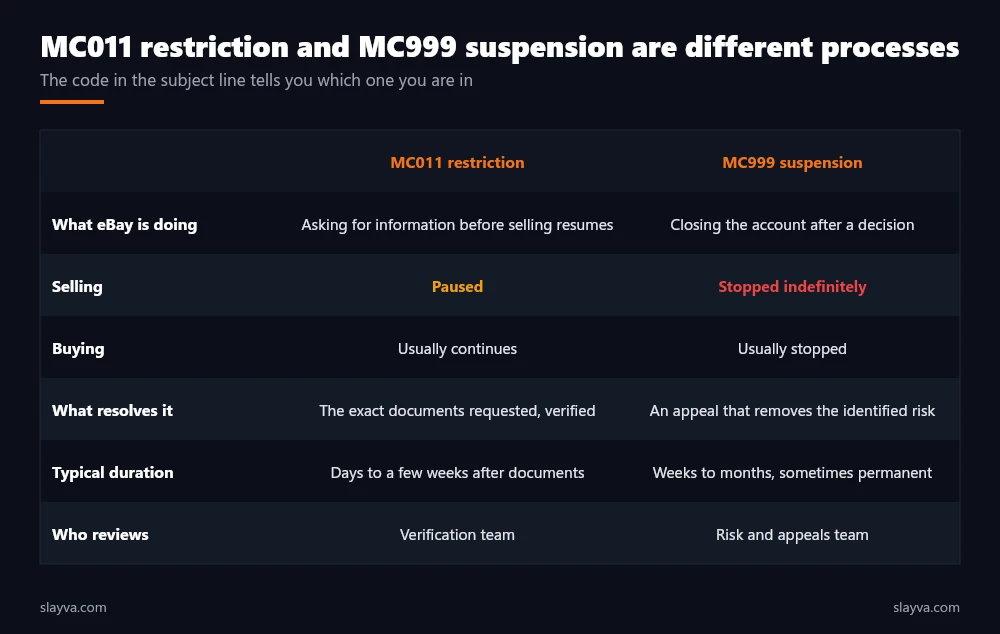
This guide explains what an eBay MC011 email is asking for, why restrictions happen, how to remove eBay MC011 restriction step by step, which documents satisfy each type of request, what happens to listings and funds while you wait, and how MC011 differs from the MC999 suspension we covered in our guide to getting a suspended eBay account reinstated.
Key Takeaways
- Main Insight: MC011 is a verification hold, not a judgement. eBay pauses selling until it confirms who you are, where you are, what you sell, and where it comes from. An MC011 restriction is therefore a documents problem with a documents answer.
- Strategy Tip: Send exactly what the message asks for, in the format it asks for, through the link it provides. Extra documents, emailed attachments, and phone arguments do not shorten the review. Mismatched names and addresses are the most common reason a pack is rejected.
- User Benefit: Sellers who keep identity, address, business, and supplier documents organised before a restriction resolve it in days rather than weeks, and they avoid the escalation to suspension that follows an ignored request. That is the whole method in one sentence: answer it.
What an eBay MC011 Email Is Asking
An eBay MC011 email tells you that selling activity on the account has been restricted and that eBay needs information to lift the restriction. The wording varies. Some versions ask for identity and address verification. Others ask for supplier invoices for specific listings. Some ask for business registration details or for confirmation of the bank account used for payouts. Occasionally the message asks you to call or to wait for a call. What every version shares is a specific request and a specific route for answering it, and lifting the restriction comes down to satisfying that request precisely.
eBay’s seller protections page and its selling limits guidance describe restrictions as a normal part of account risk management rather than a penalty. That framing matters for tone. The verification team is not accusing you. It is checking boxes, and the fastest path is to give it what it needs to check them. Every step below follows from that.
Why Restrictions Happen
Restrictions follow a change eBay’s systems flag as risk.
In accounts we have handled, the common triggers are a sudden increase in sales volume or order value, a move into a category eBay treats as high risk such as electronics, branded goods, or event tickets, a mismatch between the registered details and the payout account, a new seller listing high value items early, buyer complaints or cases arriving in a cluster, and connections to another account with problems.
None of these is proof of wrongdoing. Each is a reason for eBay to confirm the account before more money flows through it, and knowing which one applies shapes the response in your case. Our guide to eBay selling limits covers the related mechanism that caps volume on newer accounts.
| Trigger | What eBay usually asks for | Typical resolution |
|---|---|---|
| Sales spike or high value orders | Supplier invoices, identity | Fast once invoices match listings |
| New high risk category | Supplier invoices, authenticity proof | Fast with proper invoices, slow with retail receipts |
| Details do not match payout account | ID, address, bank confirmation | Fast once details are aligned |
| Business selling on a personal account | Business registration, tax ID | Often needs account type change |
| Cluster of buyer complaints | Tracking, supplier proof, explanation | Depends on the complaints |
| Link to another account | Proof of separate identity and business | Slow, sometimes escalates |
Not sure what the request is asking for?
Send us the MC011 email. We tell you which documents answer it and how to send them once. The review is free.
How to Remove eBay MC011 Restriction: The Five Step Sequence
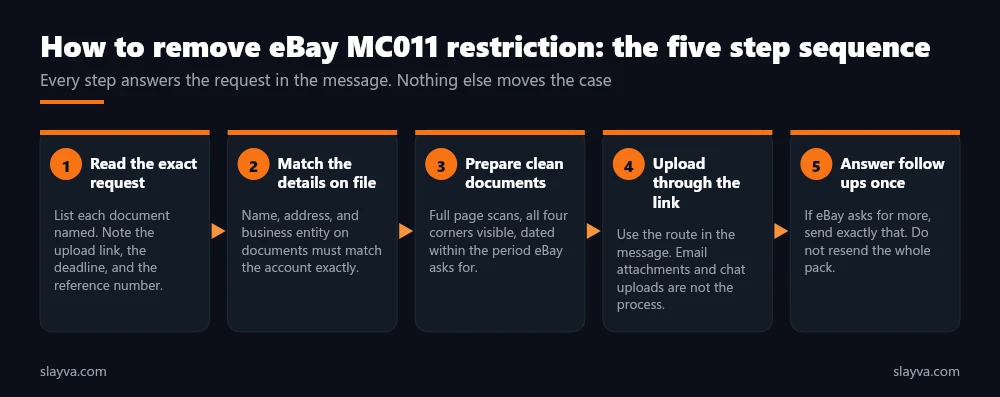
The sequence below lifts the restriction in the fewest exchanges. Each step exists because skipping it produced a rejected pack or a longer wait in accounts we have worked on.
Step 1: Read the Exact Request
Open the message in eBay Messages, not only in your email client, because the in-platform version carries the upload link and sometimes additional detail. Write down each document named, the deadline if one is stated, the reference number, and the route for submission. If the request names particular listings, note the item numbers. This list is your entire task, and lifting the restriction is the act of completing it. Nothing outside this list moves the case.
Step 2: Match Every Detail to the Account
Before scanning anything, open your account details and compare. The name on your ID must match the registered name. The address on the utility bill must match the registered address. The business name on the registration must match the business name on the account. The bank account must be in the same name.
Where they differ, decide whether to update the account first or to include a short explanation, and never leave a mismatch unaddressed. Mismatches are the single most common reason a review takes three rounds instead of one. Sellers switching between account types should read our guide on eBay business versus personal accounts first, because a business trading on a personal account is a frequent cause of this request.
Step 3: Prepare Clean Documents, Where the Case Is Won or Lost
Scan or photograph each document as a full page with all four corners visible, in colour, legible at normal zoom, and dated inside whatever window eBay specified. Do not crop, redact, or annotate. Name the files sensibly, because a clean pack is most of the work. Supplier invoices need the supplier’s legal name and address, your name or business name as the buyer, the items with quantities, and the dates. Retail receipts, screenshots of online orders, and invoices addressed to someone else are the eBay account restricted documents most often rejected for inventory checks.
Step 4: Upload Through the Link in the Message
Use the upload route eBay provided. Attachments sent by email reply, files pasted into chat, and documents read out over the phone do not enter the verification queue. If the link has expired or fails, contact eBay through the help centre to request a new one rather than improvising. Everything depends on the pack reaching the right team, and the link is the only path that guarantees that.
Step 5: Answer Follow Ups Once, Then Wait
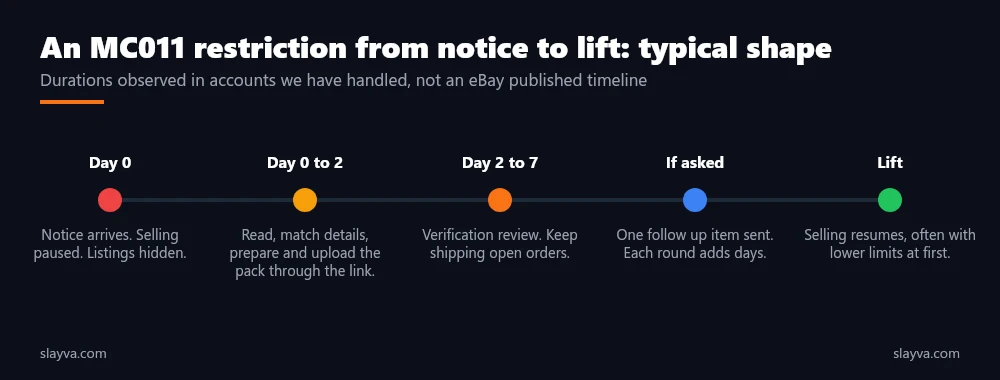
If eBay replies asking for one more item, send exactly that item. Do not resend the whole pack, and do not add commentary. Then wait. In cases we have handled, decisions on complete packs have arrived within a few business days, and incomplete packs have added a week or more per round. eBay publishes no service level for restriction reviews. Repeated calls and messages while a review is open tend to restart the clock rather than shorten it. Patience is a genuine part of the process.
A restriction review is a checklist. Sellers who send the checklist items, in the format asked, through the link provided, are the ones whose accounts come back quickly.
eBay Account Restricted Documents: What to Send
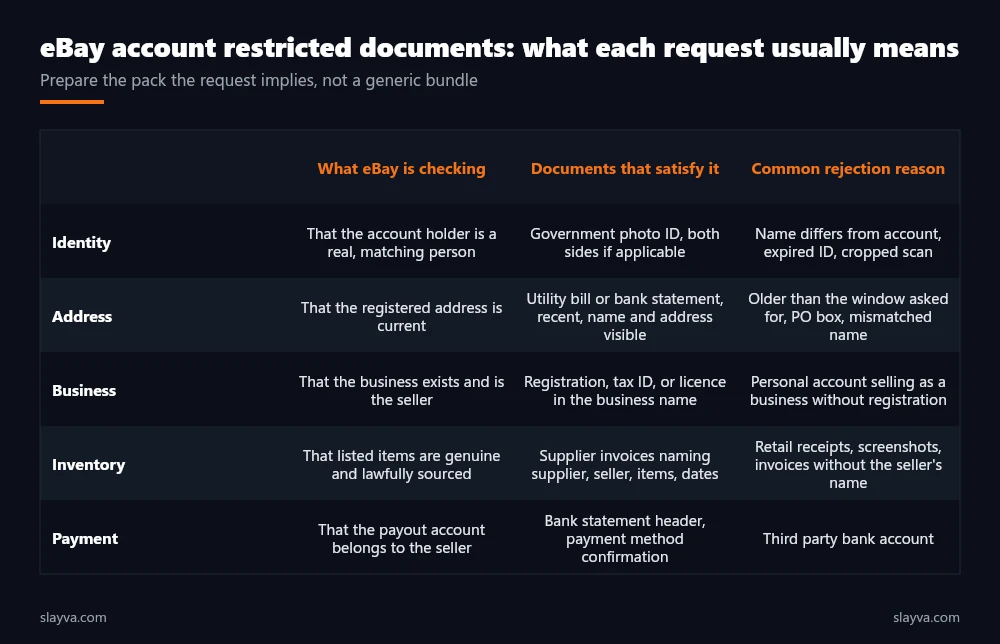
The document list in an MC011 message tells you what eBay is checking. Identity and address requests are checking that the account holder is a real, matching person at a real, current address. Business requests are checking that the business exists and is the entity selling. An eBay supplier invoice request is checking that the inventory is genuine and lawfully sourced. Payment requests are checking that payouts go to the seller and not to a third party. Preparing the eBay account restricted documents for the check being made, rather than a generic bundle, is what separates a one round review from a three round one. It is the practical centre of the whole process.
The eBay Supplier Invoice Request, the Hardest Part
The eBay supplier invoice request deserves its own note because it catches sellers who source informally. eBay wants invoices that show a commercial relationship: the supplier’s legal name and contact details, your name or business as the customer, the specific items, quantities, unit prices, and dates. It uses these to confirm that the goods in your listings exist, are genuine, and were bought in a way that supports the volume you are selling.
Sellers who buy from retail clearance, from liquidation and thrift sources, or through dropshipping arrangements often hold nothing that meets this standard, and that gap is the most common reason an inventory restriction drags on. If your documents are weak, say so plainly in a short note, provide what you have, and expect a slower, more conditional outcome. Honesty about sourcing is the part that no template covers.
| Document | Must show | Gets rejected when |
|---|---|---|
| Government ID | Full name, photo, expiry, both sides if relevant | Expired, cropped, name differs from account |
| Proof of address | Name, address, issuer, recent date | Older than requested, PO box, different name |
| Business registration | Business name, registration number, status | Name differs from account, registration lapsed |
| Supplier invoice | Supplier details, your name, items, quantities, dates | Retail receipt, screenshot, invoice to a third party |
| Bank confirmation | Account holder name matching the account | Third party account, partial statement |
eBay Selling Restriction Verification: What Happens While You Wait
During an eBay selling restriction verification, listings are typically hidden from search or ended, and new listings are blocked. Buying usually continues. Open orders still have to be fulfilled, and buyers still expect shipping inside the stated handling time, so the restriction does not pause your obligations. Complete every paid order and upload tracking, because cases opened during a restriction count exactly as they would at any other time, and a cluster of them is the kind of signal that turns a restriction into the suspension described in our guide to handling an eBay account warning.
Payouts are often held for the duration of the verification. eBay’s payments terms allow it to hold funds while risk is assessed, and in restricted accounts we have handled the hold has usually released with the restriction, though not always on the same day. Our guide to eBay managed payments covers how payout schedules and holds work in normal operation. Plan cash flow for a hold of at least the review period. Cash planning is a quiet part of getting through a review without damaging the business around it.
Restricted does not mean paused. Orders, messages, cases, and metrics continue. The only thing that stops is new selling, and the way to restart it is the document pack.
Mistakes That Turn an MC011 Restriction Into an MC999 Suspension
Most restrictions resolve. The ones that escalate share a few patterns, listed here from client work rather than from published eBay data.
- Ignoring the deadline: Requests with a stated deadline that pass unanswered move to suspension by default. Send something, even a partial pack with an explanation, before the date.
- Opening a second account: Selling from a new account while the first is restricted links the two and usually suspends both.
- Sending fabricated or altered documents: Edited invoices and mismatched IDs are detected more often than sellers expect and convert a routine verification into a fraud finding.
- Arguing instead of answering: Messages explaining why the request is unfair do not enter the verification queue. Documents do.
- Letting orders lapse: Unshipped orders during a restriction generate cases and defects that feed the risk score the restriction was checking.
Lifting a restriction is mostly about avoiding these five. The pack itself is rarely difficult for a seller who runs an honest operation with organised records.
| Situation | Right move | Wrong move |
|---|---|---|
| Documents requested, all in hand | Upload the full pack through the link the same day | Wait for a call that was never promised |
| One document missing | Send what you have with a one line note and a date for the rest | Send nothing until everything is ready |
| Details on file are wrong | Correct the account, then submit matching documents | Submit documents that contradict the account |
| Supplier will not issue invoices | Provide what exists, state the sourcing model honestly | Create an invoice |
| No reply after two weeks | One polite status request through the help centre | Daily calls and messages |
After the Restriction Lifts: Keeping It Lifted
Reinstated accounts often return with lower selling limits and closer monitoring for a period. Treat the first weeks as a demonstration, because the job includes not triggering the next one. Keep stock accurate, ship inside handling time, answer every message and case, and avoid sudden category or volume changes until the account has a clean run.
Our guides on listing optimization and managing a large eBay inventory cover the operational side. Keep the document pack you assembled, updated every few months, because a second request is faster to answer from a folder than from scratch. Sellers who would rather have this handled, including the correspondence, use our eBay suspension recovery service, which covers restrictions as well as suspensions, and our eBay account management services for the ongoing compliance work.
Frequently Asked Questions About eBay MC011 Restrictions
What does MC011 mean on an eBay message?
MC011 is the reference eBay attaches to messages about a selling restriction that requires information from you, usually identity, address, business, supplier, or payment documents. It is different from MC999, which marks an indefinite suspension. An MC011 is a verification task, while MC999 requires an appeal.
How long does it take to remove an eBay MC011 restriction?
eBay publishes no timeline, so a quick result is mostly about the first submission. In accounts we have handled, complete document packs submitted through the link have been reviewed within a few business days, and each incomplete or mismatched round has added a week or more. The seller controls most of the timeline through the quality of the first submission.
Do I have to send supplier invoices for every listing?
Send invoices for the listings the message names. If it names none and asks generally, send invoices covering your main product lines and the highest value items. Each invoice should show the supplier’s details, your name as the buyer, the items, quantities, and dates.
Will my listings come back automatically after verification?
Usually, and that is the reward for answering the request properly. Listings that were hidden generally return when the restriction lifts. Listings that were ended need to be relisted. Check each one against the reason for the restriction before relisting, particularly if supplier documentation was the issue.
Is an eBay MC011 email ever a phishing attempt?
Fake versions exist. A genuine eBay MC011 email also appears in your eBay Messages inside the platform. Never upload documents through a link that arrived only by email without confirming the same message exists in your account.
What if I ignore the restriction and simply stop selling?
Unanswered requests with deadlines typically escalate to suspension, and the restriction also follows you to any linked account. Even if you plan to stop selling, complete open orders and respond to the request so the account closes in good standing.
Does an MC011 restriction affect my seller level or metrics?
The restriction itself does not create defects. Orders left unfulfilled during it do. Keep shipping and answering cases and the metrics stay intact, which is also what the verification team sees when it reviews the account.
Restricted and unsure what eBay is asking for?
We read the request, work out what your specific case needs, assemble the pack that answers it, handle the submission and follow ups, and keep the account out of suspension territory while it is reviewed.
Conclusion
How to remove eBay MC011 restriction is a matter of reading the request, matching every detail to the account, preparing clean documents that answer the specific check, uploading them through the link eBay provided, and answering any follow up once. Keep fulfilling orders while you wait, because the restriction pauses selling and nothing else. Do not open a second account, do not alter documents, and do not argue in place of answering.
Handled this way, most restrictions lift within days and leave no lasting mark on the account. Handled badly, they become the MC999 suspension covered in our guide on how to get a suspended eBay account reinstated, which is a longer and less certain road. More eBay account guides are in the blog library.

Usman Malik
All posts by Usman MalikNeed this handled for you?
eBay Account Management
Listings, orders, cases and growth, run for you.
See the serviceeBay Suspension Recovery
MC999 and MC011 appeals written and submitted.
See the service- Have this problem now? eBay account suspended (MC999)
- Have this problem now? eBay sales dropped