
How to Calculate and Improve Your eBay Sell-Through Rate
- eBay, eBay Product Sourcing
- 12 min read
Table of contents
Two sellers list the same phone case. One lists 120 units and sells 96 in a month. The other lists 400 and sells 96. Same product, same sales, and one of them has tied up four times the cash in stock that is not moving. The number that separates them is sell-through rate, and knowing how to calculate eBay sell through rate per product is what turns a good sales month into a good buying decision. Most sellers have heard the term. Far fewer compute it for their own catalogue, per SKU, per window, and act on it.
This guide covers the eBay STR formula, the two places the number appears in eBay’s own tools, how to calculate eBay sell through rate for your own listings, what a good rate looks like by context, how the rate reads by category, and how to improve sell through rate when it is low. Our earlier guide on what to sell on eBay used the metric to rank categories. This one explains the metric itself.
Key Takeaways
- Main Insight: Sell-through rate is units sold divided by units listed in the same period, multiplied by 100. It measures demand against your supply decision, which is why it belongs in buying and pricing, not only in reporting. Calculating it correctly is the first step in both.
- Strategy Tip: Compute it per SKU and per window. An account level rate hides the two products dragging it down and the two products you should be reordering.
- User Benefit: Sellers who track sell-through per product stop over-buying slow movers, price fast movers with more confidence, and use Terapeak’s version of the number to judge a product before they enter it.
The eBay STR Formula
The eBay STR formula is short. Sell-through rate equals units sold divided by units listed, over the same period, times 100. If you listed 120 units of a product across the month and sold 96, the sell-through rate is 96 divided by 120, which is 0.8, or 80 percent. That is the whole calculation at its simplest. The complexity is in choosing what to count and over what window, because a correct rate depends on comparing like with like.
To run it for your own listings, with the days of stock left at the current pace, use our eBay sell-through rate calculator.
Three decisions shape the number. First, the unit. You are able to count listings or count units within listings, and for multi quantity or multi variation listings the two give different answers. Count units for stock decisions and listings for demand research. Second, the window. Thirty days is the common default because it matches most reorder cycles. Seven days is noisy. Ninety days smooths seasonality but hides recent change. Third, the population. Compare a product against its own history or against the same product in the same condition on the market, never against your whole catalogue.
| Decision | Options | Use when |
|---|---|---|
| Unit counted | Units or listings | Units for reorder and pricing, listings for market research |
| Window | 7, 30, or 90 days | 30 days for most SKUs, 90 for seasonal or slow lines |
| Population | Your SKU, your category, the market | Your SKU for stock, the market for sourcing decisions |
| Condition | New, used, refurbished | Always match the condition you sell |
How to Calculate eBay Sell Through Rate for Your Own Listings
eBay does not show a per SKU sell-through rate on your listings, so you build it from two reports in the Seller Hub. Here is how to calculate eBay sell through rate from the data you already have.
- Pull sold units: In Seller Hub, open Orders, filter to the window, and export. Sum quantity sold per SKU or per custom label.
- Pull listed units: Open Listings, export active and ended listings for the same window, and sum the quantity that was available during the period. For listings that were live the whole month, that is the starting quantity plus any additions.
- Divide and multiply: Sold units divided by listed units, times 100, per SKU.
- Record the window: Note the dates. A rate without its window is not comparable next month, and comparability is the whole point of the measure.
A Worked Example
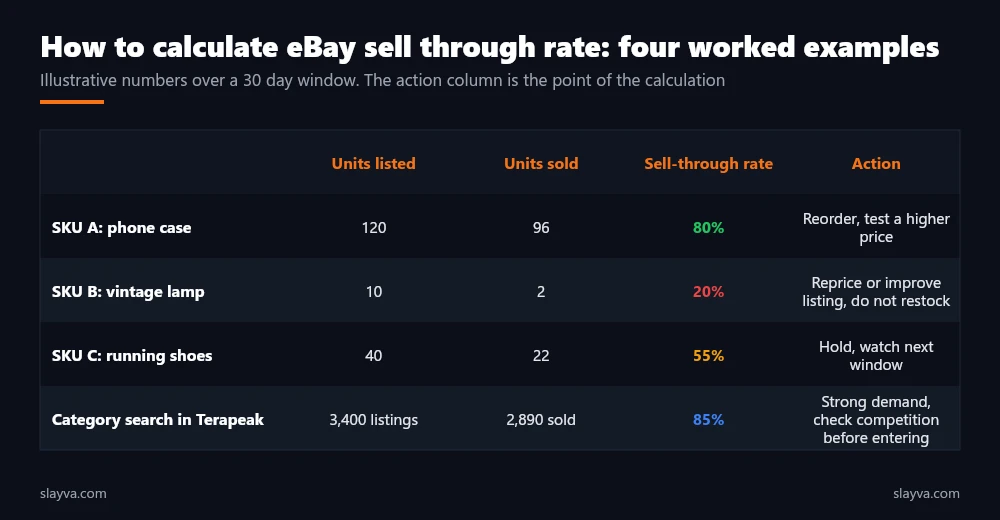
Take three SKUs over thirty days, with illustrative numbers. SKU A, a phone case, had 120 units listed and 96 sold: 80 percent. SKU B, a vintage lamp, had 10 listed and 2 sold: 20 percent. SKU C, a pair of running shoes, had 40 listed and 22 sold: 55 percent.
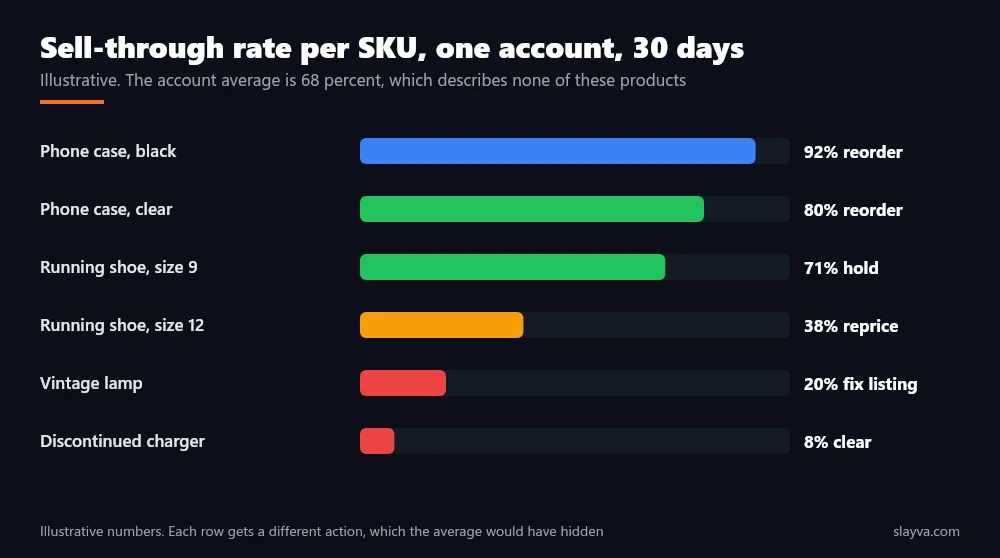
The account level rate is 120 sold out of 170 listed, about 71 percent, which looks healthy and tells you nothing. Per SKU, the phone case wants a reorder and possibly a price test, the lamp wants a repricing or a better listing and no restock, and the shoes want another window before you decide. That is the difference between reporting a number and using it, and it is why the rate per SKU matters more than the account figure.
Where eBay Shows a Sell-Through Rate, and Why You Still Need Your Own
Two eBay tools show a version of the metric. Terapeak product research, covered in our eBay Terapeak guide, reports a sell-through rate for a search: the sold listings divided by total listings for that query in the chosen window. It measures the market, not your stock, and it is the number to check before sourcing.
The Seller Hub performance area reports sales and traffic metrics that let you build your own per listing figure, which our companion guide on reading the Seller Hub traffic report walks through. Neither replaces the per SKU calculation above for stock decisions. eBay’s own seller performance standards do not include sell-through at all, which is a reminder that this is a business metric you own rather than one eBay grades.
What Is a Good Sell Through Rate on eBay?
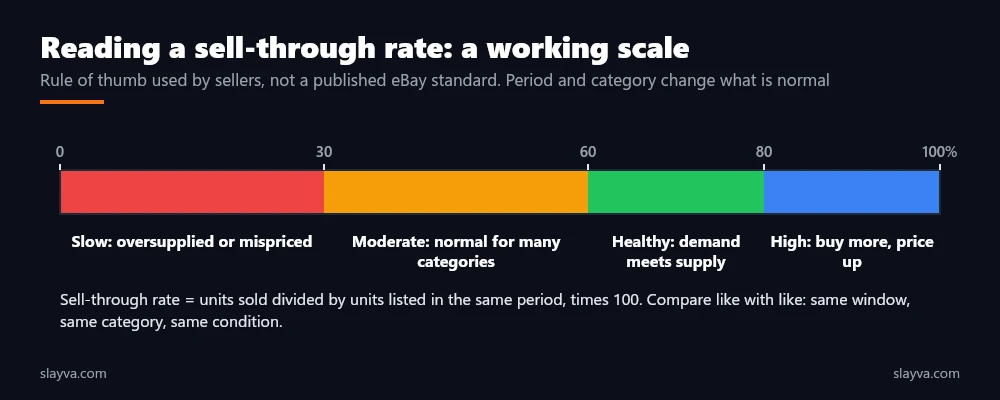
There is no published eBay threshold for a good sell-through rate, so any answer to what is a good sell through rate on eBay is a rule of thumb. Among sellers we work with, and in our own analysis, rates under 30 percent usually signal oversupply or mispricing, 30 to 60 percent is normal for many categories, 60 to 80 percent means demand is meeting supply, and above 80 percent suggests you are able to buy more and test a higher price. Those bands are working assumptions, not eBay data, and the right band shifts with category, condition, price point, and season.
The more useful question than what is a good sell through rate on eBay is what is a good rate for this product in this window compared with last window. A collectible that sells one of three listed in a quarter has a 33 percent rate and is often an excellent line at its margin. A consumable that sells 33 percent of listed units in a month is a problem. Context decides, and the context is your own history plus the market rate from Terapeak. Calculating the rate for both gives you the comparison.
Sell-through rate is a ratio of two decisions: what buyers chose and what you chose to list. When it is low, the fix is usually on your side of the fraction.
Sell Through Rate by Category: Using It for Sourcing
Sell through rate by category varies for structural reasons rather than because some categories are better. Consumables and accessories with many near identical listings turn over quickly and show high market rates in Terapeak, but with thin margins and heavy competition. Collectibles, parts, and vintage items show lower rates and longer windows, with higher margins per sale. Fashion sits in between and is heavily seasonal. Our what to sell on eBay guide lists categories that have shown high market rates, and our sourcing guide covers how to buy into them without overpaying.
| Category type | Typical rate pattern | Window to use | What a low rate usually means |
|---|---|---|---|
| Consumables and accessories | High market rate, high competition | 30 days | Price is above the sold comps |
| Electronics | High for current models, falls fast with age | 30 days | Model is ageing or listing lacks specifics |
| Fashion | Seasonal swings, size and colour dependent | 30 to 90 days | Wrong season or wrong variation mix |
| Collectibles and vintage | Low rate, high margin, long tail | 90 days | Often normal, check price against sold comps |
| Parts and industrial | Low to moderate, steady | 90 days | Fitment or compatibility data missing |
Reading sell through rate by category is a sourcing tool. Reading it per SKU is an operating tool. Sellers who confuse the two either abandon profitable slow lines or overstock fast lines with no margin. The calculation is the same in both cases. What changes is the population you divide by.
How to Improve Sell Through Rate When It Is Low
How to improve sell through rate is a matter of which side of the fraction to move. Two levers reduce what you list. Four increase what sells. Work through them in the order below, because the cheapest fixes come first.
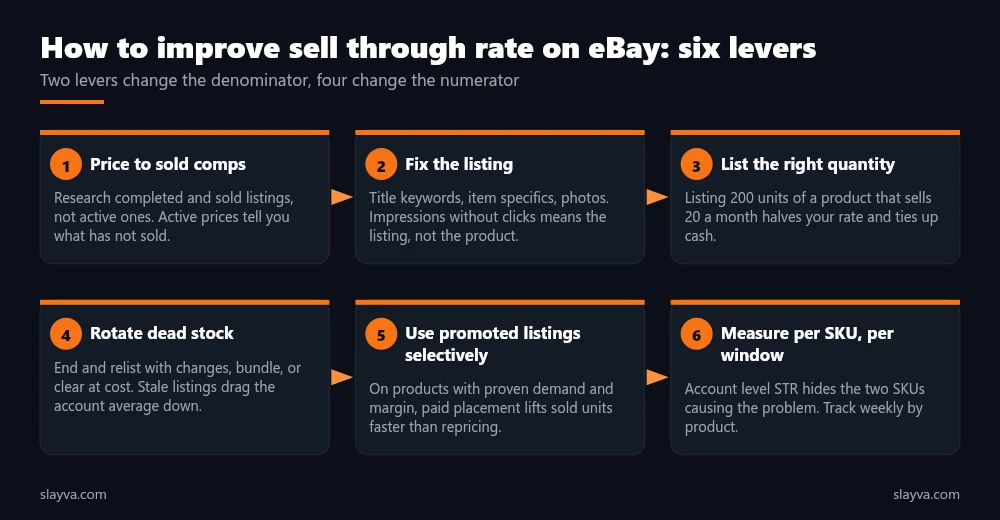
Price Against Sold Comps, Not Active Listings
Active listings show you what has not sold. Sold listings show you what buyers paid. Research completed and sold listings for the same item and condition, and price against those. Our eBay pricing strategy guide covers the research process and the two pricing models in detail. Repricing is the fastest lever and the one most sellers pull last. Recompute the rate two weeks after a change, because comparing the rate before and after is the only way to know whether the lever worked.
Fix the Listing Before You Touch the Stock
If impressions are healthy and clicks are not, the listing is the problem. Title keywords, item specifics, and photos decide whether a buyer who saw the listing opens it. Our guides on eBay listing titles and improving eBay listing visibility cover the fixes. Free keyword research finds the terms buyers use that your title is missing.
List the Quantity the Market Will Take
Listing 200 units of a product that sells 20 a month drops the rate to 10 percent and ties up cash for ten months. List closer to a month of demand and hold the rest off eBay. The rate rises, the listing looks scarcer, and your stock decisions get better data. This lever is invisible to sellers who never calculate sell-through, because their dashboard shows sales, not the ratio. Sellers with large catalogues manage this through the quantity controls covered in our large inventory guide.
Rotate Dead Stock
A listing that has not sold in ninety days is dragging the account average and is likely ranking poorly. End it, change the title, photos, or price, and relist, or bundle it, or clear it at cost to free the cash. Our guide on automatically relisting ended listings explains how to do this without returning stale listings unchanged.
Use Promoted Listings Where Demand Is Proven
On a product with demonstrated demand and margin to spare, paid placement lifts sold units faster than another price cut. On a product with a 15 percent rate, promotion usually buys impressions for a listing buyers have already declined. Our analysis of whether eBay promoted listings are worth it covers where the spend pays.
Measure Per SKU, Every Week
None of the levers above works without the measurement. Set a weekly routine: pull sold and listed units, compute the rate per SKU, flag anything under your threshold for that category, and decide one action per flagged product. The rate becomes valuable at this point, when it is a habit rather than a one off. Our eBay automation guide covers which parts of the reporting are safe to hand to software.
| Symptom | Likely cause | First lever |
|---|---|---|
| Low rate, high impressions, low clicks | Listing quality | Title, specifics, photos |
| Low rate, high clicks, few sales | Price or trust signals | Reprice to sold comps, check feedback and returns |
| Low rate, low impressions | Search visibility | Keywords, category, item specifics |
| Rate fell after a restock | Quantity too high | Reduce listed quantity |
| High rate, stockouts | Underbuying | Reorder, test a higher price |
A rising rate after a price cut is not automatically good news. Check margin per unit before you celebrate, because a rate of 90 percent at a loss is a fast way to go out of business.
A Weekly Sell-Through Routine, and How to Act on It
The calculation takes minutes once the exports are set up. The routine is what makes it pay. Every Monday, export the previous seven and thirty days of orders and listings from Seller Hub. Compute the rate per SKU for both windows. Sort by rate. Flag the bottom ten percent and the top ten percent. For each flagged SKU, decide one action from the six levers above and note it against the SKU with the date. Next Monday, check whether the action moved the rate, and only then decide the next one.
Two habits keep the routine honest. First, never change price, listing, and quantity on the same SKU in the same week, because you will not know which change worked. Second, keep the rate next to margin per unit in the same sheet. A product at 85 percent and a thin margin is a candidate for a price test, not a reorder. A product at 25 percent and a wide margin is a candidate for a listing fix, not a clearance. The rate on its own is half the picture, and calculating it is only the start of reading it.
- Monday: Export, compute per SKU, flag top and bottom ten percent.
- Tuesday to Thursday: Apply one lever per flagged SKU, log it.
- Following Monday: Recompute, compare, decide the next lever or leave it alone.
- Monthly: Compare the thirty day rate against the same window last year for seasonal lines.
Frequently Asked Questions About eBay Sell-Through Rate
What is the eBay STR formula?
Units sold divided by units listed over the same period, multiplied by 100. That is how to calculate eBay sell through rate for any product. Listing 50 units and selling 30 gives a 60 percent sell-through rate. For market research, Terapeak uses sold listings divided by total listings for a search instead of units.
Does eBay show my sell-through rate?
Not per SKU. Terapeak shows a market level rate for a search. Seller Hub gives the orders and listings data you need to compute your own. Working out the rate for your catalogue is therefore a short export and divide exercise.
What window should I use?
Thirty days for most products, because it matches reorder cycles, and thirty days is the default we use when showing clients how to calculate sell-through. Ninety days for seasonal, collectible, or slow moving lines. Always record the window with the rate so next month’s figure is comparable.
Is a high sell-through rate always good?
No. A high rate with stockouts means you are underbuying and leaving sales on the table. A high rate after a deep price cut is sometimes unprofitable. Read it alongside margin per unit and stock on hand.
Should I count listings or units?
Units for stock and pricing decisions on your own catalogue. Listings when you are researching a market in Terapeak, because that is what its figure counts. Mixing the two produces rates that are not comparable.
How does sell-through rate relate to my seller performance metrics?
It does not. Sell-through rate is a business metric for demand and stock. It has no effect on seller level, defect rate, or search placement directly, although the listing fixes that raise it often raise visibility too.
How often should I recalculate?
Weekly per SKU on fast movers, monthly on the rest. The point of measuring sell-through is to act on the trend, and a trend needs regular readings.
Want the per SKU report built and read for you?
We run weekly sell-through, margin, and stock reviews on managed accounts, including sell-through rate per SKU across the whole catalogue, and turn them into reorder and repricing decisions.
Conclusion
How to calculate eBay sell through rate is simple arithmetic: sold units over listed units, in one window, times 100. The value is in doing it per SKU, recording the window, and comparing like with like. Use Terapeak’s market rate to decide what to source, your own per SKU rate to decide what to reorder and reprice, and the weekly routine to catch problems while they are still one product rather than a category. When the rate is low, move your side of the fraction first: price, listing, and quantity, then promotion.
Combined with the fee calculator and profit calculator on our tools page, the rate tells you not only what sells but what is worth selling. More eBay operations guides are in the blog library.

Usman Malik
All posts by Usman MalikNeed this handled for you?
eBay Product Research
What to stock, from sold data and sell-through.
See the serviceeBay Account Management
Listings, orders, cases and growth, run for you.
See the service- Work out the numbers: eBay Sell-Through Rate Calculator
- Have this problem now? eBay account suspended (MC999)
- Have this problem now? eBay sales dropped