eBay Automation for Growing Sellers: 10 Essential Tasks to Stop Doing Manually
- Updated
- eBay, eBay Business & Strategy, eBay Seller Tools
- 14 min read
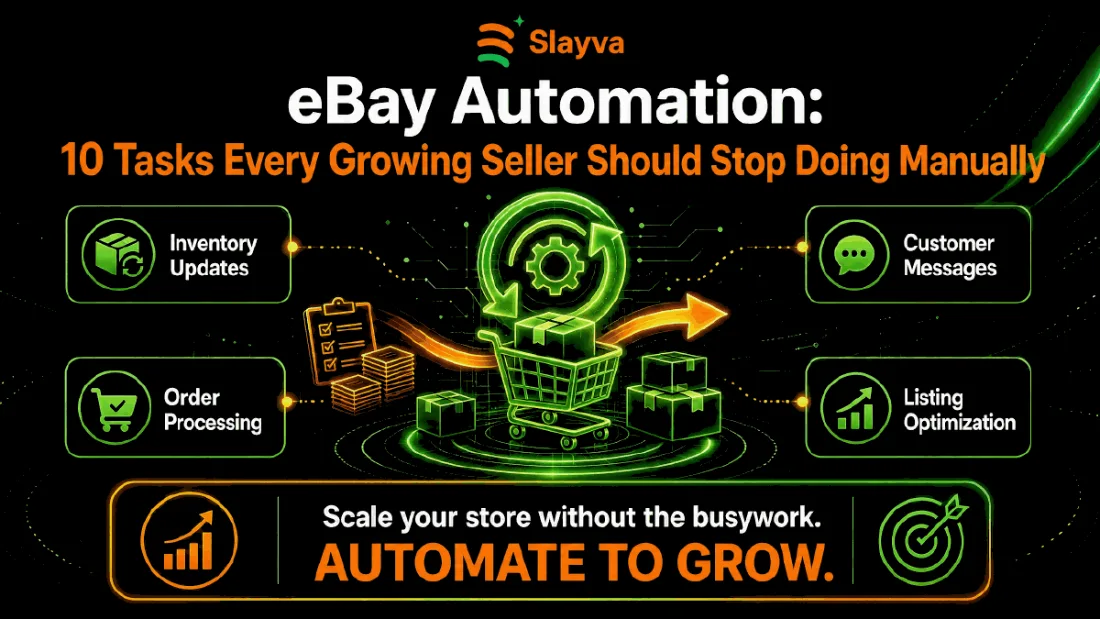
Table of contents
Your store grew, and the admin grew faster. Every new listing added minutes to your day. Every order added a label, a message, and a tracking update. eBay automation for growing sellers closes that gap by moving repetitive work to software, so your hours go to sourcing, pricing, and expansion instead of copy and paste. Sellers who make this shift early keep their evenings back and protect their account health at the same time.
This guide covers the 10 tasks that drain the most time, the order you should automate them in, and how to tell whether the change worked.
Key Takeaways
- Main Insight: eBay automation for growing sellers pays off once listing and order volume outgrow the hours in your week. There’s no published threshold, so judge it by your own admin hours rather than a listing count.
- Strategy Tip: Automate the order layer first. It carries the hardest deadlines and the largest account risk, so the return arrives fastest there.
- User Benefit: Automating inventory, orders and buyer messages removes the most repetitive work and the steps most likely to cause late shipment defects and cancellations.
Why eBay Automation for Growing Sellers Matters Now
Manual selling works at small volume, which is why automation rarely appears on a new seller’s list of priorities. You list an item, you pack it, you answer the buyer. The system holds together because the numbers stay small.
Growth breaks that system quietly. Listing count rises, order volume rises, and message volume rises with both. The work per order stays the same, so total workload climbs in a straight line while your available hours stay flat. Sellers hit the ceiling and assume they need to work harder. The real fix is eBay seller automation applied to the tasks that repeat identically every time.
The risk sits in account health. Late tracking uploads, slow message replies, and stale stock levels all feed the metrics eBay measures. A seller drowning in admin misses deadlines, and missed deadlines turn into defects. eBay business automation protects those metrics by removing the human delay from time sensitive steps.
The Volume Point Where Automation Becomes Necessary
There is no published threshold for this. A better test is your own time: log your admin hours for two normal weeks and note which task breaks first as volume rises. It’s usually message response times, then stock accuracy and label printing, then pricing and relisting.
Once admin takes more hours than you can spare without missing shipping or message deadlines, automation is worth costing out properly. The break even point rests on what your own time is worth and which tools you pick.
The 10 Tasks to Stop Doing Manually
These sit in rough priority order, and each one suits automation because the steps repeat identically every time. Work down the list rather than trying to change everything in one week.
1. Inventory Sync and Stock Levels
Selling the same stock across eBay and another channel without a sync creates oversells. An oversell forces a cancellation, and cancellations damage your defect rate faster than almost anything else.
Connect your channels to one stock source so quantity updates push everywhere within minutes. Multichannel platforms handle this directly. 3Dsellers, for example, offers inventory sync and updates alongside SKU linking, so a sale in one place adjusts availability in the others without you touching a spreadsheet. If you hold stock in a spreadsheet today, that spreadsheet becomes the weak point the moment two orders land together. Our guide to managing a large eBay inventory covers the systems that hold up past a thousand SKUs.
2. Repricing, a Core Win
Checking competitor prices by hand rewards whoever has the most free time. That stops being you the moment volume grows.
Rule based repricing adjusts your price inside limits you set, with a floor that protects margin. Set the floor using real numbers rather than instinct. Our free eBay Fee Calculator gives you the net figure after fees and shipping, which is the only number a price floor should rest on.
3. Order Processing and Shipping Labels
Buying labels one at a time is the single largest time sink in most stores. Batch label printing pulls every paid order, applies the right service by weight and destination, and produces a print run in one action.
The payoff extends past time saved, and this is where automation proves itself first. eBay order automation uploads tracking the moment the label prints, which protects your late shipment rate without you thinking about it. Pair this with the advice in our eBay shipping guide.
4. Buyer Message Responses
Message handling is the easiest entry point for automation. Most buyer messages are a handful of repeat questions: where is my item, does this fit, do you post to my country, what is your return window.
Saved replies and rule triggers handle those without you typing the same paragraph again. Helpdesk tools built for marketplaces support this pattern. 3Dsellers runs a unified inbox with message templates, auto responders and rule based workflows, which covers the repetitive share while leaving the rest to you. Keep the tone human and leave anything unusual for a real reply. Automation on messages should reduce your load, not replace your judgement.
5. Feedback Requests and Follow Up
Feedback drives conversion, and most buyers leave it when asked at the right moment. Asking manually means asking inconsistently.
Trigger a polite request a few days after delivery confirms. Keep it to one message. If a buyer raises a problem instead, route that to you rather than to another automated reply. Our guide on handling negative eBay feedback explains the recovery path when a review goes wrong.
6. Listing Creation From Templates
Typing item specifics into the listing form for every product wastes hours and introduces errors. eBay listing automation uses templates and bulk upload files so shared fields populate once. AI listing tools go further. 3Dsellers builds listings from images, URLs or product identifiers through its AI Listing Creator, and generates titles and descriptions automatically. Review that output before publishing rather than trusting it. AI drafts miss category item specifics and occasionally describe the wrong variant, and an inaccurate listing turns into an item not as described case later.
Templates also enforce consistency across your catalogue, which helps search placement. Combine this with the advice in our listing optimization guide so the template you scale is one worth scaling.
7. Relisting and Scheduling
Ending and relisting by hand means your listings go live whenever you happen to be free. That is rarely the best moment for your category, and it is one of the simplest wins available.
Scheduling tools place listings at set times and relist unsold items automatically. 3Dsellers covers both, with re-list automation for sold items and bulk publishing on a schedule, so ending and relisting stops depending on when you happen to be at a desk. Set the schedule against your own sales data rather than general advice, since the best window differs by category and by country.
8. Returns and Refund Workflows
Returns arrive at the worst times and carry tight deadlines, which makes them a strong candidate for automation. Missing one turns a routine return into a case.
Automate the acceptance step for returns that meet your stated policy, and reserve manual review for exceptions such as damage claims or high value items. Our eBay returns policy guide sets out which rules to encode.
9. Account Health Monitoring
Most sellers look at Seller Hub after a warning arrives. By then the metric has already moved. Monitoring belongs in any automation plan because it protects everything else you have built.
Set alerts on defect rate, late shipment rate, and open cases so a rising number reaches you while it remains fixable. This is the cheapest form of eBay business automation available, and it prevents the outcome that ends stores. If an account is already restricted, our eBay suspension recovery service handles the appeal.
10. Profit and Performance Reporting
Rebuilding the same spreadsheet every month tells you what happened weeks after you needed to know it. Reporting closes the loop by showing whether the earlier changes worked.
Reporting is the last layer, and the one that pays for the rest. Automated reporting pulls fees, shipping costs, and cost of goods into one view that refreshes on its own. Sellers who see profit per SKU weekly make better sourcing calls than sellers who see revenue monthly.
Manual Work Compared With Automation
The useful comparison is what each task looks like done by hand versus automated, and which risk automation removes:
| Task | By hand | Automated | Main risk removed |
|---|---|---|---|
| Order processing and labels | Buying labels one at a time and typing tracking | Batch labels, tracking uploaded on print | Late shipment defects |
| Inventory and stock sync | Updating quantities on each channel | One stock source pushed to every channel | Oversells and cancellations |
| Buyer messages | Typing the same answers | Saved replies and routing rules | Slow responses |
| Listing creation | Filling item specifics for each listing | Templates and bulk upload | Item specifics errors |
| Repricing | Checking competitors by hand | Rules with a margin floor | Margin erosion |
| Reporting | Rebuilding a spreadsheet each month | A view that refreshes itself | Late sourcing decisions |
Track your own hours before and after each change. That is the figure that tells you whether a change paid for itself, and it is the reason to automate one layer at a time.
Where Automation Saves the Most Time
Order processing wins on raw hours. Inventory sync wins on risk removed, since a single oversell damages metrics that take months to repair. If you only change one thing this quarter, change the order layer, then revisit inventory the following month.
A Low Budget Path to Automation
Paid tools are not the only entry point. Sellers working to a tight budget reach most of the benefit through free options first.
- Seller Hub bulk tools: Bulk edit, schedule, and relist at no cost, which covers listing and scheduling work for many smaller stores.
- Carrier platforms: Most shipping providers offer free batch label software that uploads tracking on print.
- Saved replies: Built into eBay messages. Ten well written templates remove the majority of daily typing.
- Spreadsheet reconciliation: A monthly fee export against a cost sheet gives you profit per SKU before you pay for analytics software.
Start there, measure the hours returned, then buy tools only where the free version runs out. This keeps automation self funding from the first month rather than a cost you carry in hope.
How to Build Your eBay Automation Stack
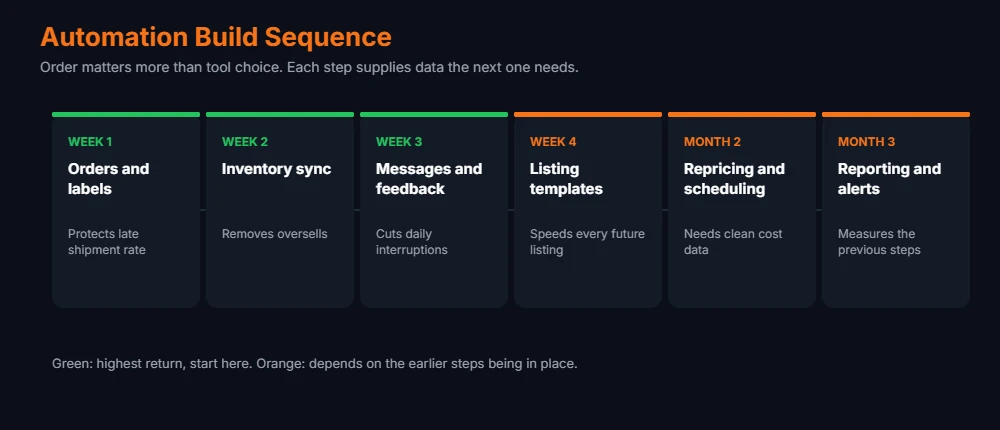
Tool choice matters less than sequence when you plan automation. Sellers who automate everything at once lose track of which change produced which result, and they inherit several new systems to learn in the same week.
Order of Operations
- Week one, orders and labels: Fastest payback and immediate protection for your late shipment rate.
- Week two, inventory sync: Removes oversells, which removes cancellations.
- Week three, messages and feedback: Cuts daily interruptions and lifts review volume.
- Week four, listing templates: Speeds up every future listing you create.
- Month two, repricing and scheduling: Needs clean cost data first, which the earlier steps provide.
- Month three, reporting and alerts: Measures whether the previous five steps worked.
Tool Categories That Support eBay Automation
The main tool categories are multichannel listing tools (templates, bulk upload, inventory sync), shipping platforms (batch labels, tracking upload, rate shopping), repricing tools (rules with price floors), helpdesk and messaging tools (saved replies, routing) and analytics tools (profit per SKU, fee reconciliation). Most vendors publish tiered plans and change prices often, so compare current pricing directly before you choose.
How 3Dsellers Can Support eBay Automation
Most sellers assemble a stack from several tools. Some prefer one platform covering more of the work. 3Dsellers sits in the second group, and its feature set lines up with several tasks above, so it works as a concrete example of what automation looks like once it is consolidated into one platform.
Listing work
The AI Listing Creator builds a listing from an image, a URL or a product identifier, with AI titles and descriptions generated alongside it. Listing design templates keep formatting consistent across the catalogue, and a bulk listing editor plus CSV import handle changes across many listings at once. For a seller adding stock weekly, this is where the hours go, and it is usually the second or third stage rather than the first.
Keeping listings live and stock accurate
Re-list automation returns sold items to the catalogue without manual work. Customized listing automation applies rules to listing actions, and inventory sync keeps quantities aligned across channels. Together these address two of the earlier tasks, relisting and stock accuracy, which sit behind most oversells.
Buyer communication
The helpdesk consolidates messages from every channel into one inbox and attaches full order detail to each ticket, which removes the tab switching that makes support slow. Auto responders, saved replies and workflow rules cover the repeated questions. Auto Messages and the Feedback Reminder handle post purchase follow up, which is the part sellers most often forget during busy weeks.
Orders and advertising
Order automation rules, bulk order actions, shipping labels and CSV tracking updates cover the order layer this guide recommends automating first, which is the highest return starting point. The platform also manages eBay Ads campaigns, keeping promotion in the same place as listings rather than in a separate tool.
Where your judgement still matters
- AI generated content: Titles and descriptions need a read before publishing. Accuracy protects you from item not as described cases, and no tool carries that risk for you.
- Pricing: The platform offers AI price suggestions and price sync across channels. Suggestions are an input to your decision, not a replacement for knowing your own floor after fees.
- Unusual messages: Route anything outside the standard categories to a person. Rules answer the predictable share well and the exceptions badly.
- Rule review: Automation follows the logic you set, including logic that has gone stale. Check your rules quarterly.
Whether you consolidate into one platform or connect several tools, the sequence holds. Automate the order layer first, then inventory, then the listing and message work. Our review of 3Dsellers features and pricing works through the cost side, and current plans are listed on the 3Dsellers site.
Automation rewards the sellers who fix their process first. Software applied to a broken workflow produces broken results faster.
Mistakes That Make eBay Automation Fail
Most failed rollouts trace back to one of six causes. Each is avoidable if you know it before you start.
- Automating a broken process: If your listing template carries weak titles, scaling it multiplies the weakness across your whole catalogue.
- Repricing without a floor: A rule set without a margin floor races competitors to a price that loses money on every sale.
- Robotic buyer messages: Replies that ignore the question raise case rates rather than lowering them. Route anything unusual to a person.
- Trusting sync blindly: Check stock accuracy weekly for the first month. Integrations drift, and silent failures surface as oversells.
- Skipping the cost data: Automated pricing built on guessed costs produces confident decisions based on wrong numbers.
- Changing everything at once: Six new tools in one week leaves you unable to tell which change moved the metric.
Measuring Results From Automation
Judging automation by feel produces the wrong conclusion. Track a small set of numbers before you start, then again at 30 and 90 days. Without a baseline you have opinion rather than evidence.
| Metric | Where to find it | Direction | Review |
|---|---|---|---|
| Weekly admin hours | Your own time log | Down | Weekly |
| Late shipment rate | Seller Hub performance | Down | Monthly |
| Average response time | Seller Hub messages | Down | Weekly |
| Listings added per week | Listing tool export | Up | Weekly |
| Net profit per SKU | Reporting tool | Up | Monthly |
| Cancellation rate | Seller Hub performance | Down | Monthly |
Results arrive in stages. Admin hours and listings added per week move first, often inside 30 days. Profit per SKU moves last because pricing and sourcing changes need sales history behind them.
One caution on interpretation. Automation lifts capacity, not demand. Adding listings faster helps only when the products themselves sell. Pair the extra capacity with better sourcing, or you scale the volume of items that sit unsold. Our guide on scaling an eBay store past a thousand listings covers that balance.
Rather skip the setup?
We run eBay accounts end to end, automation stack included. Free audit, no commitment.
Frequently Asked Questions About eBay Automation for Growing Sellers
At what size should I start automating?
Start when admin takes more hours than you can spare without missing shipping or message deadlines. Below that, automation usually costs more in setup time than it returns.
Does eBay allow automated listing and repricing tools?
Yes. eBay supports third party tools through its official APIs. Check that any tool you pick connects through those APIs rather than scraping your account, since unofficial access risks restriction.
What should I automate first?
Orders and shipping labels. That layer carries the tightest deadlines, so eBay order automation protects your late shipment rate while saving the most hours per week.
Will automation hurt my customer service ratings?
Only when it replaces judgement. Automate repetitive replies and routing, then send anything unusual to a person. Sellers who route exceptions well tend to see response times improve.
How much does a full automation stack cost?
Vendor pricing varies widely and changes often, so check current plans before budgeting. Weigh the cost against the hours it gives back: a tool that saves a few hours a week usually covers itself at any realistic hourly rate.
Is native Seller Hub enough on its own?
Partly. Seller Hub covers bulk editing, scheduling, and basic reporting at no extra cost, which suits many smaller stores. Full automation needs third party software for multichannel inventory sync and rule based repricing.
Does eBay automation for growing sellers work for part time sellers?
Yes, and the return is often larger. Part time sellers have fewer hours to lose, so removing five hours of weekly admin frees a bigger share of their available time than it does for a full time operation.
How long before results show?
Admin hours usually drop first, within the first few weeks of a change. Account health metrics follow over the next one or two monthly evaluations, and profit per SKU takes longest, because pricing changes need sales history behind them.
Conclusion
The tasks on this list share one trait, and that trait is what makes automation work. They repeat identically, which means software handles them at least as well as you do, and without the fatigue that produces missed deadlines. Automation is less about new technology and more about deciding which work deserves your attention.
Start with orders. Add inventory sync next. Treat eBay automation for growing sellers as a sequence rather than a purchase. Measure admin hours before and after, then move down the list. Sellers who work through it in sequence reach a point where adding a hundred listings no longer adds a day of work, and that is the point where growth stops competing with your time.

Usman Malik
All posts by Usman MalikNeed this handled for you?
eBay Sales Growth
Pricing, visibility and conversion work.
See the serviceeBay Account Management
Listings, orders, cases and growth, run for you.
See the service- Work out the numbers: eBay ROI Calculator
- Have this problem now? eBay account suspended (MC999)
- Have this problem now? eBay sales dropped