How to Improve eBay Listing Visibility: 10 Proven Optimization Fixes
- Updated
- eBay Listing Optimization, eBay, eBay SEO & Keyword Research
- 12 min read

Table of contents
Impressions without clicks is the most frustrating pattern in eBay selling. Your items appear in search, the numbers in Seller Hub look healthy, and almost nobody buys. Learning how to improve eBay listing visibility starts with a shift in thinking. The goal is not more impressions. The goal is impressions in front of buyers who intend to purchase the sort of thing you stock.
This guide covers 10 fixes that move listings toward qualified traffic, how to measure whether each one worked, and the mistakes that quietly suppress placement.
Key Takeaways
- Main Insight: Visibility and qualified traffic are different problems. Improving visibility means fixing relevance signals first, because impressions in front of the wrong buyers produce nothing.
- Strategy Tip: Complete every item specific before touching anything else. Item specifics feed both search matching and the left hand filters buyers use to narrow results.
- User Benefit: Work through the fixes in order and measure impressions, click through rate, and sell through separately, since each fix moves a different number.
Why Listings Lose eBay Search Visibility
Understanding how to improve eBay listing visibility starts with Best Match, the system eBay ranks results through. It weighs how closely a listing matches the query alongside signals about the listing and the seller. eBay publishes general guidance on what matters rather than exact weightings, and the eBay Seller Center is where that guidance is kept current. Treat any specific ranking formula you read online with caution, including this one. What follows reflects patterns across accounts we manage and eBay’s own published guidance, not a disclosed algorithm.
Three failure modes account for most visibility problems we see.
- Relevance gaps: The listing lacks the data eBay needs to match it against a query, usually missing item specifics or a title built around the wrong words.
- Weak engagement: The listing appears in results but few people click, and fewer buy. Low interaction feeds back into placement.
- Account level drag: Seller performance problems reduce placement across every listing at once, no matter how well written.
Fix the Right Layer First
Diagnose before you edit. Most failed attempts at better visibility start with editing the wrong layer. The table below maps the symptom to the layer that needs work.
| Symptom | Likely cause | Fix to start with |
|---|---|---|
| Few impressions | Relevance gap | Item specifics and title |
| Impressions but almost no clicks | Weak listing presentation | Photos, price, shipping terms |
| Clicks but no sales | Conversion problem | Description, price, returns |
| Everything fell at once | Account level issue | Seller performance and policy |
| Traffic from wrong searches | Category or title mismatch | Category and keyword targeting |
How to Improve eBay Listing Visibility: The 10 Fixes
Work through these in order. The early fixes feed the later ones, so jumping ahead wastes effort. Treat this as a sequence rather than a menu.
1. Complete Every eBay Item Specific, the Fastest Route to Better Listing Visibility
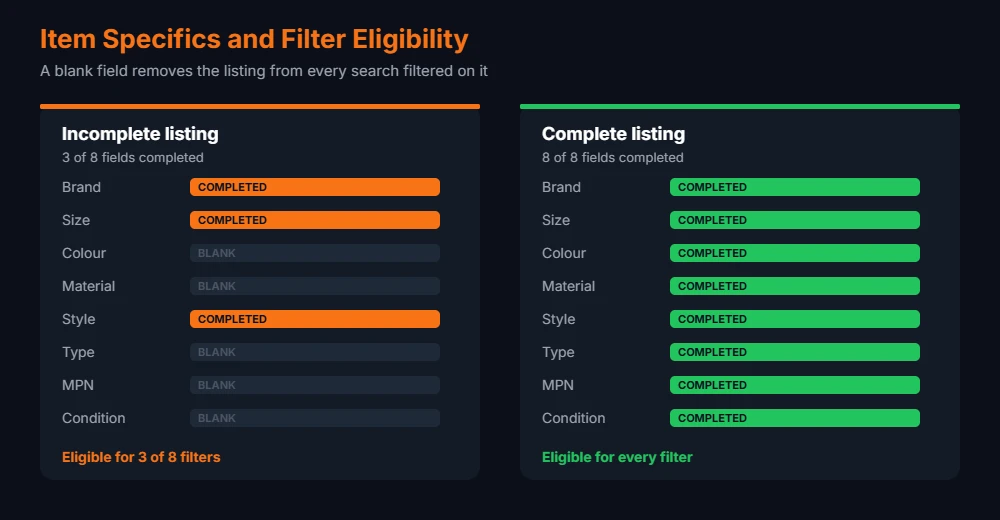
If you take one thing from this guide, take this one. It is the highest return change available to most sellers and the most commonly skipped. eBay item specifics populate the filters shown down the left of search results. A buyer who filters by brand, size, or colour removes every listing missing that field, regardless of how good the listing is otherwise.
At catalogue scale, this becomes bulk work rather than listing by listing work. Bulk editors and CSV updates fill a field across hundreds of listings in one pass, and 3Dsellers is one of the tools offering that alongside a listing quality score that flags where fields are missing. Fill the recommended fields as well as the required ones. Where eBay offers a dropdown, pick from it rather than typing a custom value, because custom entries frequently fail to match the filter. eBay documents the required and recommended fields per category in its guide to adding item specifics, which is worth checking whenever you list in an unfamiliar category.
2. Rebuild Titles Around Terms Buyers Type
Titles are the second lever. You have 80 characters. Spend them on words buyers search, not words you would use internally. Lead with the item as a buyer names it, then brand, model, key specification, size, and condition.
Skip decoration. Symbols, repeated words, and phrases like “look” or “rare” consume characters without matching queries. AI title tools speed the rewrite up, and 3Dsellers generates titles and descriptions as part of its listing tools, though the output needs checking against the category before it goes live. An AI written title that misstates a model number costs more than the time it saved. Our guide to writing eBay titles that rank sets out the exact structure, and our free keyword research methods show how to find the terms first.
3. Put the Listing in the Right Category
Category placement sits underneath everything else because it decides which searches you appear in and which item specifics eBay offers. A listing in a loosely related category competes against the wrong items and loses the filters buyers rely on.
Check where completed sales for your product sit rather than guessing. Listing in a second category rarely repays the extra fee for standard items.
4. Fix the First Photo Before the Rest
Once placement is working, presentation takes over. The first image decides your click through rate in a grid of near identical results. A clean product shot on a plain background reads faster at thumbnail size than a styled scene.
- Fill the frame: Crop tight so the product is legible as a thumbnail on a phone.
- Use plain backgrounds: White or light grey separates the item from busy competing images.
- Show real condition: For used goods, photograph flaws directly. It reduces returns and item not as described cases.
- Add the full set: Multiple angles answer questions that otherwise become messages or lost sales.
5. Write Descriptions That Answer Buyer Questions
Descriptions play a smaller part in visibility than titles and item specifics, and a much larger part in conversion. A buyer who cannot find measurements, compatibility, or condition detail leaves.
Keep it scannable. Short blocks, clear headings, specifics near the top. Our guide on writing eBay descriptions that sell covers the structure that converts.
6. Price Inside the Competitive Band
Price influences both buyer behaviour and placement, which makes it part of visibility rather than a separate concern. Competitiveness sits among the signals eBay describes as relevant to Best Match. Pricing well above comparable sold listings suppresses clicks even when placement holds.
Work from completed sales rather than active listings, because active listings show what sellers hope for. Our eBay pricing strategy guide covers the method, and the free eBay Fee Calculator gives you the floor you cannot price below after fees.
7. Make Shipping and Returns Terms Competitive
Delivery terms are an underrated part of visibility. Speed and return terms both feed buyer filters. A buyer filtering for fast delivery removes slower listings before reading a single title.
Shorten handling time to what you reliably hit on a bad week, not a good one. Our shipping guide and returns policy guide cover the settings worth changing.
8. Improve Sell Through and Listing Freshness
Sell through connects sourcing to visibility. Items that sell reliably tend to hold placement better than items that sit. Sell through rate is worth tracking per product rather than per store, because a few slow lines drag the average.
Ending and relisting stale items gives them a fresh start in results. Time it against your own sales data. Our guide to the best time to list on eBay covers the timing question, and choosing categories by sell through rate stops the problem at the sourcing stage.
9. Protect the Account Signals Behind Your Visibility
This is the widest reaching item in any visibility plan. Account health affects placement across your whole catalogue at once. Late shipments, defects, and open cases work against every listing you own, which makes this the fix with the widest reach.
- Upload tracking on time: Late tracking is the most common avoidable defect.
- Answer messages quickly: Response time feeds buyer experience metrics.
- Resolve cases before escalation: A resolved issue costs less than an escalated one.
- Watch the dashboard weekly: Metrics are easier to correct while the numbers are small.
The thresholds that decide whether an account sits at Above Standard or below are published in eBay’s seller performance standards. Check them against your own dashboard rather than working from memory, since the figures are revised periodically.
10. Use Promoted Listings Deliberately
Promotion buys placement, and it is the last step rather than a shortcut past the others. It does not fix a listing that fails on relevance, price, or photos, and paying to show a weak listing to more people multiplies the waste.
Fix the nine items above first, then promote the listings that already convert. Our analysis of whether promoted listings are worth it works through where the ad rate stops paying.
Promotion amplifies whatever the listing already does. Amplifying a listing that nobody clicks produces a more expensive version of the same result.
Measuring the Result
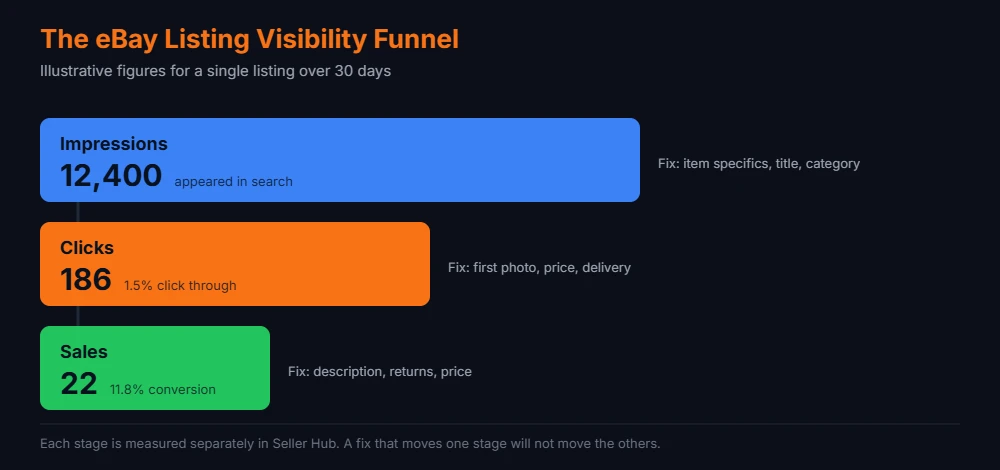
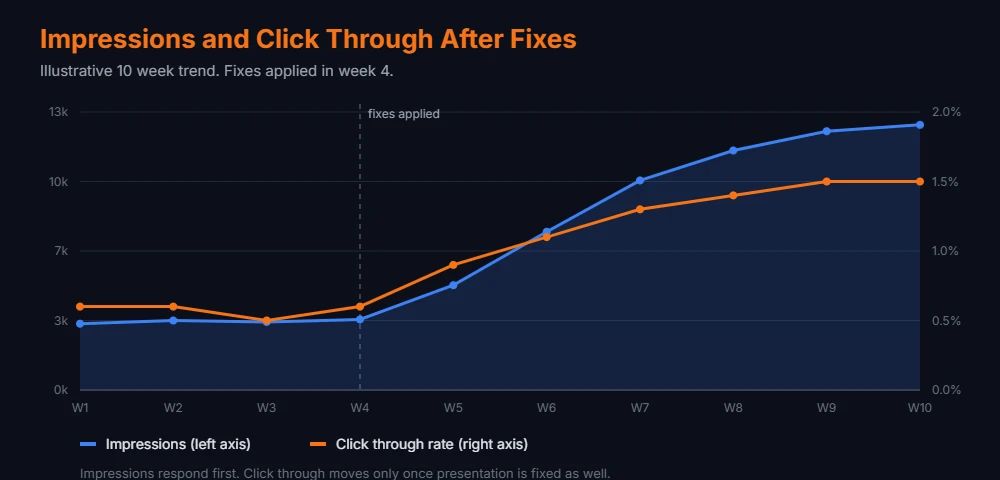
Impressions alone tell you nothing about quality. Measurement is where most visibility work falls down, because sellers watch one number and change five things. Track the stages separately so you know which fix moved which number.
| Metric | Where to find it | What it tells you | Fix if weak |
|---|---|---|---|
| Impressions | Seller Hub traffic report | Whether you appear at all | Item specifics, title, category |
| Click through rate | Seller Hub traffic report | Whether the result appeals | First photo, price, delivery |
| Conversion rate | Listing analytics | Whether the page persuades | Description, photos, returns |
| Sell through rate | Sold versus active | Whether stock moves | Pricing and sourcing |
| Defect rate | Seller Hub performance | Whether the account drags | Operations and fulfilment |
Change one variable at a time and give each change two to four weeks before judging it. This is the discipline that separates optimisation from guesswork. Editing five things at once leaves you unable to tell which one worked. That waiting period is the part most sellers skip, and skipping it is why the same fixes get repeated every quarter.
Mistakes That Undo eBay Listing Optimization
- Keyword stuffing the title: Repeating terms wastes characters and reads as spam to buyers deciding between results.
- Irrelevant keywords: Adding popular but unrelated terms breaches eBay policy on search manipulation and brings traffic that never converts.
- Leaving item specifics blank: The single most common cause of low impressions, and the easiest to correct.
- Editing everything at once: Without a control you learn nothing from the result.
- Ending listings with sales history: A listing with engagement carries that history. Revise it instead of replacing it wherever that remains an option.
- Treating promotion as a repair: Ad spend on a listing with a weak first photo buys more people leaving.
A Practical Order of Work for eBay Listing Optimization
Sellers with hundreds of listings need a sequence rather than a wish list. This order works across a catalogue by putting the widest reaching work first.
- Audit your worst 20 listings: Pull the traffic report and sort by impressions. Low impressions point to relevance, so start there.
- Bulk fill item specifics: Use eBay bulk editing or a listing tool. This is the largest single lift available.
- Rewrite those 20 titles: Apply keyword research rather than instinct.
- Replace weak first photos: Target the listings with impressions but poor click through.
- Review pricing against completed sales: Adjust anything sitting well above the band.
- Wait, then measure: Two to four weeks, then compare the same metrics.
- Roll out to the catalogue: Apply whatever worked more broadly.
For larger catalogues, doing this by hand stops being realistic. Our guides to managing a large eBay inventory and eBay listing software cover the bulk editing tools that make catalogue wide changes practical, and the nine listing optimization tips go deeper on individual listing quality.
How to Improve eBay Listing Visibility Across a Large Catalogue
Everything above works listing by listing. Past a few hundred items, visibility stops being an editing task and becomes an operations problem, and the sellers who plateau are usually the ones still editing one listing at a time. Catalogue wide work needs a different method.
Segment Before You Edit
Segmentation is where catalogue wide visibility work begins. Sort the traffic report into three groups. Listings with low impressions have a relevance problem. Listings with impressions and poor click through have a presentation problem. Listings with clicks and no sales have a conversion problem. Each group takes a different fix, and treating them as one pile is why bulk edits often produce nothing.
Fix by Template, Not by Listing
Working at scale means working on patterns. Most catalogues contain repeating ones. The same missing item specific across a category, the same title structure across a product line, the same weak photo style across a supplier. Find the pattern and correct it once across every affected listing rather than opening them individually. Bulk listing editors exist for exactly this. Our review of 3Dsellers features and pricing covers one option, and our guide to eBay listing software compares the wider field.
Change One Variable Per Batch
Run changes in batches with a control group left untouched. If you rewrite titles across 200 listings and leave 50 alone, the comparison after three weeks tells you whether the rewrite worked. Without a control you have a change and a hope.
Build Visibility Into Your Listing Process
Retrofitting item specifics across a catalogue is slow and repetitive. Adding them at the point of listing costs almost nothing. Listing templates carry the fields forward automatically, which stops the backlog rebuilding itself every quarter. Most listing platforms support this, 3Dsellers included, and the setup cost is paid once rather than every time you list.
The economics matter here. Working through 500 listings by hand at a few minutes each runs into days of work. That is the point where sellers either accept the backlog or move to bulk tooling, and visibility becomes a question of process rather than of individual listing quality.
Traffic flat despite the fixes?
We audit and manage eBay accounts for growing sellers, listing quality and account health included. Free audit, no commitment.
Frequently Asked Questions About eBay Listing Visibility
How long before listing changes affect visibility?
Allow two to four weeks. Anything you change needs time to gather data. eBay collects engagement data on the revised listing before placement settles, so judging a change after a few days tells you little.
Does ending and relisting improve eBay search visibility?
Sometimes, for stale listings with no engagement history worth keeping. For listings with watchers and sales history, revising is usually the better move, since ending discards the signals the listing has built.
Are eBay item specifics that important?
Yes. They feed both search matching and the filters buyers use to narrow results. A missing field removes your listing from a filtered search entirely, which no amount of title work will recover.
Do promoted listings help organic placement?
Promotion buys placement in ad slots. Any organic effect is indirect, through the sales and engagement a promoted listing generates. It is not a substitute for improving visibility organically.
Why did all my listings drop at once?
A simultaneous drop across the catalogue usually points to an account level cause rather than listing quality. Check Seller Hub performance for defects, late shipments, or a policy notice before editing listings.
How many item specifics should I complete?
Complete every field eBay offers for the category, required and recommended. Where a dropdown exists, choose from it rather than typing a custom value.
Does the description affect eBay SEO for listings?
Descriptions carry less search weight than titles and item specifics. Their value sits in conversion, and conversion feeds engagement signals that support placement over time.
Conclusion
Most of how to improve eBay listing visibility comes down to missing data rather than anything mysterious about ranking. Complete item specifics, titles built on real search terms, photographs that read at thumbnail size, and prices inside the band buyers accept will move more listings than any single trick.
Work the fixes in order, change one variable at a time, and measure impressions, click through rate, and conversion as separate numbers. That discipline is what turns listing optimisation from a guessing game into a repeatable process, and it is how our eBay listing optimization service works. If you want more of what is working, browse our full library of eBay guides.

Usman Malik
All posts by Usman MalikNeed this handled for you?
eBay Listing Optimization
Titles, item specifics and photos rewritten for search.
See the serviceeBay Account Management
Listings, orders, cases and growth, run for you.
See the service- Have this problem now? eBay account suspended (MC999)
- Have this problem now? eBay sales dropped