How to Run eBay Promotions With Markdown Manager, Order Discounts, and Coupons
- eBay, eBay Marketing & Advertising
- 13 min read
Table of contents
A storewide 20 percent sale doubles units for a week, the sales chart looks wonderful, and the month’s profit comes in lower than the month before. That is the promotion most sellers run, and it is the reason most sellers conclude promotions do not work. They work. They work on margin, in both directions, and the difference between a promotion that builds a business and one that quietly drains it is which tool you choose and which listings you put in it. Working out how to use eBay Markdown Manager, and the other discount tools that now sit beside it in Seller Hub, starts with that choice.
This guide covers what the eBay promotions manager offers today and what each tool is called, how to use eBay Markdown Manager for a sale event without breaking eBay’s price rules, when an eBay order discount promotion beats a markdown, how eBay coded coupons let you discount some buyers and not others, how to measure an eBay sale event on margin rather than on units, and the mistakes that turn a promotion into a permanent price cut. Our eBay pricing strategy guide covers the list price. This is the layer on top of it.
Key Takeaways
- Main Insight: A markdown gives every buyer a discount they did not ask for. An order discount or volume pricing gives a discount only to buyers who add units. Coded coupons give one only to buyers you choose. Using markdowns well is mostly knowing when not to.
- Strategy Tip: Select listings for a promotion from the profit per SKU sheet, never from the sales report. A best seller at thin margin is the worst candidate for a markdown and the best candidate for volume pricing. That selection is most of running markdowns without losing money.
- User Benefit: Sellers who match the tool to the goal, clearance, order value, or retention, run promotions that pay for themselves and stop training buyers to wait for the next sale. That is the outcome a markdown should be judged on.
What the eBay Promotions Manager Offers Now, and Where Markdowns Fit
The tool set lives in Seller Hub under Marketing, then Promotions, and eBay’s Seller Hub Discounts page lists what it currently contains: sale events with markdowns, order size discounts, volume pricing, coded coupons, shipping discounts, and offers to buyers. All of it is free for Store subscribers.
Markdown Manager is the older name for the sale event plus markdown tool, and sellers still search for it under that name, which is why this guide uses both. The eBay promotions manager has been renamed and reorganised more than once, so treat the names below as current at the time of writing and check the Marketing tab for the live labels. The method has outlived several renamings.
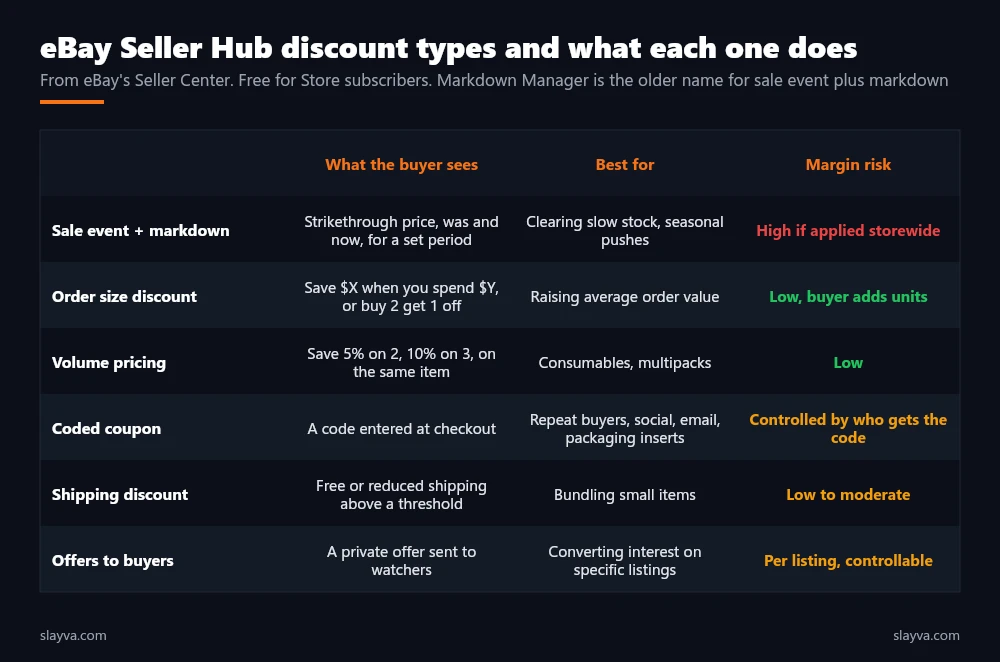
| Tool | Goal it serves | Who gets the discount |
|---|---|---|
| Sale event + markdown | Clearance, seasonal push, visibility | Every buyer of the marked listings |
| Order size discount | Higher average order value | Buyers who reach the threshold |
| Volume pricing | Multiple units of the same item | Buyers who take two or more |
| Coded coupon | Retention, off platform traffic | Buyers who have the code |
| Shipping discount | Bundling small items | Buyers above the shipping threshold |
| Offers to buyers | Converting watchers on specific listings | Watchers you send an offer to |
How to Use eBay Markdown Manager for a Sale Event
A sale event marks selected listings down by a percentage or an amount for a set period, and shows buyers the strikethrough was price beside the now price, in search results and on the listing. That strikethrough is the whole value: it signals a deal without you having to explain it, and it is the reason sellers look for Markdown Manager in the first place. Here is how to use eBay Markdown Manager, in its current form as sale event plus markdown, in the order that protects margin.
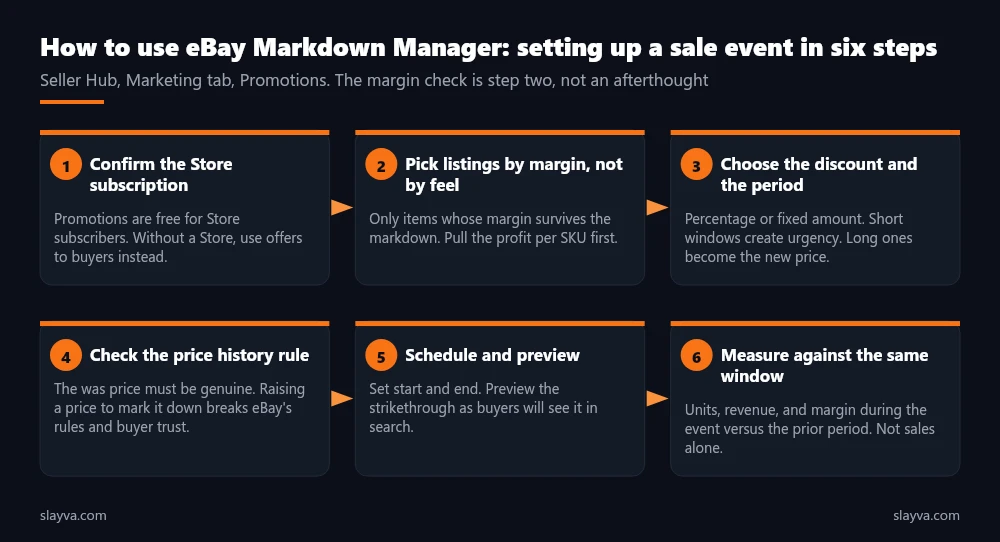
- Confirm the Store subscription: Promotions are free for Store subscribers. Without a Store, offers to buyers and Promoted Listings are the tools available, and our fees breakdown covers what a Store costs.
- Pick listings by margin: Open the profit per SKU view from our guide on how to track eBay profit and expenses. Include only items whose margin survives the markdown you plan. Slow movers with wide margin are ideal. Fast movers with thin margin are not.
- Choose the discount and the period: Percentage or fixed amount. Short windows, a few days to two weeks, create urgency. Events that run for months become the new price in buyers’ minds.
- Check the price history: The was price has to be a genuine recent price. Raising a price in order to mark it down breaks eBay’s rules and, more practically, buyers who watch the listing see it. eBay’s sale events page describes the feature and its conditions.
- Schedule and preview: Set the start and end, and preview the strikethrough as it will appear in search. This is the mechanical part, and the easiest.
- Measure on margin: Compare units, revenue, and margin during the event with the same length window before it. Units alone will always look good. Margin is the number that decides whether to run it again.
When a Markdown Is the Right Tool
Markdowns fit three situations. Clearance, where the alternative is stock that never sells and the margin you give up is smaller than the cash you free. Seasonal windows, where buyers are already comparing prices and the strikethrough decides the click, which our guide on the best time to list on eBay touches on. And visibility, where a listing with a healthy margin but weak click-through needs a reason for the buyer to choose it in results, a pattern you find in the Seller Hub traffic report. Outside those three, a different tool usually keeps more margin. Using it well includes knowing when to close it and open the order discount tool instead.
A markdown pays every buyer to do what most of them were going to do anyway. An order discount pays only the buyers who do something extra. Start from that difference and most promotion decisions make themselves.
eBay Order Discount Promotion: The Alternative When Order Value Is the Goal
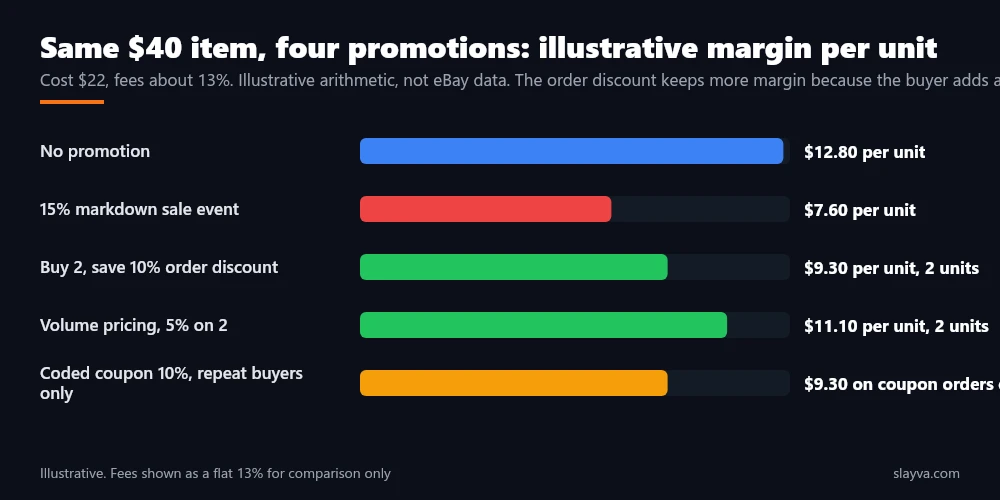
An eBay order discount promotion rewards buyers for spending more or buying more: save $25 when you spend $125, or buy two and get 15 percent off. The discount only applies when the buyer crosses the threshold, so a buyer who would have bought one unit at full price and now buys two at a discount has raised your revenue and, in most cases, your total margin on that order, even though the margin per unit fell. This is the promotion to run on catalogues with complementary items, on consumables, and on anything where the second unit costs you less to ship than the first.
Volume pricing is the narrower cousin: tiered discounts on multiples of the same item, shown on the listing itself. Save 5 percent on two, 10 percent on three. It suits multipack style products and it needs no threshold planning, because the tiers sit on the listing. Both tools share a rule: set the threshold above your current average order value, not below it.
This is the rule that separates the order discount from a markdown, because a markdown has no threshold at all. A threshold below the average gives a discount on orders you were already getting. Our guide on how to calculate eBay sell through rate per SKU tells you which items have the demand to support a multi unit push.
| Goal | Right tool | Wrong tool and why |
|---|---|---|
| Clear 200 units of last season’s stock | Sale event + markdown on those listings only | Storewide markdown, which discounts the stock that was selling fine |
| Raise average order value on a broad catalogue | Order size discount above current AOV | Markdown, which raises units but lowers order value |
| Sell multipacks of a consumable | Volume pricing on the listing | Coded coupon, which needs the buyer to find the code first |
| Bring repeat buyers back | Coded coupon in the parcel or by message | Public markdown, which gives the same deal to strangers |
| Convert 40 watchers on one listing | Offers to buyers | Markdown visible to everyone, including future full price buyers |
| Bundle small items into one parcel | Shipping discount above a threshold | Item markdown, which does nothing for shipping cost |
eBay Coded Coupons: The Controlled Version of a Markdown
eBay coded coupons are a code the buyer enters at checkout. eBay’s Seller Center describes them as a discount code you share privately or publicly, and that word privately is the point. A public markdown discounts everyone. A code slipped into the parcel, sent in a post purchase message, or posted to a social audience discounts the people you want to reward, and nobody else.
Coupons are the answer when a markdown would give the discount to too many people. eBay coded coupons suit repeat buyer programmes, off platform traffic you want to bring back to your listings, and thank you offers after a resolved problem. Our guide on handling negative eBay feedback covers where a goodwill gesture fits and where it looks like buying silence.
Two rules keep coupons profitable. Set an expiry, because an open ended code circulates further than you intended. And track redemptions by code, so a code shared on one channel tells you what that channel is worth. A single code used everywhere tells you nothing.
Measuring an eBay Sale Event
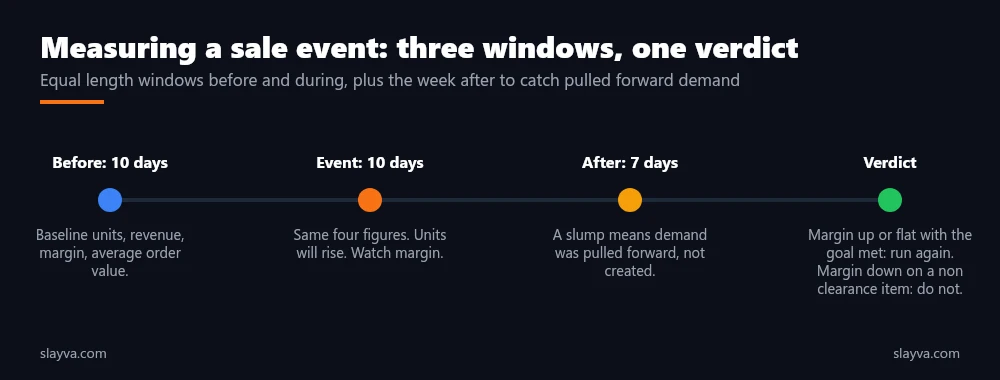
The measurement most sellers do is units during the event against units the week before. That measurement flatters every promotion ever run. The measurement that matters compares three figures across two windows of equal length, before and during: units, revenue, and margin after fees, shipping, and cost of goods. An eBay sale event that raises units 60 percent and revenue 30 percent while margin falls 10 percent moved stock at a loss. Whether that was worth it depends on why you ran it. For clearance, yes. For a best seller, no. Measuring this way keeps markdowns a tool rather than a habit.
Add two more readings. Sales in the week after the event, because a promotion that pulls forward purchases buyers were going to make anyway shows up as a slump afterwards. And the fee lines, because Promoted Listings fees and final value fees are charged on the discounted price, so the fee percentage is unchanged and the fee amount falls, which slightly softens the margin hit. Our guide on tracking eBay profit and expenses covers the monthly close where these figures come from, and our analysis of whether eBay promoted listings are worth it covers the paid placement often run alongside a sale.
| Metric | Before window | During window | Read it as |
|---|---|---|---|
| Units sold | Baseline | Usually up | Necessary, never sufficient |
| Revenue | Baseline | Up less than units | The discount at work |
| Margin after all costs | Baseline | Up, flat, or down | The verdict |
| Average order value | Baseline | Up for order discounts, down for markdowns | Whether the tool matched the goal |
| Week after | Baseline | Watch for a slump | Pulled forward demand |
Every promotion increases units. That is not a result, it is the mechanism. The result is what happened to margin, and it is the only figure that tells you whether to run it again.
Markdown Mistakes That Turn a Promotion Into a Permanent Price Cut
The patterns below are drawn from accounts where promotions were running before we arrived. They are illustrative of what we see rather than published eBay data. Each is a misuse of the markdown tool or its neighbours, and each has a simple correction.
- Storewide markdowns: Every listing discounted, including the ones selling at full price. Correction: select listings by margin and by sell-through, never by category. This is the most common misreading of the tool.
- Events that never end: A sale extended month after month becomes the price, and the strikethrough stops meaning anything. Correction: fixed end dates, gaps between events.
- Thresholds below average order value: An order discount at $50 on an account whose average order is $65 pays for nothing. Correction: set thresholds above the current average.
- Inflating the was price: Raising a price before marking it down. Correction: never. It breaks eBay’s rules and watchers notice.
- Stacking without checking: A markdown, a coupon, and volume pricing applying to the same order. Correction: confirm how tools combine on a test listing before launch.
- Measuring units only: Declaring success on the sales chart. Correction: margin in equal windows, plus the week after.
Sellers running promotions across large catalogues should also read our guide to managing a large eBay inventory, because a sale event on a listing with inaccurate stock is the fastest way to produce the out of stock cancellations described in our guide on cancelling an eBay order without a defect. Sellers who would rather have the selection, scheduling, and measurement handled use our eBay account management services, where promotions are planned from the profit per SKU report rather than from the calendar.
Three Promotions, Worked Through
Illustrative cases, with round numbers, to show the tool choice in practice, and where a markdown was and was not the answer.
Case one: 300 units of a discontinued colour. Cost $9, list price $24, selling four a week. At that pace the stock lasts more than a year and the cash is trapped. A 30 percent sale event for ten days brings the price to $16.80, still above cost after fees, and moves 140 units. Margin per unit fell, total margin on those 140 units was positive, and the cash came back. Markdown was the right tool, and it was applied to one listing, not the store.
Case two: an account with a $38 average order and hundreds of small accessories. A storewide 10 percent markdown would raise units and lower the average order. An order size discount of $5 off orders over $50 instead nudges buyers to add a second or third item. Average order rises to the mid $50s in the window, units rise, and margin per order rises because the second item ships in the same parcel. The order discount was the right tool, and the threshold sat above the old average.
Case three: a seller with 1,200 past buyers and no repeat traffic. A public markdown gives strangers the same deal as customers. A coded coupon for 12 percent, printed on a card in every parcel and valid for 45 days, goes only to people who already bought. Redemptions are tracked by code, and the seller learns that about one in fourteen parcels produces a second order. The coupon was the right tool, because the goal was retention, not units.
Frequently Asked Questions About eBay Markdown Manager
Is Markdown Manager still a thing on eBay?
The feature exists under the name sale event plus markdown, inside Promotions in the Seller Hub Marketing tab. Sellers still search for Markdown Manager, and how to use eBay Markdown Manager today means using that sale event tool.
Do I need an eBay Store to run promotions?
eBay’s Seller Center states that Seller Hub discounts are free for Store subscribers, so using markdowns begins with holding a Store. Without a Store, offers to buyers and Promoted Listings are the main tools available. Our fees breakdown covers Store subscription costs.
Does a markdown reduce my eBay fees?
Final value fees are charged on the discounted sale price, so the fee amount falls with the price while the percentage stays the same. The reduction is small relative to the margin you give up, so it should not drive the decision.
What is the difference between an order discount and a markdown?
A markdown lowers the price for every buyer of the listing. An eBay order discount promotion lowers the price only when the buyer reaches a spend or quantity threshold, so it rewards larger orders rather than discounting every sale.
How long should an eBay sale event run?
Long enough for buyers to see it, short enough to stay a deal. Duration is the part that sellers most often get wrong. A few days to two weeks works for most catalogues. Events that run for months become the normal price and lose the urgency the strikethrough is meant to create.
Is it possible to combine coupons, markdowns, and volume pricing?
Sometimes, depending on how each is configured, and stacking a markdown with other tools needs care. Test on a single listing and check the order total before launching, because three discounts on one order is a common way to sell at a loss without noticing.
How do I know if a promotion worked?
Compare units, revenue, and margin after all costs during the event with an equal window before it, and watch the week after for a slump. Units up and margin down is a clearance result, which is fine for clearance and a loss for anything else. That measurement is the last step.
Promotions running on instinct?
We choose the right promotion tool, select the listings from the margin report, set the thresholds above your real order value, schedule the events, and report the result on margin, not on units.
Conclusion
How to use eBay Markdown Manager comes down to a sequence and a choice. The sequence: confirm the Store subscription, choose listings from the profit per SKU sheet, set a discount and a short window, keep the was price honest, preview, then measure on margin in equal windows. The choice: a markdown for clearance, seasonal pushes, and visibility, an eBay order discount promotion or volume pricing to raise order value, and eBay coded coupons to reward the buyers you choose. Match the tool to the goal and the promotion pays for itself. Mismatch them and you have given the discount to buyers who were paying full price.
Promotions sit on top of a list price that has to be right first, which our pricing strategy guide covers, and they show up in the traffic and profit reports covered elsewhere in this series. More eBay marketing and operations guides are in the blog library.

Usman Malik
All posts by Usman MalikNeed this handled for you?
eBay Promoted Listings Management
Ad rates and campaigns managed for profit.
See the serviceeBay Account Management
Listings, orders, cases and growth, run for you.
See the service- Work out the numbers: eBay Profit Calculator
- Have this problem now? eBay account suspended (MC999)
- Have this problem now? eBay sales dropped