
How to Track eBay Profit and Expenses Properly
- eBay, eBay Fees & Payments
- 13 min read

Table of contents
Sales were up 30 percent last month and the bank balance went down. Every seller who has lived through that month has asked the same question afterwards, and the answer is never in the Seller Hub sales total. It is in the gap between that total and what arrived in the bank, and in the costs eBay never sees at all. Working out how to track eBay profit and expenses properly means closing that gap every month, order by order, until the number you call profit is the number you are able to spend.
This guide covers what to count as revenue and as cost, the reports eBay gives you, how to reconcile eBay payouts to your bank, how to attach eBay cost of goods sold to every order, what a working eBay profit spreadsheet needs, the eBay bookkeeping for sellers routine that keeps it all current, and the mistakes that make sellers think they are profitable when they are not. Our eBay seller fees breakdown explains what eBay charges. This guide explains how to account for it.
Key Takeaways
- Main Insight: Profit per order is gross order value minus eBay fees, minus shipping cost, minus cost of goods, minus packaging, minus an allocation of overhead. Every one of those has a source, and tracking profit is the discipline of pulling all six every month.
- Strategy Tip: Reconcile the payout report to the bank before you trust any profit figure. A payout that does not match a deposit is a refund, a hold, a fee, or a timing difference, and each one changes the month. Reconciliation is the honest half of the job.
- User Benefit: Sellers who track profit per SKU stop scaling products that lose money on every sale, price to real margin, and arrive at tax time with records rather than a shoebox. That is what tracking buys you.
What Counts: Revenue and the Six Costs
Revenue on eBay is the gross order value: the item price plus any shipping the buyer paid, before anything is deducted. Everything after that is cost. eBay’s fees come first, and they include the final value fee on the total order amount, the per order fee, any Promoted Listings fees, and any store subscription.
Shipping cost is next, whether the label was bought through eBay and deducted from the payout or bought elsewhere. Cost of goods sold is what the item cost you landed, including inbound shipping and duties. Packaging and supplies are small per order and large per year. Refunds and returns reverse revenue and sometimes fees. Overhead, such as software, storage, and your own time, is real even though eBay never sees it. Tracking profit is the act of pulling each of those into one place per order.
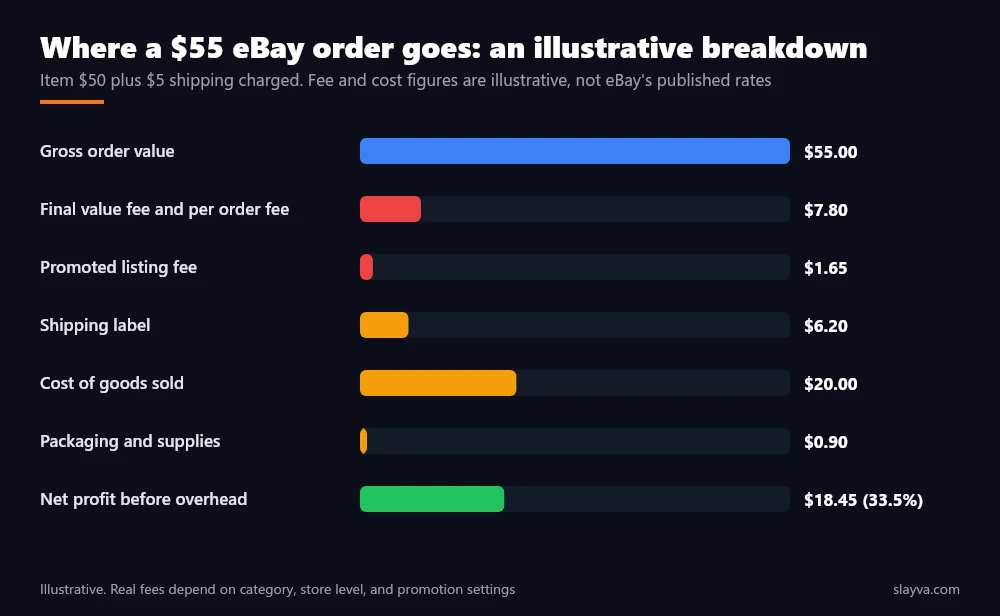
| Line | Where the number comes from | Commonly missed |
|---|---|---|
| Gross order value | Transaction report | Shipping charged to the buyer is revenue, not a pass through |
| eBay fees | Transaction report, fee lines | Promoted Listings fees, per order fees, international fees |
| Shipping cost | Payout deductions or carrier invoices | Labels bought outside eBay, insurance, adjustments |
| Cost of goods sold | Your purchase records | Inbound freight, duties, supplier fees |
| Packaging and supplies | Your purchase records | Tape, labels, printer consumables |
| Refunds and returns | Transaction report | Return shipping you paid, restocking loss |
| Overhead | Your records | Software, storage, store subscription, your time |
The Reports eBay Gives You
Everything eBay knows about your money sits in the Payments area of Seller Hub. Two reports do most of the work. The transaction report lists every order, refund, fee, adjustment, and label charge as individual lines, with dates and order references. The payout report lists each payout to your bank and the transactions bundled into it.
A financial statement summarises a period, and eBay’s seller standards policy explains the below standard fee increase that shows up in those statements when performance slips. Our guide to eBay managed payments explains how payouts are scheduled and why a payout rarely equals a day’s sales. For profit tracking, the transaction report is the source of revenue and eBay side costs, and the payout report is the bridge to the bank.
What eBay does not give you matters as much. It does not know what you paid for the item, what the box cost, what you paid a carrier outside eBay, or what your software subscription costs. Those live in your own records, which is why an eBay profit spreadsheet has two halves: the eBay half, imported, and your half, maintained. Tracking profit is the joining of the two.
How to Track eBay Profit and Expenses Per Order
The unit of tracking is the order, keyed by order number and SKU. Account level totals hide the products that lose money. Here is how to track eBay profit and expenses at that level without building a full accounting system.
- Import the transaction report: Every line, with order number, SKU or custom label, gross amount, and each fee as its own column.
- Attach cost of goods sold: Match each SKU to its landed cost from your purchase records. Landed means item cost plus inbound shipping and duties, divided across units.
- Attach shipping cost: From payout deductions for eBay labels, or from carrier invoices for labels bought elsewhere, matched to the order.
- Add packaging: A standard cost per order size is accurate enough. Recalculate it each quarter from what you spent.
- Apply refunds: Reverse revenue and any fees eBay credited. Record return shipping you paid as a cost on that order.
- Allocate overhead: Monthly overhead divided by orders, or by revenue, applied per order. Crude, but far better than ignoring it, and the last line in the per-order calculation.
eBay Cost of Goods Sold: The Number Sellers Guess
eBay cost of goods sold is where most profit tracking breaks. Sellers know roughly what they paid for a batch and guess at a per unit figure. The honest method is landed cost per unit, updated per purchase, so that a SKU bought at three prices over a year carries the right cost against each sale.
Sellers sourcing from thrift, liquidation, and wholesale channels often have irregular costs, which is a reason to record each purchase, not a reason to average. eBay cost of goods sold also includes the units you bought and never sold, which is inventory, and the units you threw away, which is a loss, and a good eBay profit spreadsheet tracks both so that stock on the shelf is not mistaken for profit in the bank. Inventory value is the number most profit tracking leaves out.
Revenue is what eBay tells you. Profit is what you are left with after you tell yourself the truth about costs. The second number is the only one worth managing.
Reconcile eBay Payouts to the Bank: The Step Most Sellers Skip
To reconcile eBay payouts is to prove that every payout on the report became a deposit in the bank, and that every difference has a name. The three sources that must agree are the payout report, the bank statement, and your order level records. When they do not, the gap is one of a short list: a refund issued after the payout, a hold on funds, a fee or adjustment applied later, a label charge, or a timing difference where the payout was issued in one month and landed in the next. Naming the gap is the whole skill, and it is central to tracking profit without fooling yourself.
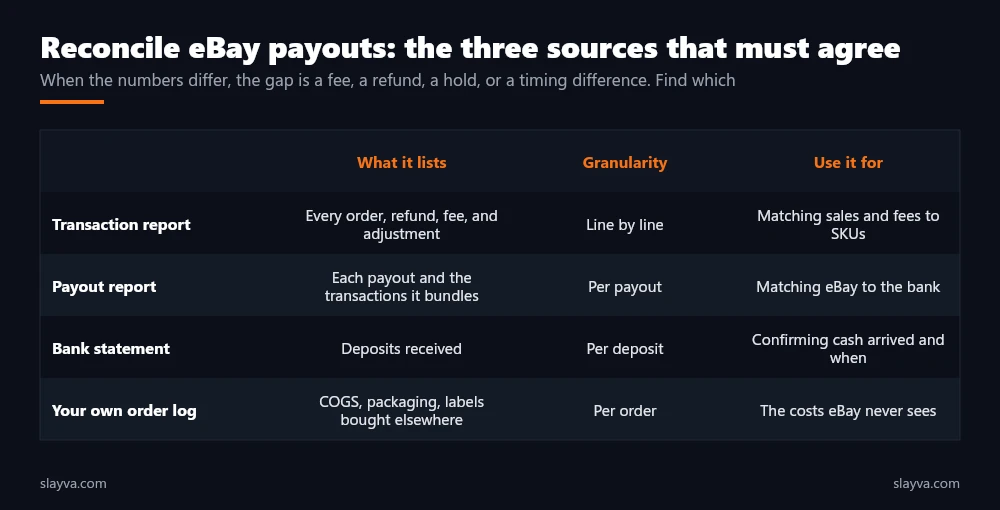
The routine is short once it is set up. Sum the payouts on the report for the month. Sum the eBay deposits on the bank statement. If they differ, list the payouts that have no matching deposit and the deposits with no matching payout, and resolve each. Then confirm that the transactions inside each payout sum to the payout amount. Sellers who skip this step and reconcile eBay payouts only at year end find out in January that a held payout, a cluster of refunds, or a fee change turned a profitable quarter into a loss they were not tracking. Our eBay returns policy guide covers why refunds arrive out of step with sales.
| Difference found | Usual cause | Where to confirm |
|---|---|---|
| Payout smaller than expected | Refund, label charge, or fee deducted before payout | Transaction report lines dated before the payout |
| Payout missing entirely | Funds on hold, or payout scheduled into next month | Payout report status, payments dashboard |
| Deposit with no payout | Previous month’s payout landing late | Payout report for the prior month |
| Transactions do not sum to payout | Adjustment or dispute applied to the bundle | Payout detail view |
| Fees higher than expected | Below standard rate, promoted listings, international | Fee lines and seller level dashboard |
Building an eBay Profit Spreadsheet as You Grow
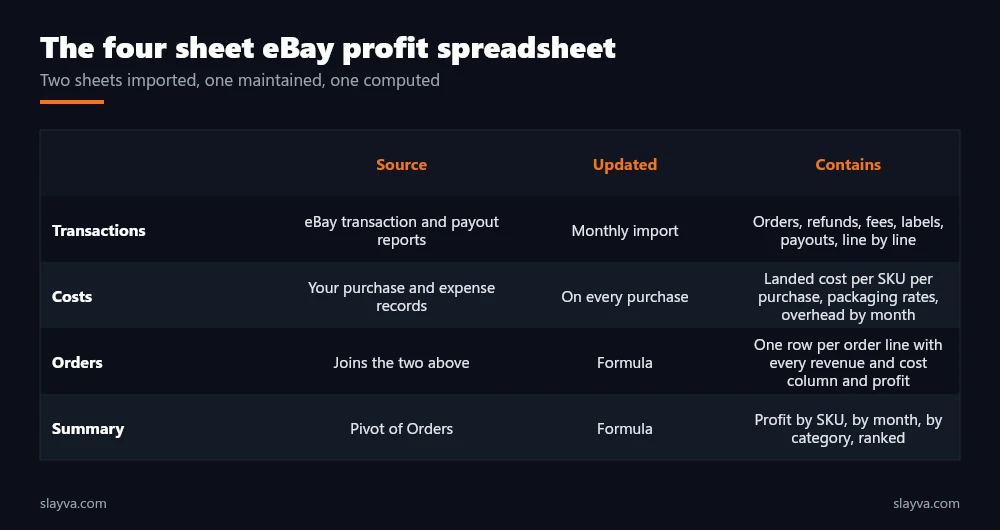
A working eBay profit spreadsheet has four sheets. Transactions, imported from eBay monthly. Costs, maintained by you: landed cost per SKU per purchase, packaging rates, overhead by month. Orders, which joins the two, one row per order line with every revenue and cost column and a profit column at the end. Summary, which pivots orders by SKU, by month, and by category. The summary is where the decisions live: which SKUs earn the most per unit, which lose money after shipping, and which are profitable only when not promoted. That summary is the output of the whole exercise, and the reason to do it.
Two design rules keep it usable. Never type a number that eBay or a supplier has already given you in a file, import it. And never overwrite history: a SKU’s cost changes with each purchase, and the sale in March should carry March’s cost, not December’s.
When the spreadsheet passes a few thousand orders a year, most sellers move to bookkeeping software with an eBay integration, and the same structure carries over, because the method does not change with the tool. Our eBay automation guide covers which parts of the import are safe to automate. Our free eBay profit calculator and fee calculator handle the per order arithmetic when you are pricing a single item and want to see the margin before listing.
eBay Bookkeeping for Sellers: The Monthly Close
eBay bookkeeping for sellers is a routine, not a project. The close below takes an afternoon for a few hundred orders once the spreadsheet exists, and it is the practical form of profit tracking over time.
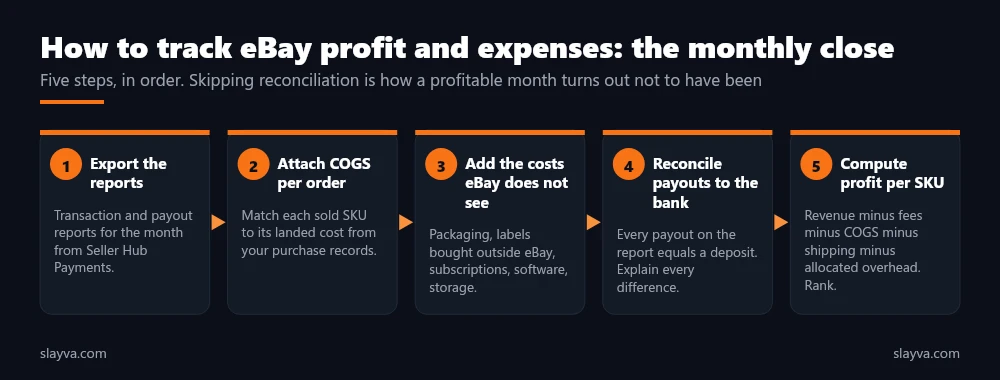
- Week one of the month: Export last month’s transaction and payout reports. Import into the transactions sheet.
- Attach costs: Update landed cost for any SKU purchased last month. Confirm packaging rates. Enter overhead for the month.
- Reconcile: Payouts to bank, transactions to payouts. Resolve every difference and note the cause.
- Review the summary: Profit by SKU and by category. Flag anything negative and anything whose margin fell more than a few points. This is where tracking turns into decisions.
- Decide: Reprice, stop promoting, stop reordering, or renegotiate cost on the flagged SKUs. Log the decision against the SKU.
Sellers who pair the close with the sell-through review in our guide on how to calculate eBay sell through rate get both halves of the product decision: whether it sells and whether it pays. Tax obligations sit on top of all this and vary by country and by seller status, so treat the close as the record your accountant works from rather than as tax advice. Tracking profit is the bookkeeping. The tax treatment is a separate conversation.
The month is not closed when the sales report is read. It is closed when every payout matches a deposit and every order has a cost against it.
Tracking Mistakes That Make a Loss Look Like a Profit
The list below comes from accounts we have taken on, where the first month’s close disagreed with the seller’s own view of the business. Each is a specific tracking failure, and each is fixable.
| Mistake | Effect | Fix |
|---|---|---|
| Counting payouts as profit | Fees are already out, but COGS, packaging, and outside labels are not | Profit is computed per order, never read from the bank |
| Ignoring shipping charged as revenue | Margin understated on orders with paid shipping, overstated on free shipping | Gross order value includes shipping charged, shipping cost is a separate line |
| Averaging cost of goods | Sales carry the wrong cost when purchase prices move | Landed cost per purchase, applied to the units from that purchase |
| Forgetting Promoted Listings fees | Promoted SKUs look more profitable than they are | Import the fee lines, attribute to the order |
| Treating stock as profit | Cash spent on unsold units is invisible | Track inventory value separately from profit |
| Skipping reconciliation | Holds, refunds, and fee changes go unnoticed for months | Monthly payout to bank match, every difference explained |
Sellers whose fees are higher than expected should also check the seller level dashboard, because a below standard rating adds a percentage to final value fees, as explained in our guide on how to lower eBay defect rate. Sellers who would rather hand the close to someone who runs it every month use our eBay account management services, where profit per SKU is part of the monthly report.
A Worked Month, Start to Finish
Take an illustrative month of 300 orders. The transaction report shows $16,500 in gross order value, $2,300 in eBay fees across final value, per order, and Promoted Listings lines, and $410 in refunds. Payout deductions show $1,850 in eBay labels. Your purchase records put landed cost of goods on those 300 orders at $6,200. Packaging at a standard $0.90 per order adds $270. Overhead for the month, including software, storage, and the store subscription, is $640. Profit before your own time is $16,500 less $2,300 less $410 less $1,850 less $6,200 less $270 less $640, which is $4,830, or about 29 percent of gross.
Now reconcile. The payout report shows eight payouts totalling $12,120. The bank shows seven deposits totalling $10,900. The difference is one payout of $1,220 issued on the last day of the month and landing on the second day of the next. Noted and carried forward. Inside one payout, transactions sum to $180 less than the payout amount, which turns out to be a dispute adjustment credited back. Noted. The month is closed, and the summary sheet ranks the 40 SKUs: 31 profitable, 6 marginal, 3 losing money after shipping on every sale. The three are the decision, and the reason the whole exercise exists.
Frequently Asked Questions About eBay Profit Tracking
Does eBay show my profit anywhere?
No. eBay shows sales, fees, and payouts. It does not know your cost of goods, packaging, outside shipping, or overhead, so profit is always a figure you compute. How to track eBay profit and expenses starts with accepting that the number has to be built.
Which eBay report should I use for bookkeeping?
The transaction report for line level revenue and fees, and the payout report to reconcile to the bank. Between them they cover the eBay side of the job. Both are in the Payments area of Seller Hub and export to spreadsheet formats.
How do I handle shipping that the buyer paid?
Count it as revenue in gross order value, and count the label you bought as a cost. Treating it as a pass through hides the margin you make or lose on shipping.
What is landed cost?
The item’s purchase price plus the inbound shipping, duties, and supplier fees needed to get it to you, divided across the units in that purchase. It is the right figure for eBay cost of goods sold because it reflects what the unit cost to make available for sale.
How often should I reconcile eBay payouts?
Monthly at minimum, as part of the close, because reconciliation is the part that catches what the sales report hides. Weekly for high volume accounts. Reconciling once a year is how a held payout or a refund cluster stays invisible until it is too late to act on.
Do I need accounting software?
Not at first. A four sheet spreadsheet handles a few thousand orders a year, and it is the simplest form of profit tracking that still works. Beyond that, software with an eBay import saves time, and the structure described here carries straight into it.
Should I include my own time as a cost?
Yes, at least as an estimate, if you want to know whether the business pays you. A product that shows a profit before your time and a loss after it is a product to automate, outsource, or drop, and honest tracking includes that line.
Want profit per SKU in your monthly report?
We run the close, reconcile the payouts, track profit and expenses across every SKU, and hand you a ranked list of what earns and what loses, with the pricing and reorder decisions attached.
Conclusion
How to track eBay profit and expenses comes down to one row per order with every revenue and cost line filled in from its source. Revenue and eBay fees from the transaction report. Shipping from payout deductions or carrier invoices. Cost of goods from your own purchase records at landed cost. Packaging at a standard rate, overhead allocated, refunds reversed. Then reconcile every payout to the bank before you believe the total. Do it monthly and the summary sheet tells you which products to scale, reprice, or drop.
The fees are in our fees breakdown, the pricing decisions in our pricing strategy guide, and the per order arithmetic in the free profit calculator. More eBay finance and operations guides are in the blog library.

Usman Malik
All posts by Usman MalikNeed this handled for you?
eBay Account Management
Listings, orders, cases and growth, run for you.
See the serviceeBay Suspension Recovery
MC999 and MC011 appeals written and submitted.
See the service- Work out the numbers: eBay Fee Calculator
- Have this problem now? eBay account suspended (MC999)
- Have this problem now? eBay sales dropped