
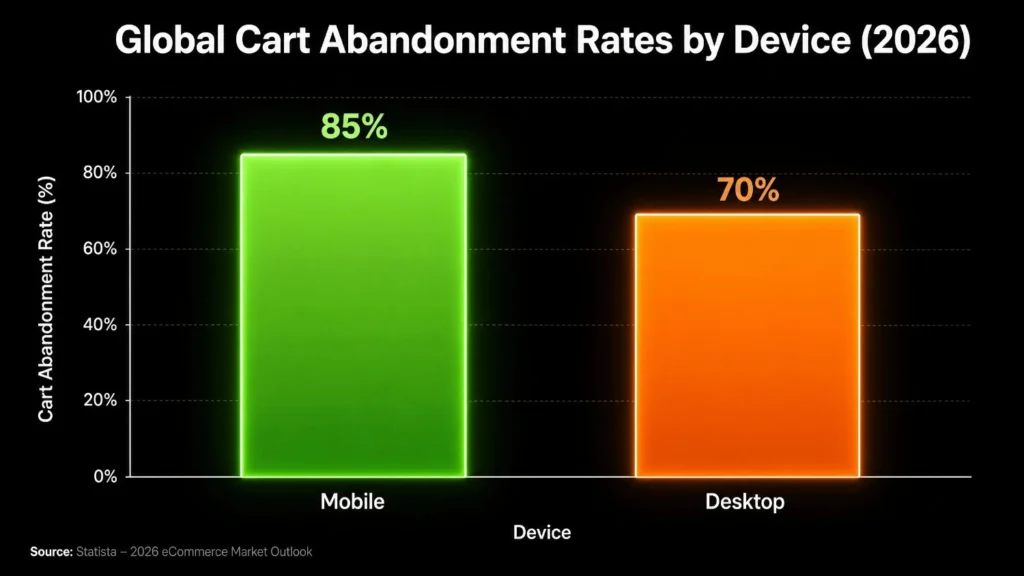
WooCommerce abandoned cart is one of the most expensive problems facing eCommerce store owners today. According to the Baymard Institute, the average documented online cart abandonment rate sits at 70.19%. That means roughly 7 out of every 10 shoppers who add something to their cart walk away before completing their purchase.
For WooCommerce store owners, those numbers translate directly to lost revenue every single day.
A store generating $15,000 per month in completed sales, with a 70% abandonment rate, is potentially leaving over $35,000 per month on the table. Recovering even a fraction of that through an automated recovery system changes the trajectory of your business.
This guide walks you through the exact strategies used by high-performing WooCommerce stores in 2026. Every method here is actionable, tested, and runs on autopilot once set up.
Why WooCommerce Abandoned Cart Recovery Is Critical in 2026
The eCommerce environment in 2026 is more competitive than it has ever been. Paid traffic costs more. Customer attention is harder to hold. First-time visitors convert at a lower rate than returning customers in almost every product niche.
That makes your WooCommerce abandoned cart audience one of the most valuable segments in your entire store. These are not cold visitors who stumbled onto your homepage. They browsed your products, chose something specific, and added it to their cart. They completed the research phase. Something stopped them at the final step.
Recovering these shoppers costs a fraction of what it takes to acquire new traffic. Your abandoned cart audience already knows your brand. They want the product. Your job is to remove whatever stopped them and bring them back to complete the order.
Research from HubSpot’s email marketing studies consistently shows that triggered emails, including abandoned cart sequences, generate open and click rates 2 to 3 times higher than standard promotional emails. That is because they reach the right person at exactly the right moment.
In 2026, customers also expect personalized follow-up. When a store stays silent after a cart is abandoned, it signals to the customer that the brand does not care about the sale. Stores that send timely, relevant recovery messages build trust while simultaneously recovering revenue.
The Real Cost of WooCommerce Abandoned Carts
Look at concrete numbers to understand the size of this opportunity.
The Baymard Institute estimates that eCommerce businesses lose approximately $260 billion in recoverable revenue annually due to cart abandonment. A meaningful portion of that is recoverable with improved checkout design and follow-up automation.
For a typical WooCommerce store:
- Monthly completed sales: $5,000
- Cart abandonment rate: 70%
- Potential abandoned cart revenue: approximately $11,667 per month
- Recovering 10% of that adds $1,167 per month
- Recovering 20% adds $2,333 per month
Those numbers scale directly with your traffic volume. The larger your store, the larger the recovery opportunity. And because recovery campaigns run automatically, the cost to maintain them stays low regardless of scale.
Why Customers Abandon Their WooCommerce Carts
Before setting up recovery systems, understand why customers leave. Addressing these issues at the source reduces your abandonment rate before recovery tools even activate.
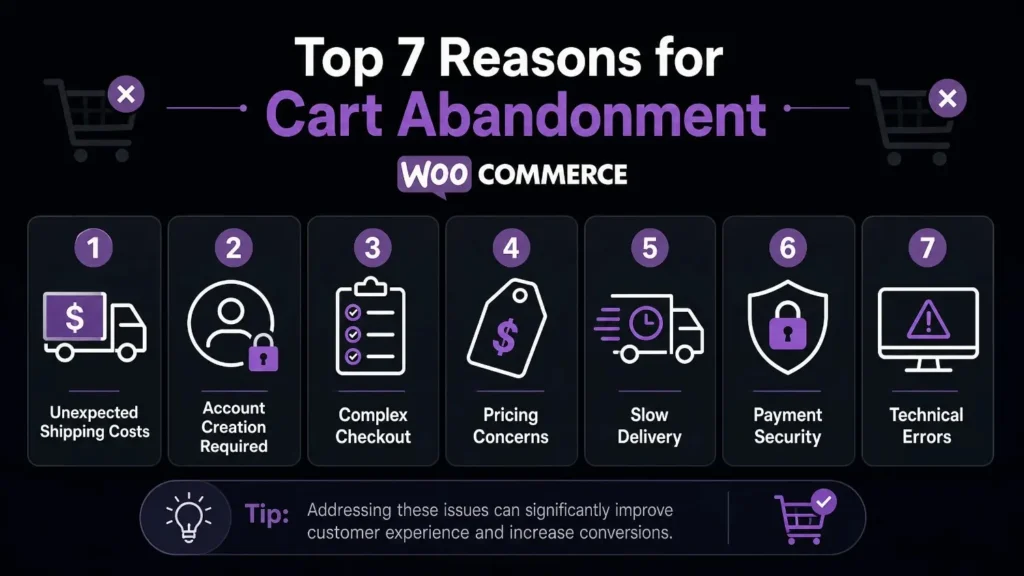
The Baymard Institute identifies the top reasons for cart abandonment across thousands of user studies. The most frequently cited include:
- Extra costs like shipping and taxes revealed too late in the checkout process
- Required account creation before completing a purchase
- Long or complicated checkout forms
- Lack of trust in the site’s payment security
- Slow website performance during checkout
- Unsatisfactory or unclear return and refund policies
- Price comparison behavior with no immediate intent to buy
Each of these problems is solvable on the WooCommerce platform. Enabling guest checkout removes the account barrier. Displaying shipping costs earlier in the shopping experience removes the surprise at checkout. Improving your site speed reduces drop-off during the checkout process itself.
Fix the root causes first. Then layer recovery strategies on top. This combination produces the strongest overall results.
How to Recover Abandoned Carts in WooCommerce 2026: 7 Strategies That Work
1. Install a Dedicated WooCommerce Abandoned Cart Plugin
The foundation of any WooCommerce abandoned cart recovery system is a reliable plugin. These tools automatically track cart activity, capture customer information before checkout is fully completed, and trigger follow-up sequences without any manual input after the initial setup.
Best WooCommerce Abandoned Cart Plugin for Beginners
Choosing the right plugin depends on your store size, budget, and the channels you want to use for recovery.
Here are the top options in 2026:
- WooCommerce Cart Abandonment Recovery by CartFlows – Free plugin, integrates directly with WordPress, includes email automation out of the box. The best starting point for beginners.
- Retainful – Clean and intuitive interface, pre-built email sequences, free tier available for smaller stores.
- Abandoned Cart Lite for WooCommerce – Lightweight and simple. Works well for stores that need basic email recovery without extra features.
- Klaviyo for WooCommerce – Ideal for stores that want advanced segmentation, multi-channel automation, and detailed analytics.
- Omnisend – Combines email, SMS, and push notifications into a single platform. An excellent option for stores that want multi-channel recovery in one tool.
For most store owners who are new to cart recovery, the free CartFlows plugin is the right place to start. It requires no subscription and sets up in minutes inside your WordPress admin dashboard.
2. How to Set Up Abandoned Cart Emails in WooCommerce
Email recovery is the highest-converting channel for WooCommerce abandoned cart campaigns. A well-timed sequence routinely brings back 5% to 15% of abandoned shoppers. Stores with strong copy and smart segmentation report recovery rates above 20%.
HubSpot’s email marketing benchmark data shows that triggered emails like cart recovery sequences generate open rates 2 to 3 times higher than standard marketing emails. That makes email one of the most efficient marketing activities available to WooCommerce store owners.
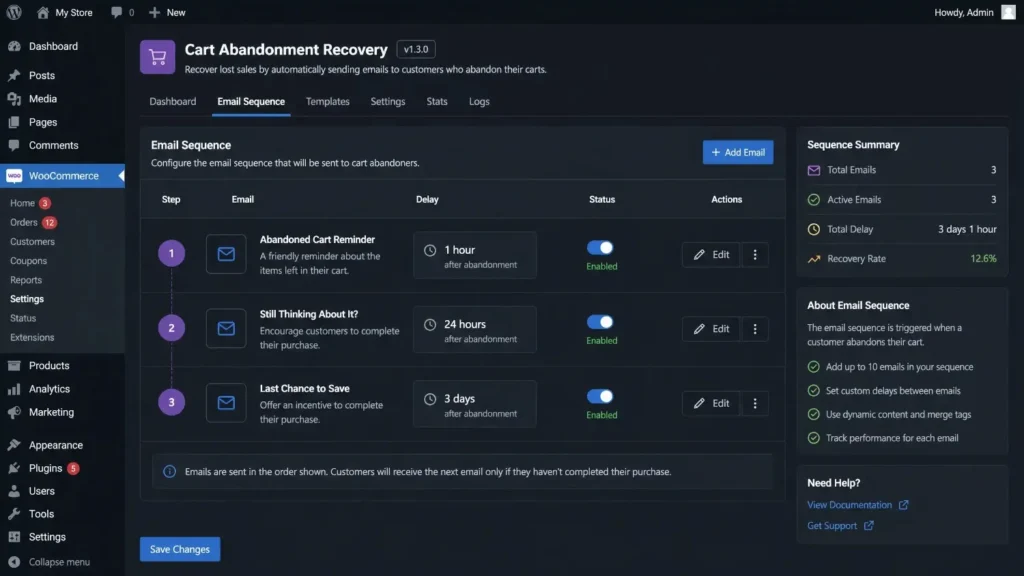
How to Set Up Abandoned Cart Emails in WooCommerce Step by Step
- Install and activate your chosen abandoned cart plugin from the WordPress plugin directory
- Connect your email service provider (Mailchimp, Klaviyo, or your hosting SMTP)
- Configure the delay for the first email to trigger 30 to 60 minutes after abandonment
- Write a subject line that references the specific product the customer left behind
- Include a direct one-click link back to the customer’s saved cart
- Add a single, prominent call-to-action button above the fold
- Test the full sequence with a real email address before setting it live
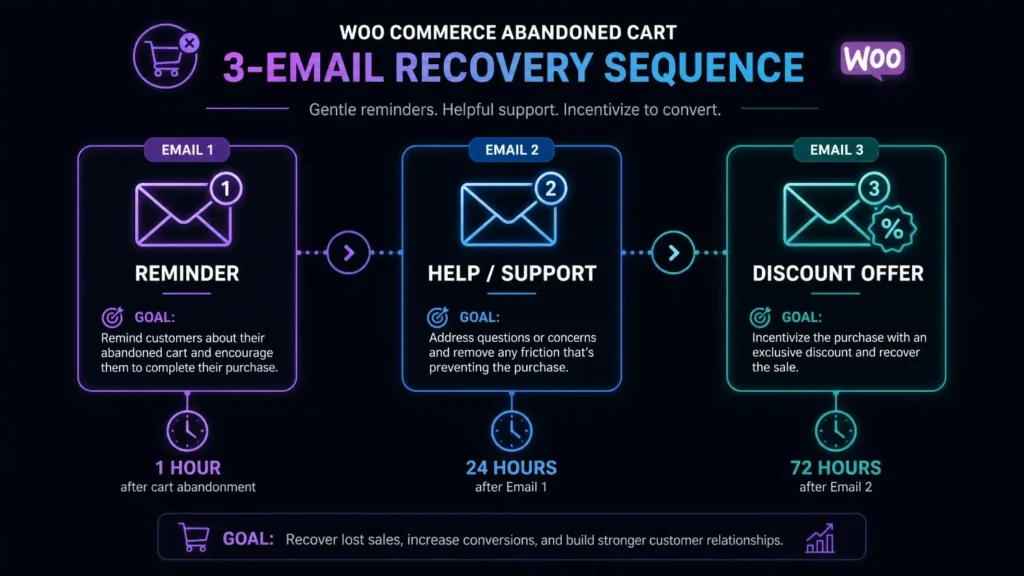
The 3-Email WooCommerce Abandoned Cart Recovery Sequence
A 3-email sequence is the proven standard for WooCommerce abandoned cart recovery. It balances persistence with respect for the customer’s inbox.
Email 1: The Reminder – Send 1 hour after abandonment
Keep this email short and focused. Remind the customer what they left behind. Use their first name and include a product image. The goal is a simple, friendly nudge.
Subject line example: “[Name], you left something in your cart”
Email 2: The Objection Handler – Send 24 hours after abandonment
Use this email to address the concerns that stopped the purchase. Mention your free shipping threshold if you have one. Reference your return policy. Include a customer review for the specific product left in the cart. Build confidence in the purchase decision.
Subject line example: “Still thinking it over? Here is what our customers say”
Email 3: The Urgency Email – Send 72 hours after abandonment
Introduce a reason to act now. A limited-time discount of 5% to 10% works well here. If the product has limited stock, mention it specifically. Create a clear deadline for the offer to close the loop.
Subject line example: “Last chance – your cart expires soon + 10% off inside”
3. Add Exit-Intent Popups to Your Store
Exit-intent technology tracks mouse movement across the page in real time. When a visitor moves their cursor toward the browser navigation bar, the system identifies this as an exit signal and triggers a popup at that exact moment.
These popups work best when they:
- Display a small discount or free shipping offer
- Reference the product currently sitting in the customer’s cart
- Include a single, clear button like “Complete My Order”
- Keep any form to one field at most (an email address)
- Appear no more than once per session per visitor
Tools like OptinMonster and Popup Maker integrate directly with WooCommerce and handle the technical triggering automatically. You set the offer and the design. The plugin manages the timing and display logic.
Exit-intent popups convert between 2% and 4% of would-be exits into completed purchases. That is revenue that would otherwise leave with zero recovery opportunity.
4. Add SMS Recovery Messages to Your WooCommerce Store
SMS open rates sit above 90% across all industries. That puts text messaging far ahead of email for raw reach. Adding SMS to your WooCommerce abandoned cart recovery workflow multiplies your overall recovery rate significantly.
The Klaviyo platform blog reports that SMS cart recovery flows generate revenue per recipient rates 5 to 8 times higher than email alone for certain eCommerce categories. The combination of both channels outperforms either one used in isolation.
Platforms that support WooCommerce SMS recovery include:
- Klaviyo – Deep WooCommerce integration, supports SMS and email in unified automation flows
- SMSBump – Built specifically for eCommerce SMS automation, straightforward setup
- Omnisend – Multi-channel platform that handles SMS, email, and push notifications in one workflow
The ideal SMS recovery message is short, personal, and includes a direct link back to the cart:
“Hi [Name], your cart is saved. Complete your order here: [link]. Reply STOP to unsubscribe.”
Send this 30 to 45 minutes after abandonment. For many stores, this single SMS touchpoint outperforms a full 3-email sequence on its own. Always include a clear opt-out option in every message to stay compliant with SMS regulations in your region.
5. Retarget Abandoned Cart Visitors With Paid Ads
Retargeting ads display your products to people who have already visited your store. This keeps your brand in front of warm prospects after they leave your site and prompts them to return and complete their purchase.
Both Google and Meta offer dynamic retargeting that pulls directly from your WooCommerce product catalog. The ads automatically show the exact products a user viewed or added to their cart.
To set up WooCommerce retargeting ads:
- Create a product data feed from your WooCommerce store using a plugin or manual export
- Submit the feed to Google Merchant Center or Meta Commerce Manager
- Install the Google or Meta pixel on your WooCommerce site to track cart and checkout behavior
- Build a retargeting campaign targeting users who added to cart but did not complete a purchase within 7 days
- Set your ad creative to reference the product directly and include a time-sensitive message
Google Merchant Center provides full documentation on setting up WooCommerce product feeds, verifying your account, and connecting product feeds to Google Ads retargeting campaigns.
Average retargeting ad conversion rates for cart abandonment audiences range from 2% to 5%. For stores with consistent traffic volume, this channel adds a meaningful additional revenue layer on top of your email and SMS sequences.
6. Activate Browser Push Notifications
Browser push notifications reach customers on their desktop or mobile device even when they are not in their inbox. When a visitor opts in to notifications on your WooCommerce store, you gain a direct channel to send cart recovery messages straight to their browser or device.
Services that integrate with WooCommerce for push notification recovery include:
- PushEngage – Built specifically for eCommerce, includes cart abandonment automation and product-level targeting
- OneSignal – Widely adopted, free tier available, integrates with WooCommerce through a WordPress plugin
Push notifications work best as a third channel in your recovery stack alongside email and SMS. The wider your recovery coverage across channels, the higher your total recovery rate.
A basic cart recovery push notification looks like this:
“You left something behind. Your cart is waiting – complete your order now.”
Include the product image as the notification icon where the platform supports it. This visual reference raises click-through rates by giving the customer an immediate reminder of what they left behind.
7. Simplify Your WooCommerce Checkout Process
The most effective WooCommerce cart recovery tips to win back customers in 2026 start with reducing the abandonment rate before it happens.
Checkout friction is the leading cause of preventable cart abandonment. Every extra field, every additional step, and every unexpected cost increases the probability a customer leaves before the purchase is complete.
Changes that reduce WooCommerce checkout abandonment include:
- Enable guest checkout – Remove the requirement to create an account before buying. According to the Baymard Institute, 26% of shoppers abandon specifically because of forced account creation.
- Reduce checkout to a single page – Multi-step checkouts create additional drop-off opportunities at each stage.
- Display trust signals prominently – Place SSL badges, accepted payment logos, and money-back guarantee text near the payment button where customers make their final decision.
- Show a progress indicator – Let customers see how close they are to finishing. Visible progress reduces anxiety and checkout drop-off.
- Add more payment options – Accept Apple Pay, Google Pay, and Buy Now Pay Later services like Klarna or Afterpay. Customers who do not see their preferred payment method at checkout abandon at a higher rate.
- Display shipping cost early – Show estimated shipping costs before the final checkout step. Surprise costs at the end are one of the top cited reasons for abandonment in Baymard research.
The official WooCommerce documentation includes detailed guides on enabling guest checkout, configuring payment gateways, and optimizing the full checkout experience for higher completion rates.
Additional WooCommerce Cart Recovery Tips to Win Back Customers in 2026
Beyond the 7 core strategies, these additional tactics improve overall recovery performance across your WooCommerce store:
Personalize every touchpoint. Use the customer’s first name in every email, SMS, and push notification. Reference the specific product left behind. Generic messages convert at significantly lower rates than personalized ones.
A/B test your subject lines. A single wording change in a subject line produces measurable differences in open rates. Test one variable at a time and run each version for at least two weeks before making a conclusion.
Segment your recovery audience. First-time visitors behave differently from returning customers. Build separate sequences for each group. Returning customers respond well to loyalty-focused messaging. New visitors need more trust-building content upfront.
Add product reviews inside recovery emails. Social proof directly addresses the hesitation that stopped the customer from buying. A single verified 5-star review placed inside a recovery email raises conversion rates for most product categories.
Time your messages to match your audience’s behavior. If your store analytics show most customers shop between 7pm and 10pm, schedule recovery emails to arrive in that window rather than immediately after abandonment.
Set up GA4 event tracking for cart behavior. Tracking cart additions, checkout starts, and purchase completions in Google Analytics 4 gives you the data you need to pinpoint exactly where customers drop off in your funnel and make targeted improvements.
How to Measure Your WooCommerce Abandoned Cart Recovery Performance
Tracking results is non-negotiable. Without measurement, you do not know what is working, what is underperforming, or where your next improvement should come from.
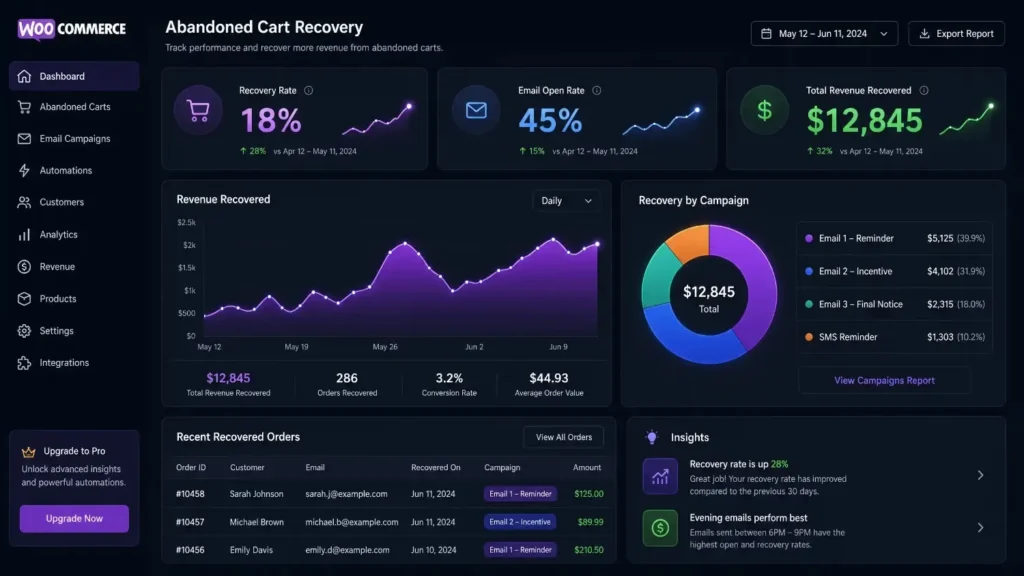
Key metrics to monitor every month:
- Cart abandonment rate – Divide completed purchases by total carts created, then subtract from 100. This is your baseline number.
- Recovery rate – The percentage of abandoned carts that result in a completed order after your recovery campaign triggers.
- Email open rate – Target above 40% for cart recovery emails. Rates below 30% indicate subject line problems or deliverability issues.
- Email click-through rate – Target above 10%. Low click rates point to weak email copy or a broken cart link.
- SMS click rate – Target above 20% for cart recovery text messages.
- Revenue recovered per month – The clearest single indicator of whether your recovery strategy is producing meaningful results.
Review these numbers on a monthly basis. Make one change at a time so you know exactly which adjustment produced the result. Most WooCommerce abandoned cart plugins include built-in dashboards that track these metrics automatically with no manual reporting required.
FAQs About WooCommerce Abandoned Cart Recovery
What is a WooCommerce abandoned cart?
A WooCommerce abandoned cart occurs when a shopper adds one or more products to their cart on your WooCommerce store but leaves the site without completing the purchase.
How do I recover abandoned carts in WooCommerce for free?
Install the free WooCommerce Cart Abandonment Recovery plugin by CartFlows. It captures email addresses entered during checkout and sends automated recovery emails at no cost with no monthly subscription required.
How long should I wait before sending the first recovery email?
Send the first email 30 to 60 minutes after the cart is abandoned. This is the window when the purchase intent is highest and recovery rates are strongest.
What is a good WooCommerce cart recovery rate?
A recovery rate between 5% and 15% is a solid benchmark for most stores. Stores using multi-channel recovery combining email, SMS, and retargeting ads consistently reach 15% to 25%.
Do I need coding knowledge to set up WooCommerce abandoned cart recovery?
No. The leading WooCommerce abandoned cart plugins are designed for non-technical users. Installation follows the standard WordPress plugin process and most platforms include a guided setup wizard.
Which WooCommerce abandoned cart plugin is best for beginners?
The free WooCommerce Cart Abandonment Recovery plugin by CartFlows is the top choice for beginners. It is free to install, sets up in minutes, and includes full email automation without any subscription fee.
Is sending WooCommerce cart recovery emails legal?
In most regions, capturing an email during the checkout process and sending cart recovery emails is considered legitimate interest under GDPR, provided you have a clear privacy policy and an unsubscribe option in every email. Always check the regulations specific to your country or consult a legal advisor for confirmation.
How often should I review and update my recovery email sequence?
Review your recovery sequence every quarter. Update subject lines, copy, and offers based on your latest open rate and recovery rate data. Static sequences that go unchanged for extended periods typically see declining performance over time.
Do retargeting ads work for WooCommerce abandoned cart recovery?
Yes. Dynamic retargeting ads on Google and Meta show the exact products customers left in their cart. Combined with email and SMS recovery, retargeting ads add an additional 2% to 5% conversion rate on top of your other recovery channels.